Installing an MP—Models MP-341 and MP-352
Chapter 3
Installing and Connecting an MP
33
Confidential—Beta1 Draft—Confidential—Beta1 Draft—20 Sep 04
9 Insert the Cat 5 cable(s) into the connector(s):
● For a single connection, use the connector for port 1.
● For a dual-homed connection, insert one cable into each connector.
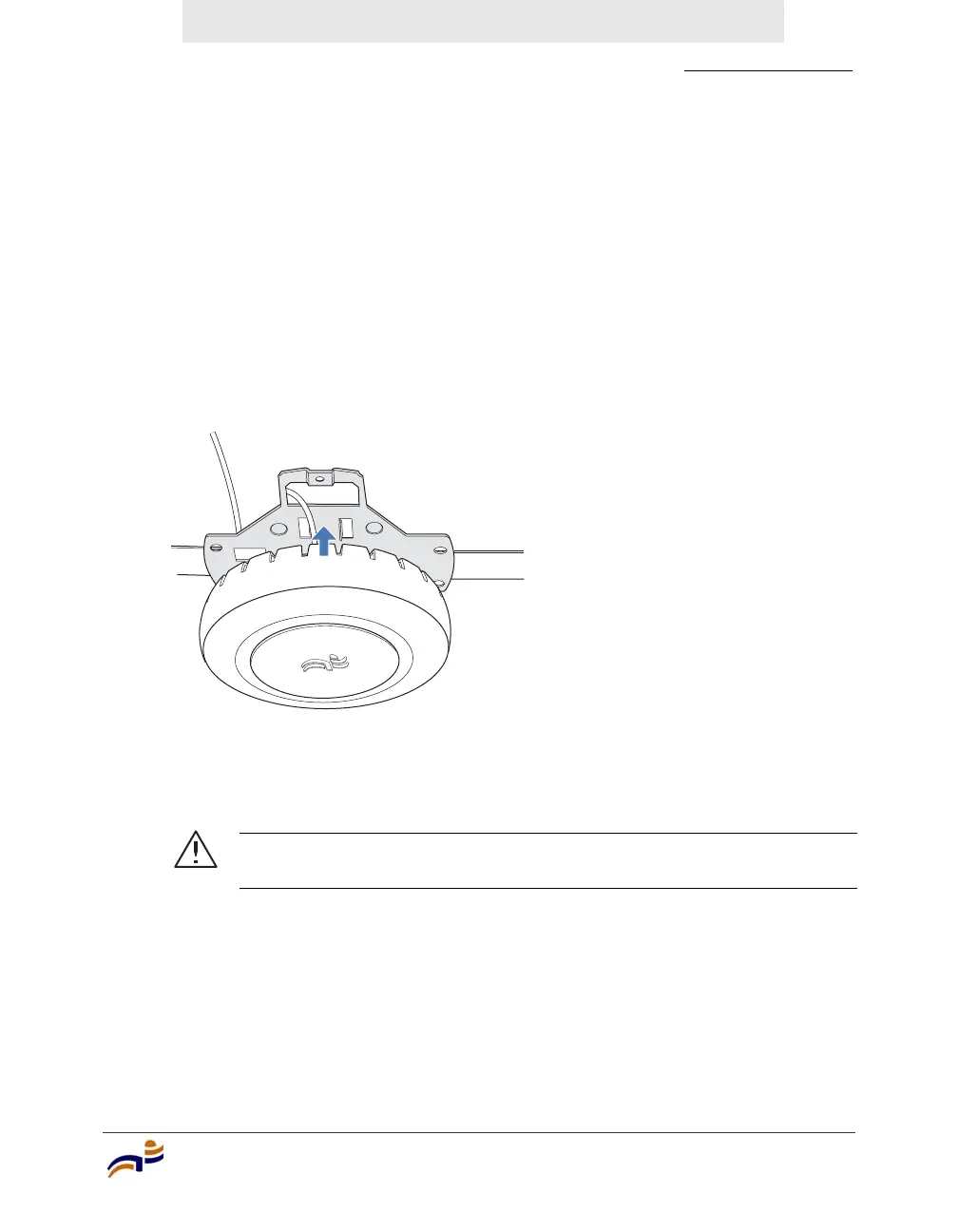
10 Lift the MP access point into place on the universal mounting bracket as
shown in Figure 15.
Make sure the cable feeds properly into the ceiling as you lift the device, and
does not become trapped between the access point and the bracket.
Figure 15. Step 10—Placing the MP Access Point on the Bracket
11 Lock the MP access point onto the bracket by inserting the 3-mm or 1/8-inch
screwdriver into the Lock hole on the access point as shown in Figure 16.
Caution! To prevent possible damage to the MP access point, make
sure the device is fully locked onto the bracket before letting go of it.
840-9502-0002


 To Next Page