EN-25
| evation
4.2.1 Switch on drive system
More detailed information can be found → in chapter 23.1 "Switching the drive system
on and off" or in chapter 27.1 "Switching the drive system on and off".
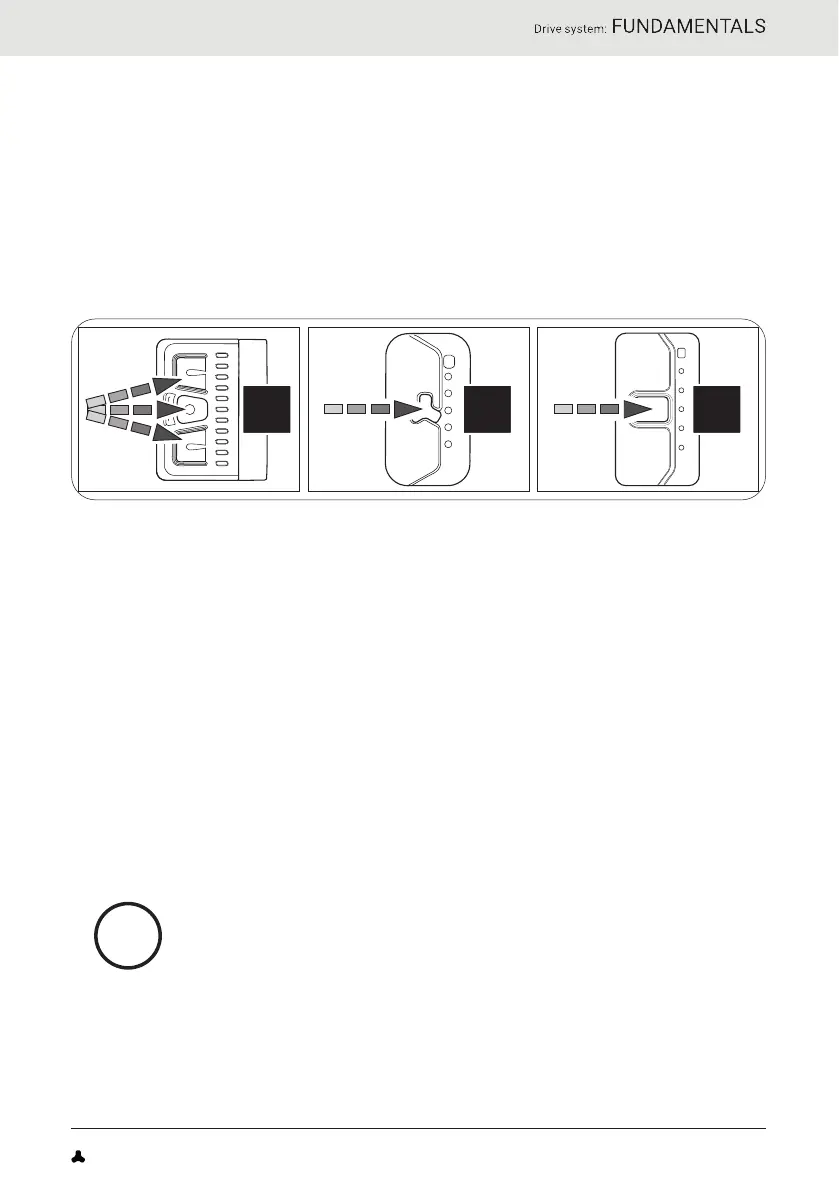
► Turn on the drive system using the Remote b by pressing one of the
three buttons.
or
► Turn on the drive system using the Remote fX or Remote bX by pressing
the center button.
CC C
4.2.2 Switch off drive system
More detailed information can be found → in chapter 23.1 "Switching the drive system
on and off" or in chapter 27.1 "Switching the drive system on and off" as well as in
chapter 4.4 "Switching on the drive system after standstill"as .
You can switch off the drive system in various ways:
► Press and hold the center button on the remote for 2 seconds
(Remote b) or 1 second (Remote fX and Remote bX) to turn off the
drive system.
or
► Remove the drivepack from your e-bike.
or
► Turn off the battery by pressing the on/off button.
In addition to the drive system, Fazua also recommends
switching off the battery if you park your e-bike for a longer
period of time (e.g. if you take a break during a trip).
More detailed information can be found → in chapter 31.4 "Switching
off the battery"
FAZUA Original_Instrucion_US-EN.indb 25FAZUA Original_Instrucion_US-EN.indb 25 28-Feb-20 13:08:2828-Feb-20 13:08:28



 To Next Page