18
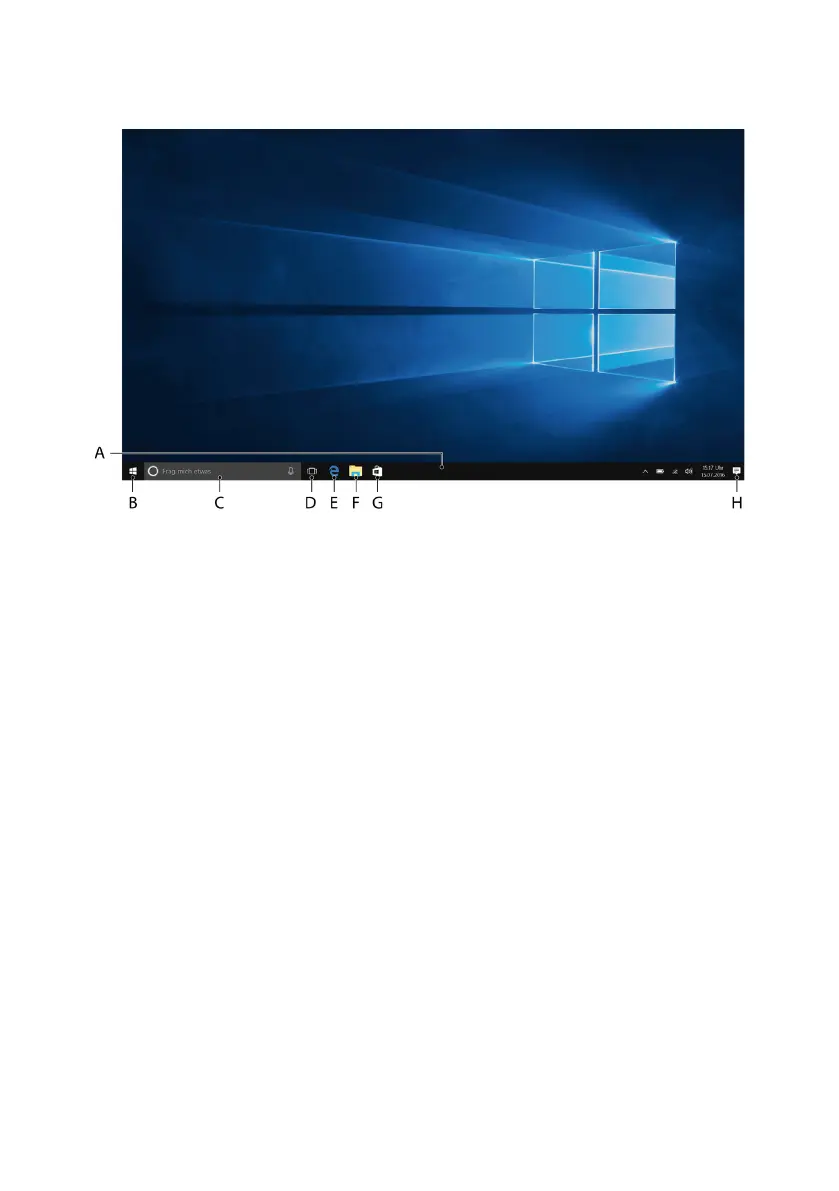
11. Important elements on the start screen
A) Task bar
B) Windows icon: Opens the Start menu
C) Cortana: Your digital assistant reminds you of pending tasks and
appointments and gives hints and tips
D) Task View: Enables the Task View and shows all open programs including
the "+ New Desktop" button for creating virtual desktops
E) "e" – Microsoft Edge: Opens the Internet browser
F) Folder symbol: Opens the ile browser
G) Windows Store: Opens the Windows Store
H) Memo symbol: Opens the Action Center
12. Using the keyboard
Special keys and function buttons on the keyboard
To simplify operation, the keyboard has numerous special keys and function
buttons for controlling the Surbook.
Fn key (blue)
The blue Fn key is used to enable or operate the additional function buttons
(blue symbols) on the keyboard.


 To Next Page