19
These additional function keys include the F1 to F12 function keys, the "settings"
(cogwheel symbol) , "deactivate touchpad", "|", "<" and ">" keys as well as
the keys for controlling display brightness (sun symbol and "+" or "-"). It also
includes "Page (high)", "Page (down)", "Home" and "End" for faster navigation.
To enable and use these functions, keep the Fn key pressed as you press the key with
the required blue symbol.
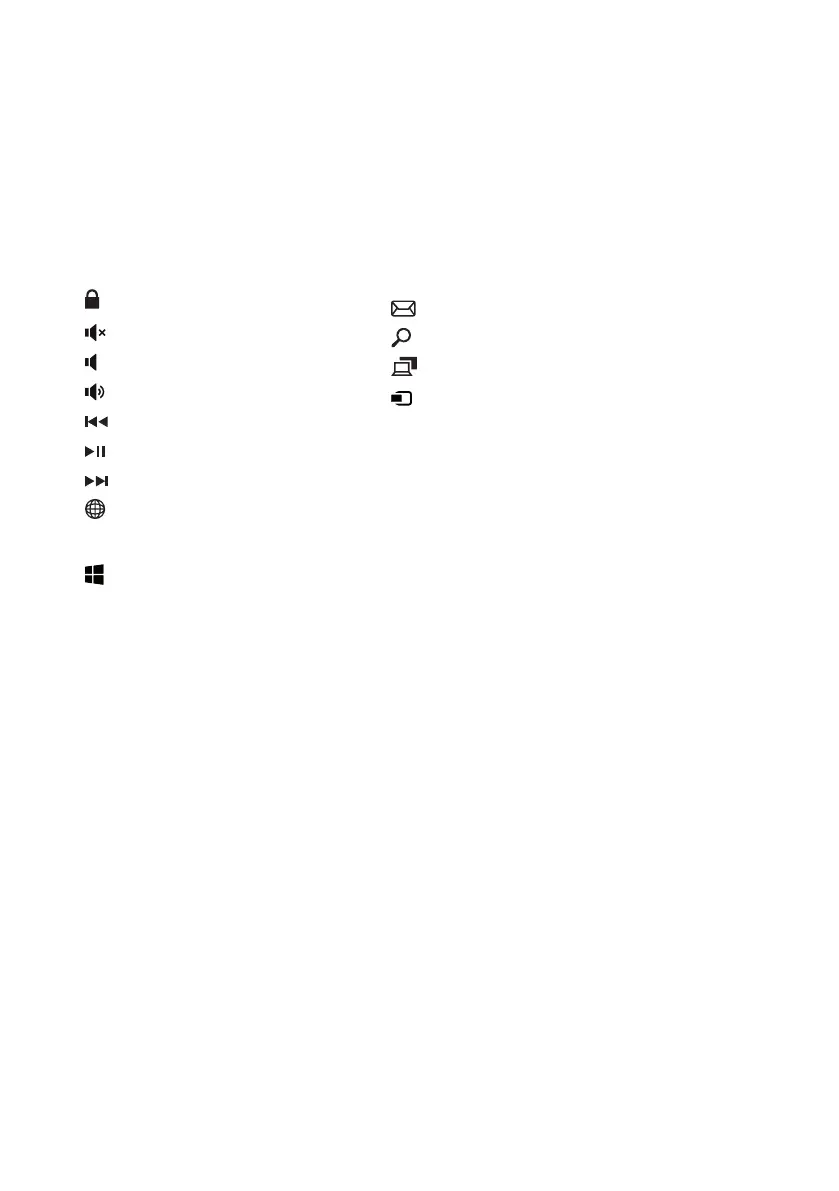
Function buttons in the top row of buttons
Lock screen
Mute
E-Mail
Search
Project
Devices
Prt Scr (= Print Screen)
Ins (= Insert)
Volume -
Volume +
Previous track
Play/Pause
Next track
Open browser
Windows button
Press this button to enter the Start menu. In conjuction with other keys, e. g.
Windows + E (display My Computer), other control demands can be given.
13. Touchpad
The touchpad performs the functions of a mouse. Move the cursor on the touch
surface by swiping your inger across the surface in the desired direction.
The keys (invisibly integrated in the lower part of the touchpad) perform the
same functions as mouse keys:
You use the left key to select functions, programs and iles, position objects and
conirm commands. The right mouse key calls up the context menu.
You can change the size of some displays (images, Web pages, and so on). Move
two ingers apart on the touchpad to enlarge the display.
In reverse, move two ingers towards each other on the touchpad to reduce the
display again.
Similarly, you can move the screen contents either up or down by placing two
ingers on the touchpad in parallel and swiping either up or down.


 To Next Page