AIR/PRO - USA
-15-
Headband
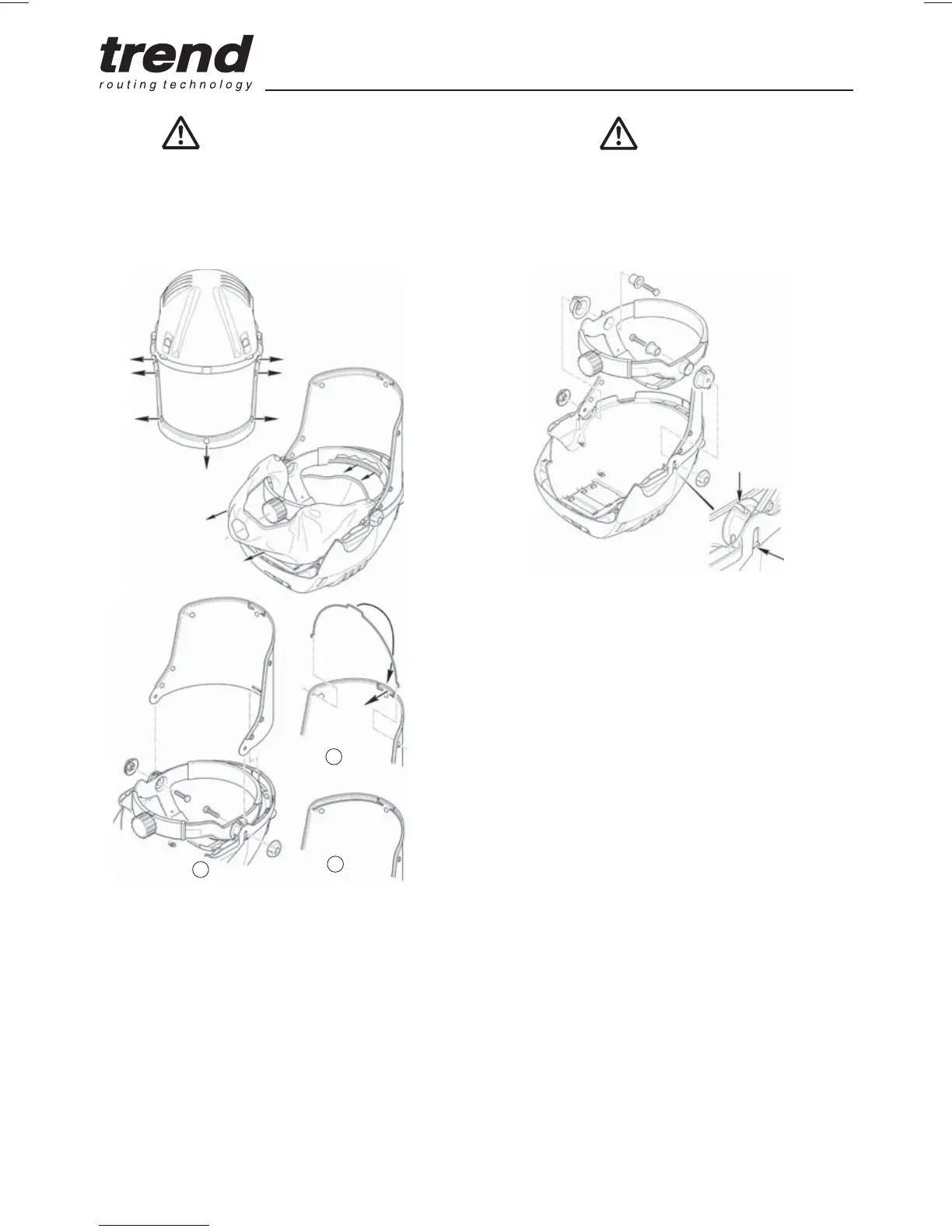
Remove face seal and visor as shown.
Install a new headband assembly as shown.
Visor Overlay
Q Peel away visor protector and ensure visor
surface is clean.
Q Peel the backing paper from adhesive strips
on replacement visor protector. Position
centrally onto visor surface, press down
adhesive strips and remove protective paper.
Q Release nuts and screw and remove the
headband from the helmet.
Q Assemble anti-rotating cap and screw retainer
to headband noting that anti-rotating caps are
PDUNHG¶/·OHIWDQG¶5·ULJKW
Q Position the headband in the helmet ensuring
that the tabs on the anti-rotating cap locate in
the helmet.
Q Fit screws through retainer, anti-rotating cap
and visor secure with nuts.
Visor
Q Remove the seven face seal pop studs from
visor.
Q Replace the old or damaged visor assembly
as shown.
Q Release nuts and push screws inwards,
release the front tab and lift visor from the
helmet.
Q Fit replacement visor ensuring slot in visor
locates on tab and bottom edge in grooves,
secure with screws and nuts.
Q Fit visor stiffener wire. Insert the wire ends
into the outer slots provided and rotate to
engage securely in the center slot.
Q Visors should be stored out of direct sunlight
and replaced at least every 5 years.
1
2
3


 To Next Page