AIR/PRO - USA
-16-
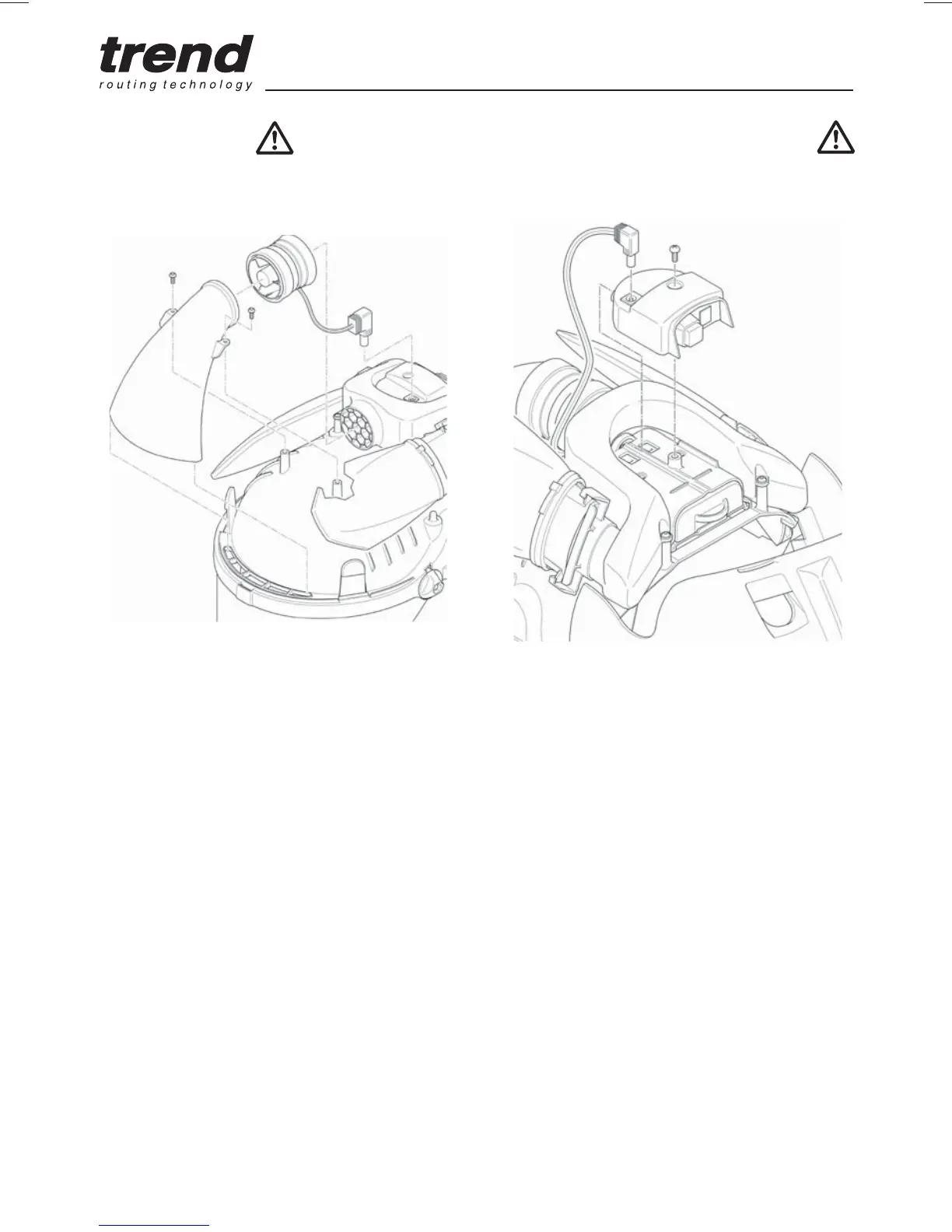
Fan-Motor Unit
Lift the cover. Replace fan/motor assembly as
shown below:
Q Disconnect fan/motor electrical lead from the
electronics unit.
Q Remove the two screws securing the front air
duct. Lift the air duct from locating lip and pull
fan/motor from rear air duct. Separate fan/
motor from front air duct.
Q Fold back both seals on replacement fan/
motor assembly. With electrical lead point
downwards locate with front air duct and
secure by unfolding seal over duct.
Q Connect electrical lead to electronics unit.
Q Locate front air duct in lip and fan/motor with
rear air duct, tuck excess cable under fan/
motor unit and unfold seal to secure. Secure
air duct with screws.
Q Ensure both seals are fully engaged with
ducts and are fully unfolded, failure to do so
may compromise the units performance.
Electronics Unit / Switch Housing
Lift the cover and replace the electronics unit as
shown below.


 To Next Page