IQView8 Touch Screen Display Data Sheet TA201232 Issue 2, 10-Jul-2012 3
Data Sheet IQView8
FUNCTIONALITY
The functionality of the IQView8 can be split into Software, Trend Network Connection, Ethernet Addressing, and Hardware
sections.
SOFTWARE
The IQView8’s software provides its functionality. It enables
viewing/adjustment of operating times and device values, as
well as the display of graphs, and alarms from an intuitive touch
screen interface. It also enables the IQView8 to be congured.
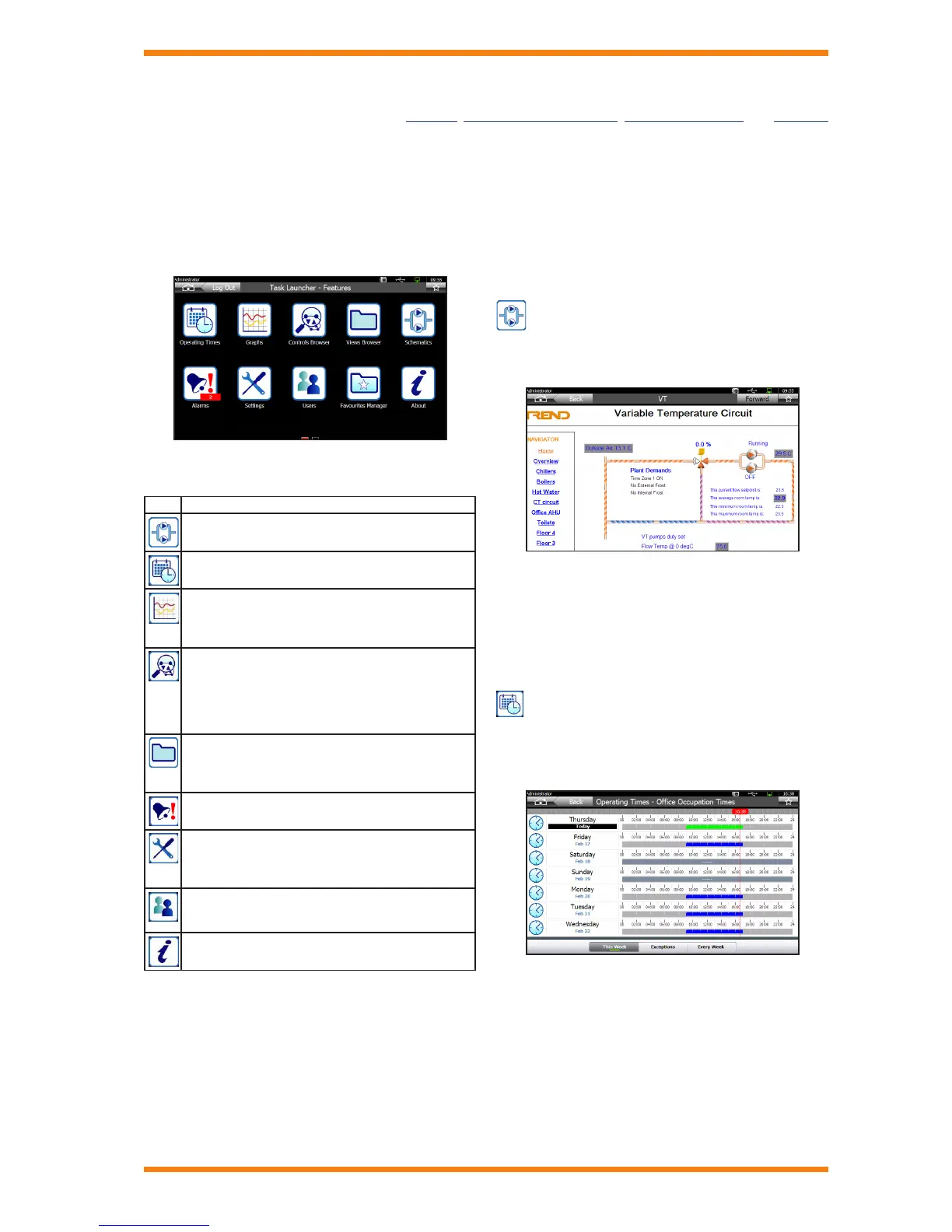
The Task Launcher - Features screen is shown below:
The Task Launcher - Features screen contains icons that
enable the selection of the main features.
Icon Description
Provides access to the schematics displays.
Provides access to the operating times of controllers
on the system.
Provides access to graph views. From here graph
views can be displayed, created or deleted. It also
enables you to browse directly to any controller plot
and display it as a graph.
Provides access to the presentation modules (i.e.
knobs, switches, time zones, and drivers) and control
loops of devices on the system to which the IQView8
is connected. From here the values can be viewed,
adjusted, or graphed.
Provides access to display and directory modules on
the system to which the IQView8 is connected. From
here the values can be viewed as a list of points or as
a GraphIQ (where available).
Provides access to alarms on the system/controller,
and alarms received by IQView8.
Allows the IQView8’s settings to be viewed/congured.
It also provides access to the facilities to upgrade the
software, back up or restore the conguration, perform
a restart, or access diagnostic information.
Provides access to the IQView8’s security features
enabling the creation, deletion, and editing of the
IQView8’s users.
Displays information about the IQView8 (i.e. Version,
Build, Date, Start time).
A second Task Launcher screen the Task Launcher - Favourites
screen contains favourites that have been set up for the
current user allowing them easy access to frequently required
information.
The IQView8’s screens make use of graphics to provide
information to the user, enable system navigation and viewing/
adjustment of values with the minimum amount of text. IQView8
offers the following functionality accessed from the users home
page.
Available functionality depends on the user’s access rights and
what features they have access to.
Schematics
The IQView8 provides the user with colour graphics pages,
which display information from the system and enable
parameters to be adjusted and graphed.
The pages may contain a backdrop, graphic images, animations.
multi state graphics (ON, OFF, waiting, error, alarm, overridden
ON, and overridden OFF), and static text. The security system
enables access to particular pages to be restricted so that users
are only presented with the necessary information.
The pages are engineered using 963 and exported for use with
IQView8 using the 96x Schematic Export Utility.
Operating Times
The IQView8 enables the user to make adjustments to the
operating times in controllers. It allows adjustment of standard
operating times, operating times for the current week, or setting
up exceptions for the year ahead.
The interface provides a common view for all types of controllers.
An easy to follow wizard guides the user through the process of
changing times and conguring exceptions.


 To Next Page
 Loading...