6 IQView8 Touch Screen Display Data Sheet TA201232 Issue 2, 10-Jul-2012
IQView8 Data Sheet
Ethernet
The IQView8 can connect to the Trend network over Ethernet.
When connecting in this way it can connect using its own
internal vCNC or a virtual CNC (vCNC) in another device.
IQ3
IQL
I/N
Ethernet
IQView8
Lan
Lan
current
loop
current
loop
current
loop
IQ2
3xtend
/EINC L
3xtend
/EINC L
LW
Network
ON ORKS
EINC
INC
LONC
IQ2
IQ2
IQ2
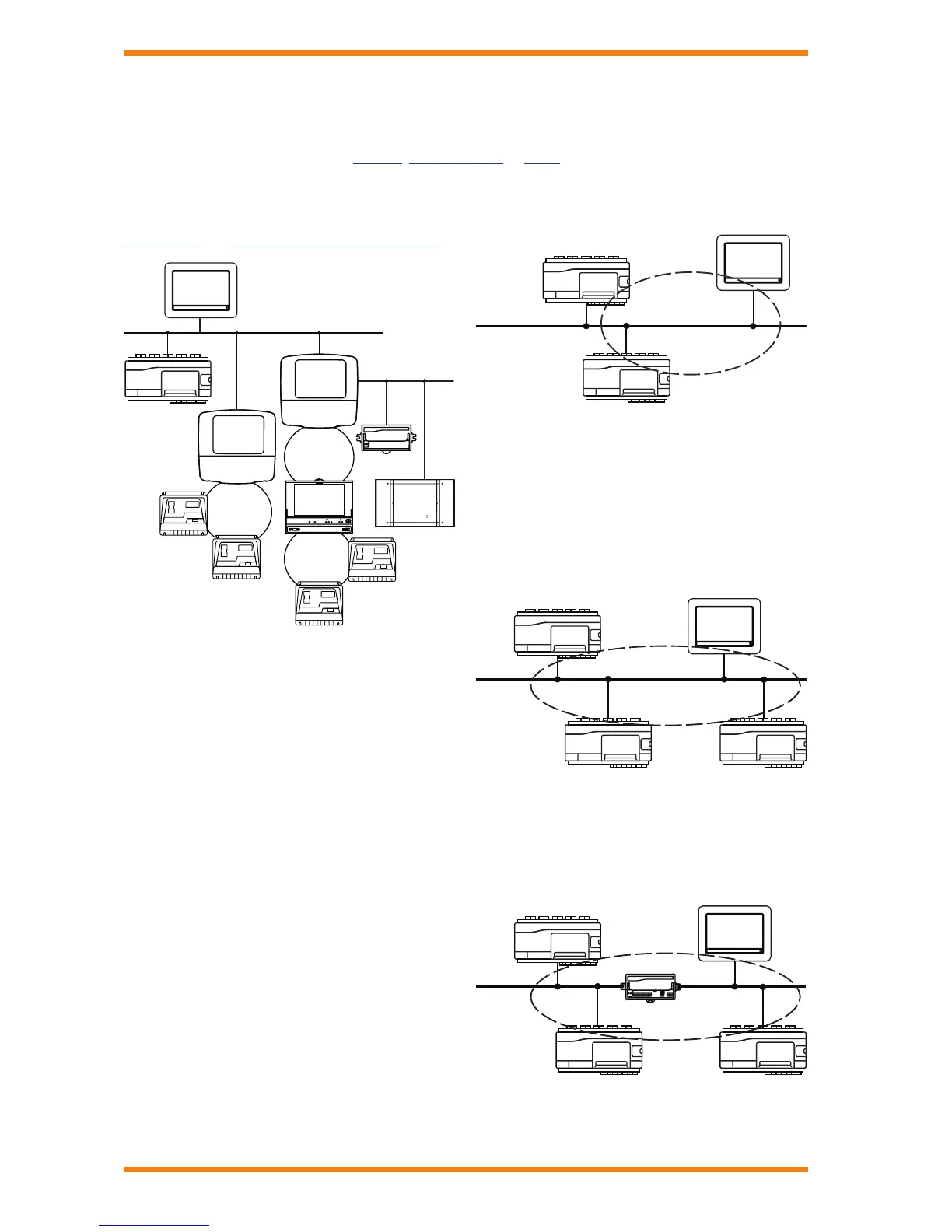
In the diagram the IQView8 is connected using its integral vCNC.
It can access the IQ3 on the Etherent network, and the IQ2s on
the current loop Lan via the 3xtend/EINC L. It can also connect
using the second 3xtend/EINC L to another current loop Lan
and to some IQLs on a L
ONWORKS® network. Connection using
a vCNC in another device provides the same connectivity.
Connection using integral vCNC
When connecting using its integral vCNC IQView8 exists on the
network with its own address on the Trend network enabling
it to build Lans and internetworks with other devices, and it to
receive alarms from other Trend devices sent to that address.
It must have its Lan number, network address and UDP port
setup. UDP port must be the same as other devices on the
network.
Building Lans: When using its integral vCNC IQView8 will
build a Lan with other Trend devices on the same segment with
the same Lan number and UDP port.
Lan 20
(on Ethernet)
Lan =20
Ethernet
Lan =20
IQView8
In the example the IQView8 has the same Lan number (20) as
the IQ3 controllers and will build a Lan (Lan 20) with them.
Building internetworks: If the IQView8’s IP address is
the lowest of the devices on its Lan it will take on the role of
INC and automatically build an internetwork with other Trend
internetwork devices on the same segment of the Ethernet
network (no routers between them) that use the same UDP port.
In the diagram below the IQ3 controllers and the IQView8 are
on the same network segment but have different Lan numbers.
Therefore they form an internetwork consisting of Lans 20, 21,
22, and 23.
Ethernet
Internetwork
(on Ethernet)
If there are routers between the IQView8 and other devices
that internetwork is to be built with another devices must be
congured to build internetworks across routers (cross router
master). This is done by specifying the IP address and subnet
mask of a device on the other side of the router that is to form
part of the internetwork in the remote devices table. IQView8 is
not able to be the cross router master.
Ethernet
Internetwork
(on Ethernet)
Address=23
Lan =21
Lan =20
Router
IQView8
In the above diagram, one of the IQ3s has the lowest IP
address on its subnet therefore it should be congured with the
IP address and subnet mask of a device the other side of the
router, enabling it to build the internetwork across the router.
TREND NETWORK CONNECTION
The IQView8 is designed to connect to a single Trend site communicating with the other devices to obtain data and make changes. It
can also receive alarms sent from other Trend devices. IQView8 is not designed for muti-site operation. It cannot access autodialled
sites (e.g using a TMN), and it cannot receive alarms from sites using autodialling or TCP/IP dial up. The connection to the Trend
network can be made in one of three ways, Ethernet, current loop Lan, or RS232.


 To Next Page
 Loading...