IQView8 Touch Screen Display Data Sheet TA201232 Issue 2, 10-Jul-2012 7
Data Sheet IQView8
Ethernet (continued)
If automatic addressing is being used the devices in the remote
devices table must be specied in the other devices using their
host names and subnet mask. In order to maintain the network
in the event of a failure of one of the devices used to build the
internetwork the details of two devices in the internetwork from
each other subnet should be set up in every device on the local
subnet.
Connection using vCNC in another device
When connecting using a vCNC in another device IQView8
takes the network address of the vCNC enabling it to receive
alarms from Trend devices on the network sent to that address. It
must be congured with the IP address of the device containing
the vCNC to which it is to connect and the vCNC’s port number.
Physical connection
The physical connection the Ethernet network is made using
a standard Ethernet cable (Cat 5e unshielded) to an Ethernet
hub. It can also connect directly to the Ethernet port of an IQ
controller (dependant on controller type) This connection type
requires the controller vCNC to be set up and will provide
access to the rest of the network.
RS232
IQView8 can connect to the Trend network by connecting to
an IQ controller’s (IQ1xx, IQ2xx, IQ4, or IQ3) local supervisor
port, or to a CNC (e.g. NBOX/CNC2) using its RS232 connector.
IQView8 takes the network address of the local supervisor port
or CNC to which it is connected enabling it to receive alarms
from Trend devices on the Trend network sent to that address.
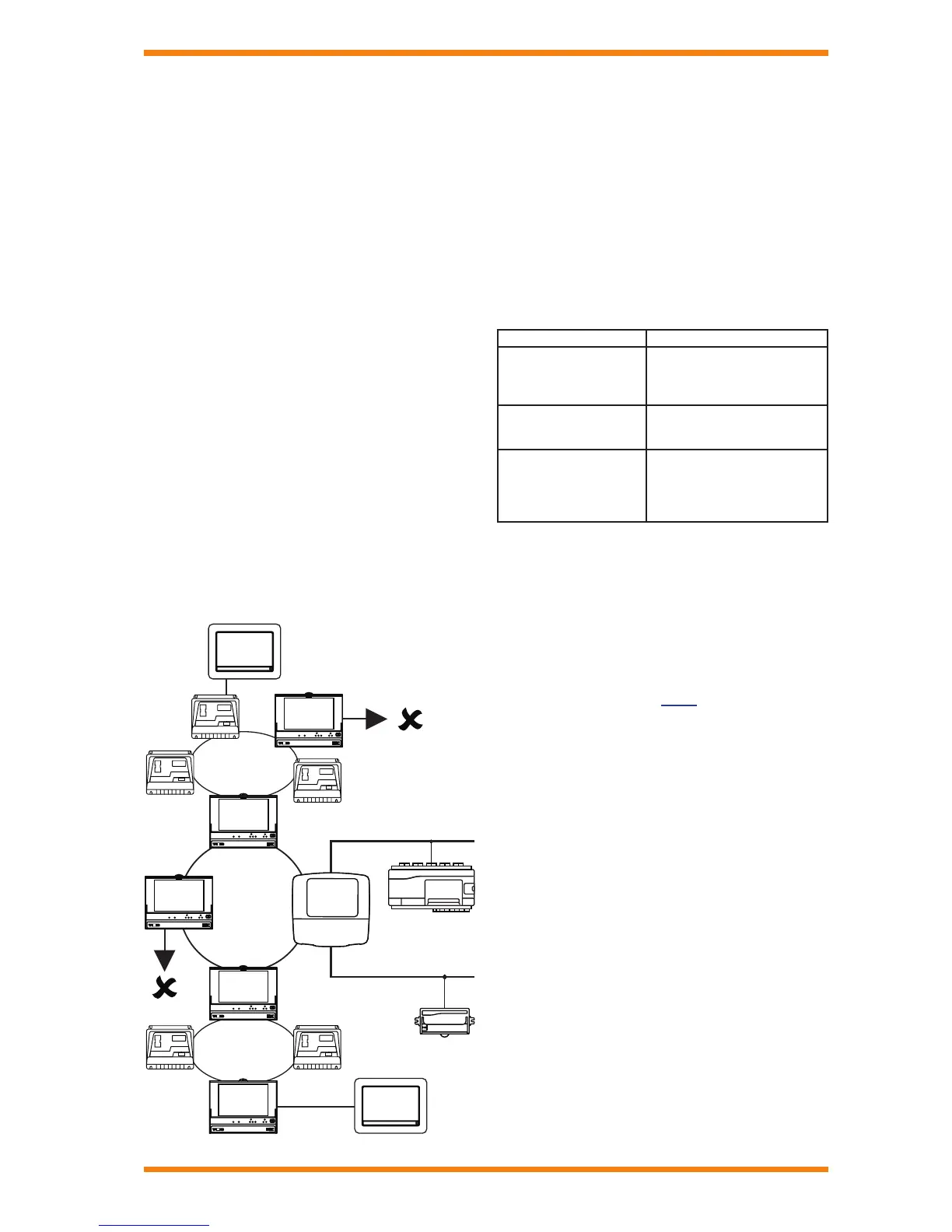
The diagram shows an IQView8 (A) connected to an IQ2xx with
its supervisor port set up to allow network access. This gives the
IQView8 access to the local Lan and across the internetwork to
the other Lans including those on the L
ONWORKS network.
IQ3xcite
IQL
I/N
Ethernet
Lan
current
loop
current
loop
IQ2
LW
Network
ON ORKS
IQ2
IQ2
EINC
TMN
EINC
INC
3xtend
/EINC L
EINC
TMN
Lan
current
loop
IQ2
IQ2
EINC
TMN
EINC
INC
IQView8
(A)
IQView8
(B)
A second IQView8 (B) is connected to the network through a
CNC. This has similar access to the previous one and takes
the address set up on the CNC’s address switches and the Lan
number of the CNC’s local Lan
In both cases it is not possible to access sites using the
autodialled links, as IQView8 only supports connection to a
single site.
Note that for IQ1xx and IQ21x controllers the local supervisor
port will give access only to that controller, but for all other
IQ2xx, IQ3 and IQ4 controllers it can provide access to the
Trend network providing it is been congured to do so.
Physical connection
Connection of IQView8 using its RS232 connector requires use
of the appropriate cables as described in the table:
Connecting to Cable Required
IQ4
IQ3
IQ2xx
IQ1xx with RJ11 connector
RJ11 to RJ11 adapter cable with
a twist (CABLE/EJ105650).
CNCs
IQ1xx with 25 Way D type
RJ11 to 25 Way D type
male adapter cable
(CABLE/EJ105651).
RJ11 to 25 Way D type male
adapter cable (CABLE/EJ105651)
in conjunction with the 25 way
socket to 5 in-line socket adapter
cable (CABLE/78-1172).
Current Loop Lan
The IQView8 can connect to the Trend network by connecting
directly to the current loop Lan using its Lan connector. The
IQView8 exists on the network and has its own address on the
Trend network enabling it to receive alarms from Trend devices
on the Trend network sent to that address. It must have its
network address set up as well as having the baud rate set to
match the Lan’s baud rate.
This type of connection gives the same range of access to the
network as that when using an RS232 connection.
Physical connection
Connection of IQView8 using its Lan connector requires use of
twisted pair cable between the IQView8 and other devices on
the network.


 To Next Page
 Loading...