RS-WMB, RD-WMB Installation Instructions TG201349 Issue 4, 26-Aug-2015. Applies to 1.02.2. 5
Installation Instructions RS-WMB, RD-WMB
10
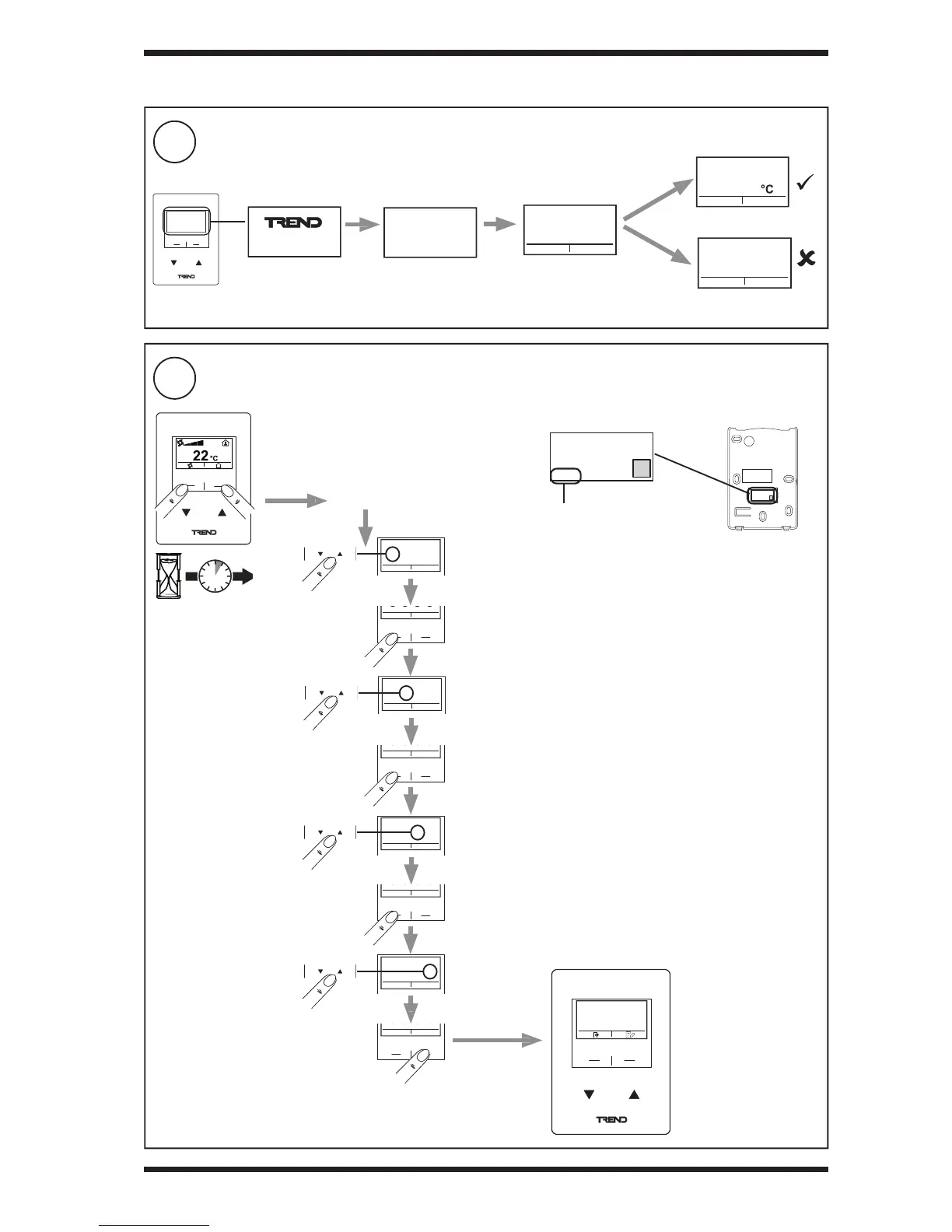
Check Connection to Controller (RD-WMB only)
11
Enter Settings Menu (RD-WMB only if con guration required, else goto step 13)
3 INSTALLATION (continued)
Communication error displayed after 3 to 6 minutes of failing to
communicate with controller
Or
RD-WMB/KOSF-THC-200
XXX-XXX
FIRMWARE REV
WMB ADDRESS
2
23.3
ERR
5s
‘Home’ display
Communication error
RD-WMB-THC
WALL MODULE
SOFTWARE VERSION
1434
e.g. Default PIN = 1434)
RD-WMB-THC
WALL MODULE
SOFTWARE VERSION
1434
Backplate rear
Enter PIN
NEXT
ENTER
0 0 0 0
ENTER PIN
NEXT
ENTER
0 0 0 0
ENTER PIN
NEXT
ENTER
0 0 0 0
ENTER PIN
NEXT
ENTER
0 0 0 0
ENTER PIN
value/setting
ITEM
Default PIN located on product label on rear of backplate.
NEXT
ENTER


 To Next Page