13
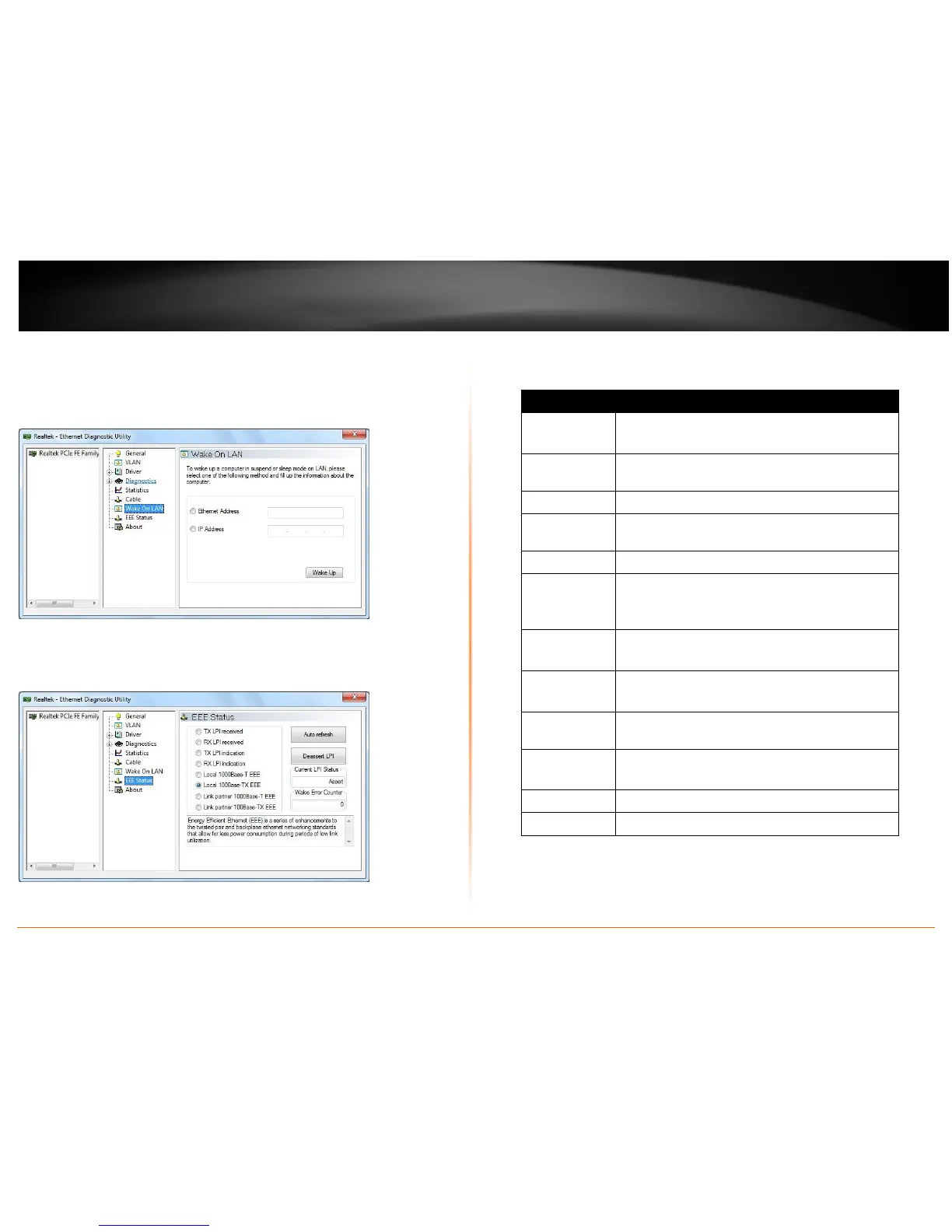
Wake On LAN
This page provides two ways for the user to wake up a PC in standby or hibernate mode
via the selected network adapter. A computer can be waked up only if related
configurations in BIOS and the network adapter are enabled.
EEE Status
This page shows information about EEE status. User can change the current LP status to
minimize system power consumption.
Technical Specifications
Hardware
Standards IEEE 802.3u 100Base-FX
IEEE 802.3x, IEEE 802.1Q, IEEE 802.1p
Network Media
Multi-mode fiber optic cable 50/125 µm up to 550m
or 62.5/125 µm up to 2km
Interface PCI Express, SC-type slot
Power
Consumption
Max. 2 watts
Diagnostic LED Speed, Link/Activity
Supported OS
Windows 8 (32/64-bit) / 7 (32/64-bit) / Vista (32/64-
bit) / XP (32/64-bit), Windows Server 2003, 2008
Linux Kernel 2.4.x / 2.6.x
Data Rate 100 Mbps (half-duplex)
200 Mbps (full-duplex)
Dimension TE100-ECFX : 117 x 107 x 57 mm (4.6 x 4.2 x 2.2 in)
TE100-ECFXL: 80 x 107 x 57 mm (3 x 4.2 x 2.2 in.)
Weight
TE100-ECFX : 45g (1.6 oz.)
TE100-ECFXL: 40 g (1.4 oz.)
Temperature Operating: 0°C ~ 50°C (32°F ~ 122°F)
Storage: -10°C ~ 70°C (14°F ~ 158°F)
Humidity Max. 95% (non-condensing)
Certifications CE, FCC








 To Next Page