5
Fiber Cable
This section describes how to connect the TE100-ECFX or TE100-ECFXL to a 100 Mbps
fiber-based Ethernet network, which contributes to its optimal performance.
Please ensure that you installed the TE100-ECFX or TE100-ECFXL into the computer
before installing the driver.
1. Remove the protective rubber covers from the TE100-ECFX or TE100-ECFXL.
2. Connect one end of the fiber cable to TE100-ECFX or TE100-ECFXL and then
connect the other end of the fiber cable to the fiber converter or fiber port into
the fiber network.
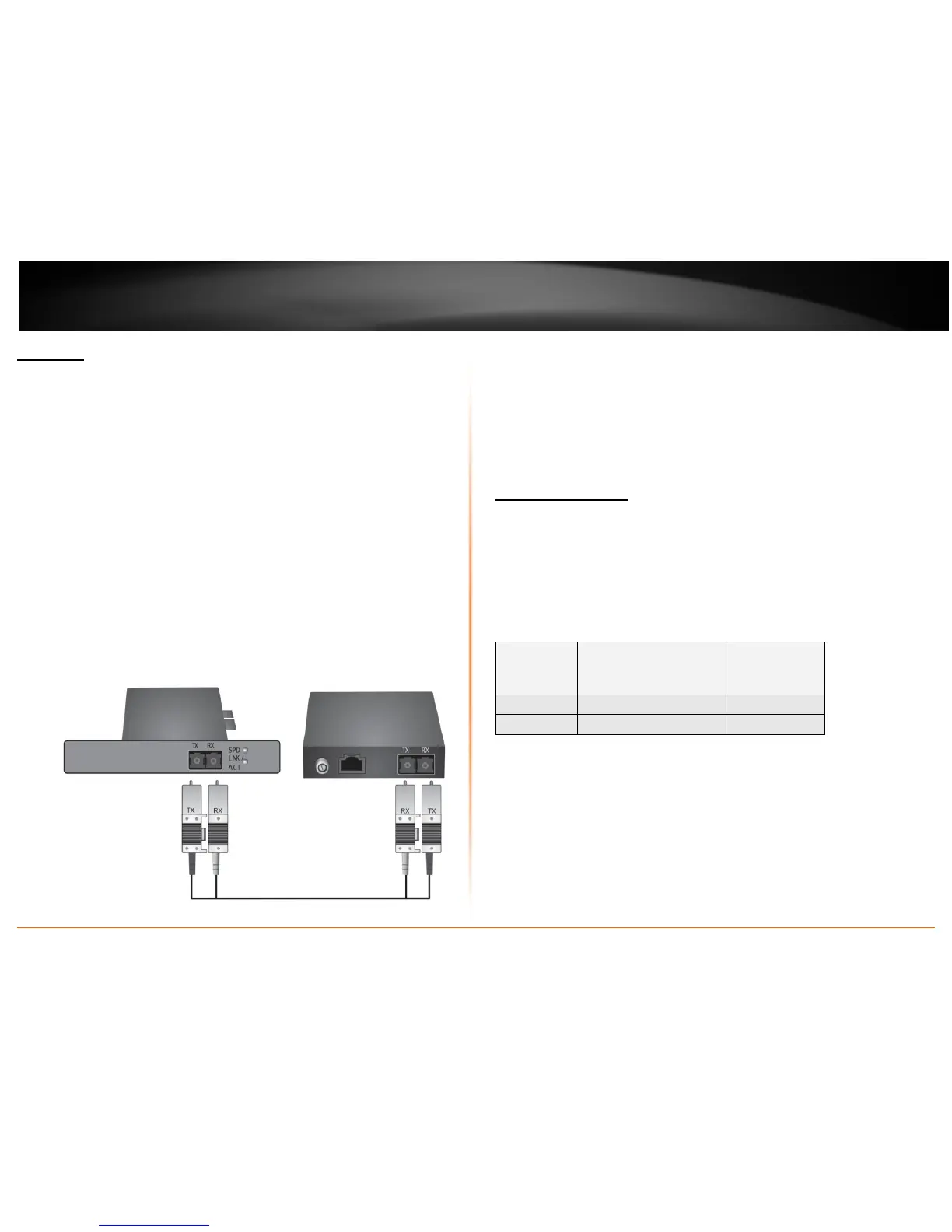
Note: The fiber cable comes with a pair. Some of them may mark as
Transmitter (TX) and Receiver (RX), some of them may have color coded or
have letters on each end. Make ensure that you have one end (TX) of the fiber
cable connects to the TX port of the TE100-ECFX or TE100-ECFXL and have the
other end of the (TX) connects to the fiber’s network device’s RX port as
example showed below.
3. Turn on the computer
4. Windows will automatic install the driver.
5. Check the LNK (link) LED on the TE100-ECFX or TE100-ECFXL. The LNK LED will
be steady on to indicate the network connection is establish.
Cabling Requirements
For connector type, cabling requirements, and maximum segment distance when
connecting the PCI Express Ethernet Adapter to your network, please refer to the
following table. The table listed below showed the type of cable that connected to
TE100-ECFX or TE100-ECFXL PCI-e adapter. You may also choose the proper fiber cable
that suitable for your network usage.
Connector
Type on Fiber
Adapter
Wavelength of 1300nm
Fiber Optic required
Maximum
Distance
(* full-duplex)
SC Multi-mode, 50/125 µm 550m
SC Multi-mode, 62.5/125 µm 2 km
<Note>
The maximum node-to-node network distance is in full-duplex operation.








 To Next Page