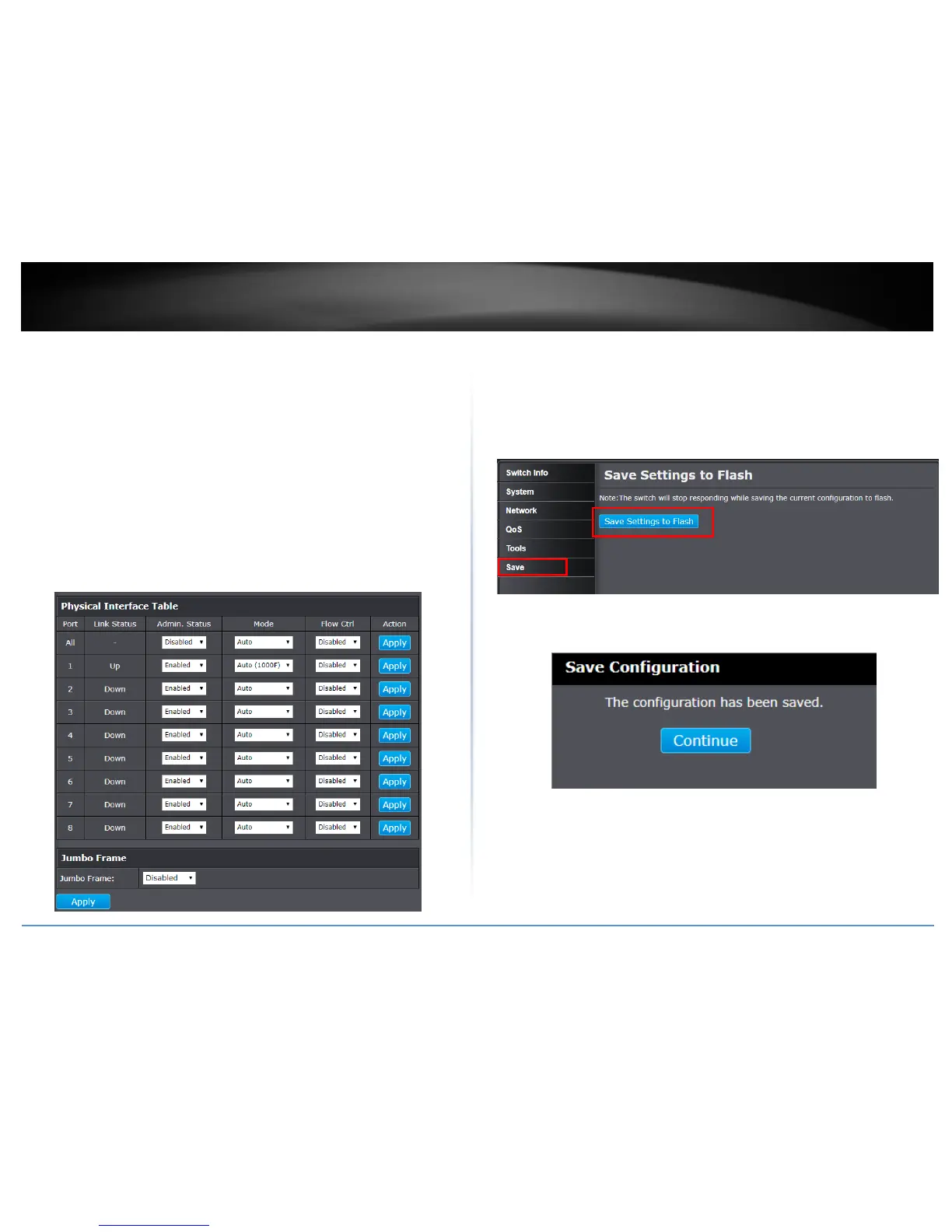
Flow Ctrl: Flow Control, This parameter reflects the current flow control setting
on the port. The switch uses a special pause packet to notify the end node to
stop transmitting for a specified period of time. The possible values are:
o Enabled - This parameter indicates that the port is permitted to use
flow control.
o Disabled - This parameter indicates that the port is not permitted to
use flow control.
Jumbo: This parameter indicates whether or not jumbo frames can be accepted
by the switch. You may want to activate jumbo frames when your switch will
transmit video and audio files. The possible values are:
o Enabled -This parameter indicates the switch is permitted to accept
jumbo frames.
o Disabled -This parameter indicates the switch is not permitted to
accept jumbo frames.
Note: When QoS is enabled, the Jumbo frame parameter cannot be enabled.
NOTE: The configured settings are only applied to the switch’s temporary memory and
will be lost upon the next power-cycle. Please follow these next steps to save the
configurations to the switch’s NV-RAM to ensure the settings will remain throughout
power-cycles and reboots:
1. From the menu on the left: click on Save, then click the blue button Save
Settings to Flash.
2. Click Continue to return to the Web Configuration of your switch.



 To Next Page