Static Multicast
Add static multicast entries to the switch
Network > Static Multicast
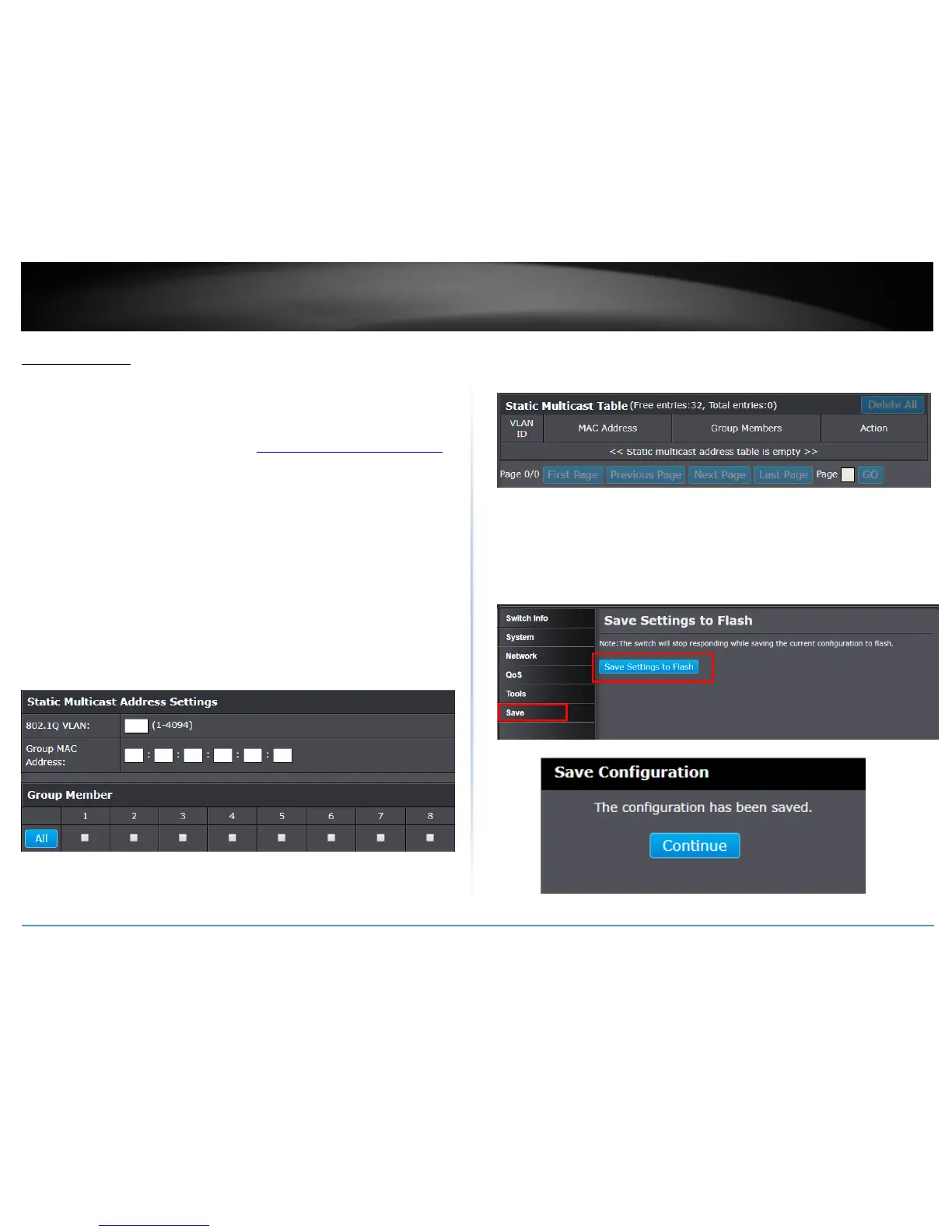
In this section, you can add static multicast entries to the switch configuration.
1. Log into your switch management page (see “Access your switch management page”
on page 7).
2. Click on Network and click on Static Multicast.
3. Review the settings.
802.1Q VLAN – Enter the VLAN ID where the multicast group MAC address will
reside.
Note: By default, all switch ports are part of the default VLAN, VLAN ID 1.
MAC Address – Enter the multicast group MAC address.
Group Member – Check the port(s) where the MAC address will reside.
Note: You can click All to select all ports.
Click Apply to add the Static Multicast Group entry to the list.
In the list, you can click Modify to modify an entry or click Delete or delete the entry. If
the entries span multiple pages, you can navigate page number in the Page field and
click Go or you can click First, Previous, Next, and Last Page to navigate the pages.
NOTE: The configured settings are only applied to the switch’s temporary memory and
will be lost upon the next power-cycle. Please follow these next steps to save the
configurations to the switch’s NV-RAM to ensure the settings will remain throughout
power-cycles and reboots:
1. From the menu on the left: click on Save, then click the blue button Save
Settings to Flash.
2. Click Continue to return to the Web Configuration of your switch.



 To Next Page