TRENDnet User’s Guide TPL-4052E
© Copyright 2015 TRENDnet. All Rights Reserved. 22
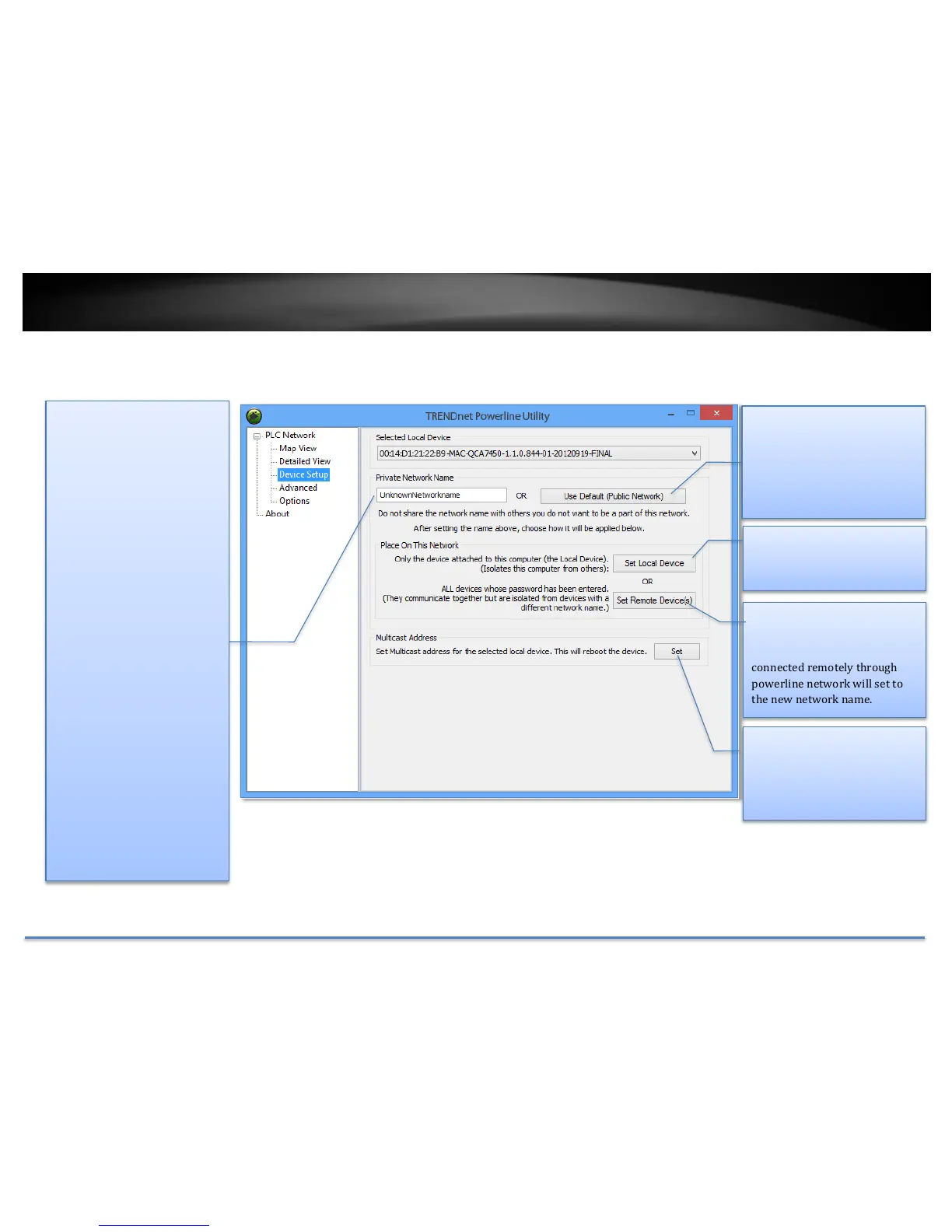
Powerline Utility – Device Setup
Private Network Name
This is the network name of
your powerline network.
Default is “HomePlugAV”. When
network name set to
“HomePlugAV”, it considered a
public network because very
out of box Powerline Adapter
can join this network.
Powerline Adapters connect to
each other only when network
name is the same. Change
network name and make your
network private is
recommended to increase your
privacy.
You have to remember your
network name (Private
Network Name). It will be
encrypted and save to device.
Even Powerline Utility cannot
read it in plain text again. When
you visit this Private Settings
again and the Private Network
Name show
UnknownNetworkName, it
means the network name is
private.
Use Default
If you don’t remember what
network name you set
previously, you can set the
network public. Then set it back
to private later.
Set Remote Devices
All devices currently connected
locally to your computer or
connected remotely through
powerline network will set to
the new network name.














 To Next Page