EasyManua.ls Logo

TRENDnet TPL-4052E - Device Hardware

TRENDnet TPL-4052E
32 pages
Print Icon
To Next Page IconTo Next Page
To Previous Page IconTo Previous Page
Loading...
TRENDnet User’s Guide TPL-4052E
© Copyright 2015 TRENDnet. All Rights Reserved. 5
* 8 active adapter can stream data at the same time. Additional adapters may
decrease network performance. 500Mbps is the maximum theoretical Powerline
data rate. Actual throughput will vary depending on the environment. Networked
Powerline devices must be plugged into power outlets that are on the same
electrical system. GFCI outlets and AFCI circuit breakers may degrade Powerline
network signals.
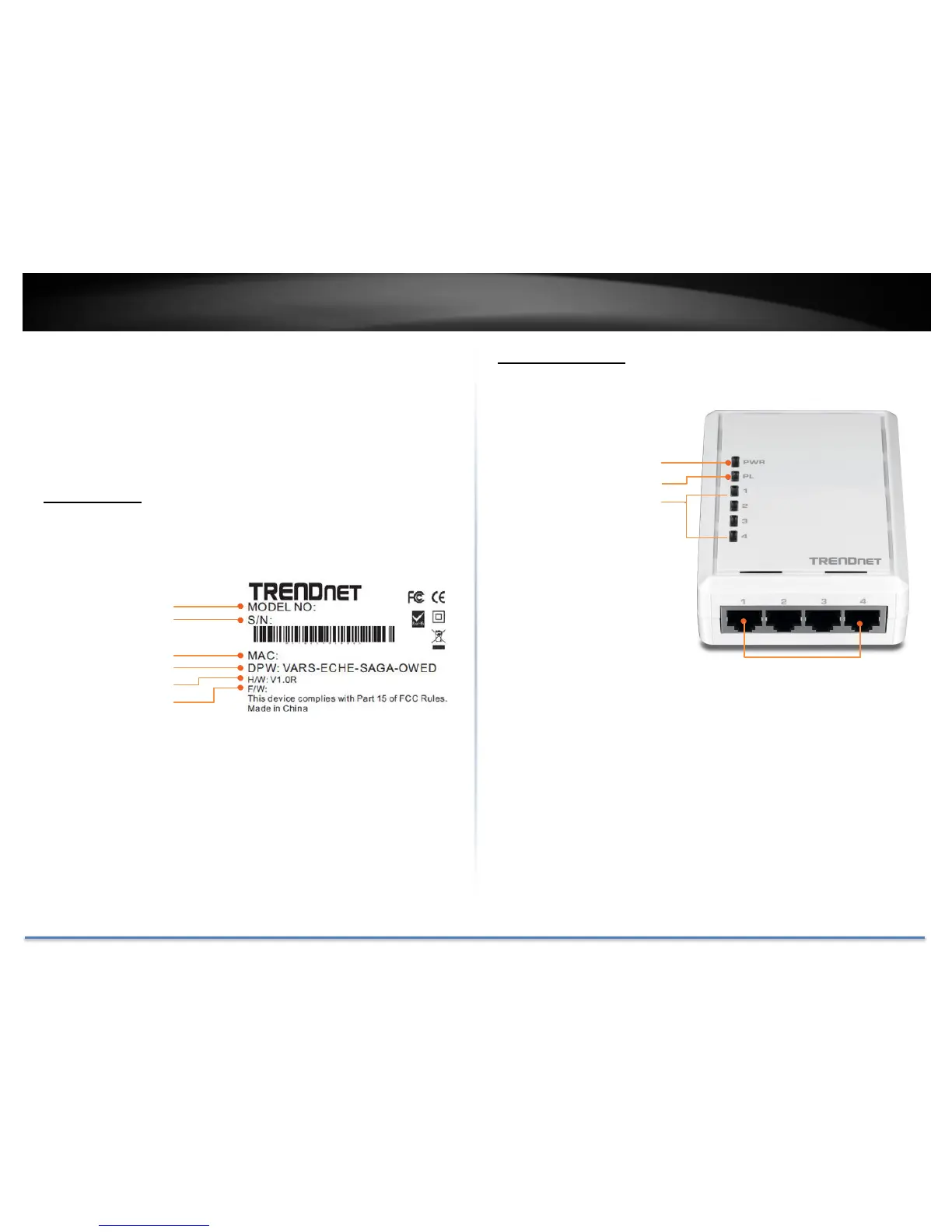
Device Label
Product Outlook

TPL-4052E
GA0112300001
Model Number
Serial Number
00:14:D1:00:14:D
1
Network MAC Address
Device Password (DPW)
Hardware version
Firmware version
Power (PWR) LED
Powerline (PL) LED
Network (1 - 4) LED
10/100 Network Ports
Connect network cables
from Powerline Adapter to
your computer, game
console, network TV, and
other network devices.
Power plug
(UK)

Other manuals for TRENDnet TPL-4052E

Related product manuals