Advanced Features
Services Screen
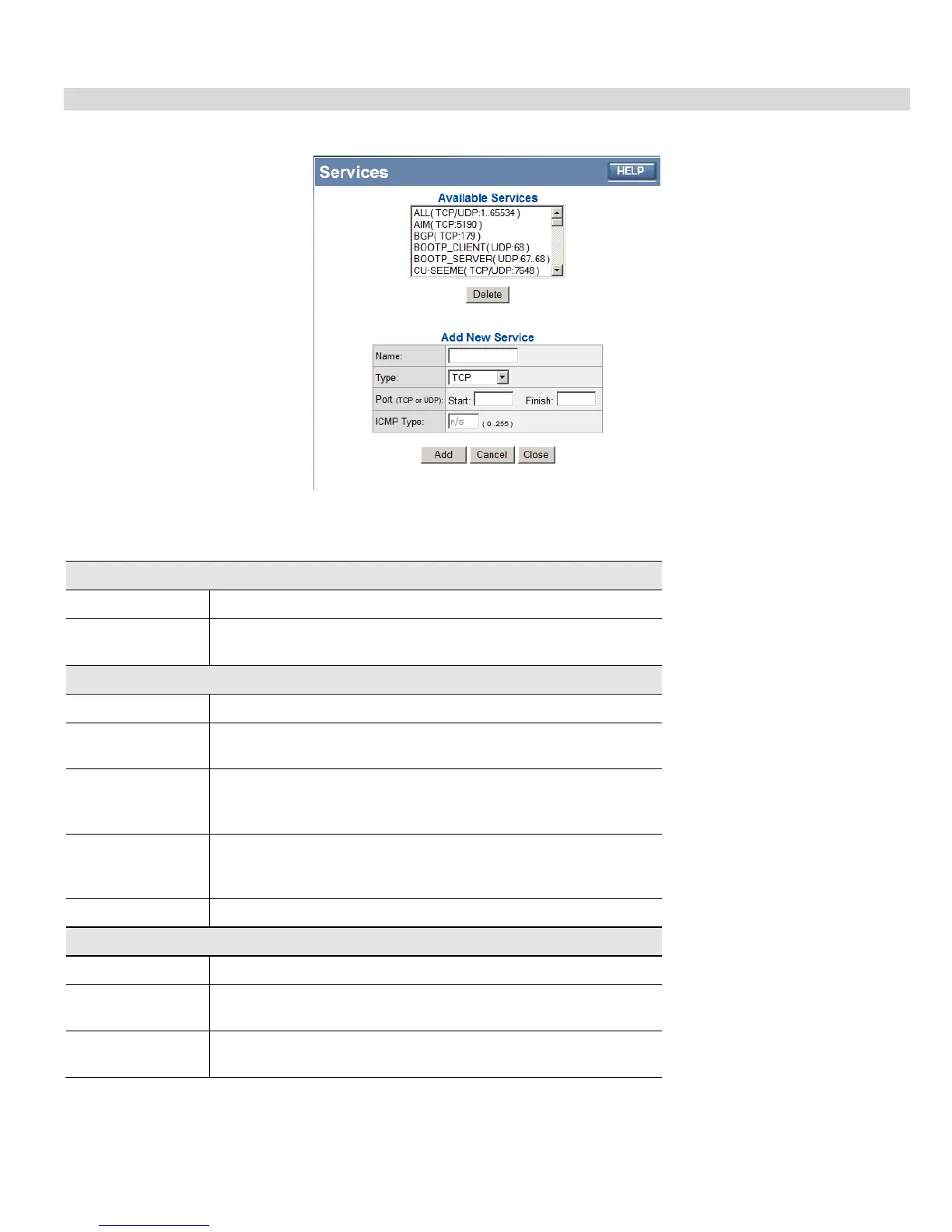
This screen is displayed when the Edit Service List button on the Access Control screen is clicked.
Figure 29: Access Control - Services
Data - Services Screen
Available Services
Available Services
This lists all the available services.
"Delete" button
Use this to delete any Service you have added. Pre-defined Services
can not be deleted.
Add New Service
Name
Enter a descriptive name to identify this service.
Type
Select the protocol (TCP, UDP, ICMP) used to the remote system or
service.
Start Port
For TCP and UDP Services, enter the beginning of the range of port
numbers used by the service. If the service uses a single port number,
enter it in both the "Start" and "Finish" fields.
Finish Port
For TCP and UDP Services, enter the end of the range of port num-
bers used by the service. If the service uses a single port number,
enter it in both the "Start" and "Finish" fields.
ICMP Type
For ICMP Services, enter the type number of the required service.
Buttons
Delete
Delete the selected service from the list.
Save
Add a new entry to the Service list, using the data shown in the "Add
New Service" area on screen.
Cancel
Clear the " Add New Service " area, ready for entering data for a new
Service.
47














 To Next Page