Introduction
3
Procedure
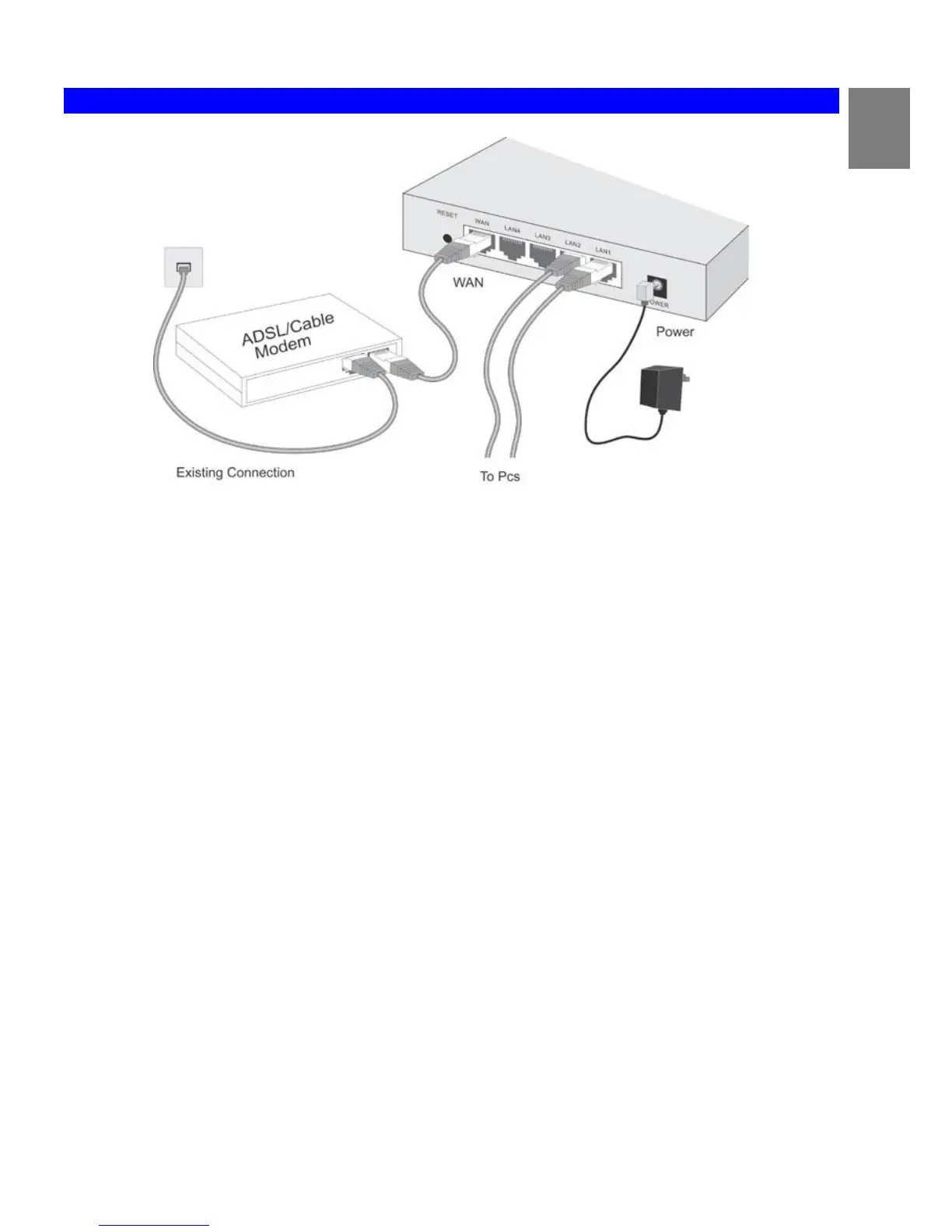
Figure 4: Installation Diagram
1. Choose an Installation Site
Select a suitable place on the network to install the Broadband Router.
Ensure the Broadband Router and the DSL/Cable modem are powered OFF.
2. Connect LAN Cables
Use standard LAN cables to connect PCs to the Switching Hub ports on the Broadband Router. Both 10BaseT and 100BaseT
connections can be used simultaneously.
If required, connect any port to a normal port on another Hub, using a standard LAN cable. Any LAN port on the Broadband
Router will automatically function as an "Uplink" port when required.
3. Connect WAN Cable
Connect the DSL or Cable modem to the WAN port on the Broadband Router. Use the cable supplied with your DSL/Cable mod-
em. If no cable was supplied, use a standard cable.
4. Power Up
• Power on the Cable or DSL modem.
• Connect the supplied power adapter to the Broadband Router and power up.
Use only the power adapter provided. Using a different one may cause hardware damage
5. Check the LEDs
• The Power LED should be ON.
• The Status LED should flash, then turn Off. If it stays on, there is a hardware error.
• For each LAN (PC) connection, the LAN Link/Act LED should be ON (provided the PC is also ON.)
• The WAN LED should be ON.
For more information, refer to Front-mounted LEDs in Chapter 1.
7














 To Next Page