4
EN
LED Indicators
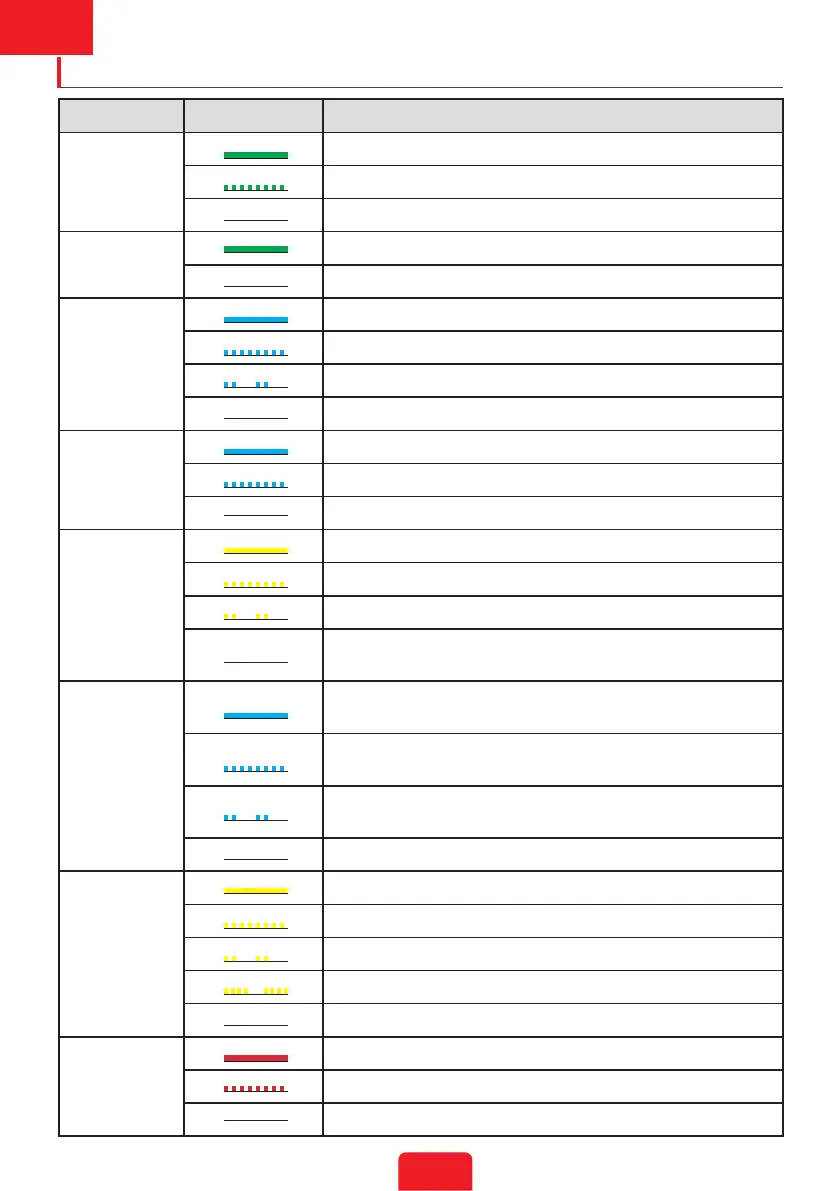
Indicator Status Explanation
SYSTEM
ON = The system is ready.
BLINK = The system is starting.
OFF =The system is not working.
BACK-UP
ON = Back-up is ready / power available.
OFF = Back-up is o / power not available.
BATTERY
ON = The battery is charging.
BLINK 1 = The battery is discharging.
BLINK 2 = The battery is low / soc is low.
OFF = The battery is disconnected / not active.
GRID
ON = The grid is active and connected.
BLINK = The grid is active but not connected.
OFF = The grid is not active.
ENERGY
ON = Consuming energy from grid / buying.
BLINK 1 = Supplying energy to grid / zeroing.
BLINK 2 = Supplying energy to grid / selling.
OFF = The grid is not connected or the system is not
working.
COM
ON = Both BMS communication and meter communication
are ok.
BLINK 1 = BMS communication fails; meter communication
is ok.
BLINK 2 = BMS communication is ok; meter
communication fails.
OFF = BMS communicationand meter communication fail.
WiFi
ON = WiFi connected / active.
BLINK 1 = WiFi is resetting.
BLINK 2 = WiFi is not connected to the router.
BLINK 4 = WiFi server problem.
OFF = WiFi is not active.
FAULT
ON = A fault has occured.
BLINK 1 = Back-up output overload / reduce load.
OFF = No fault.



 To Next Page