Stakeout Menu
R-137
Stake Curve and Offset
6WDNHRXW
&XUYH DQG RIIVHW
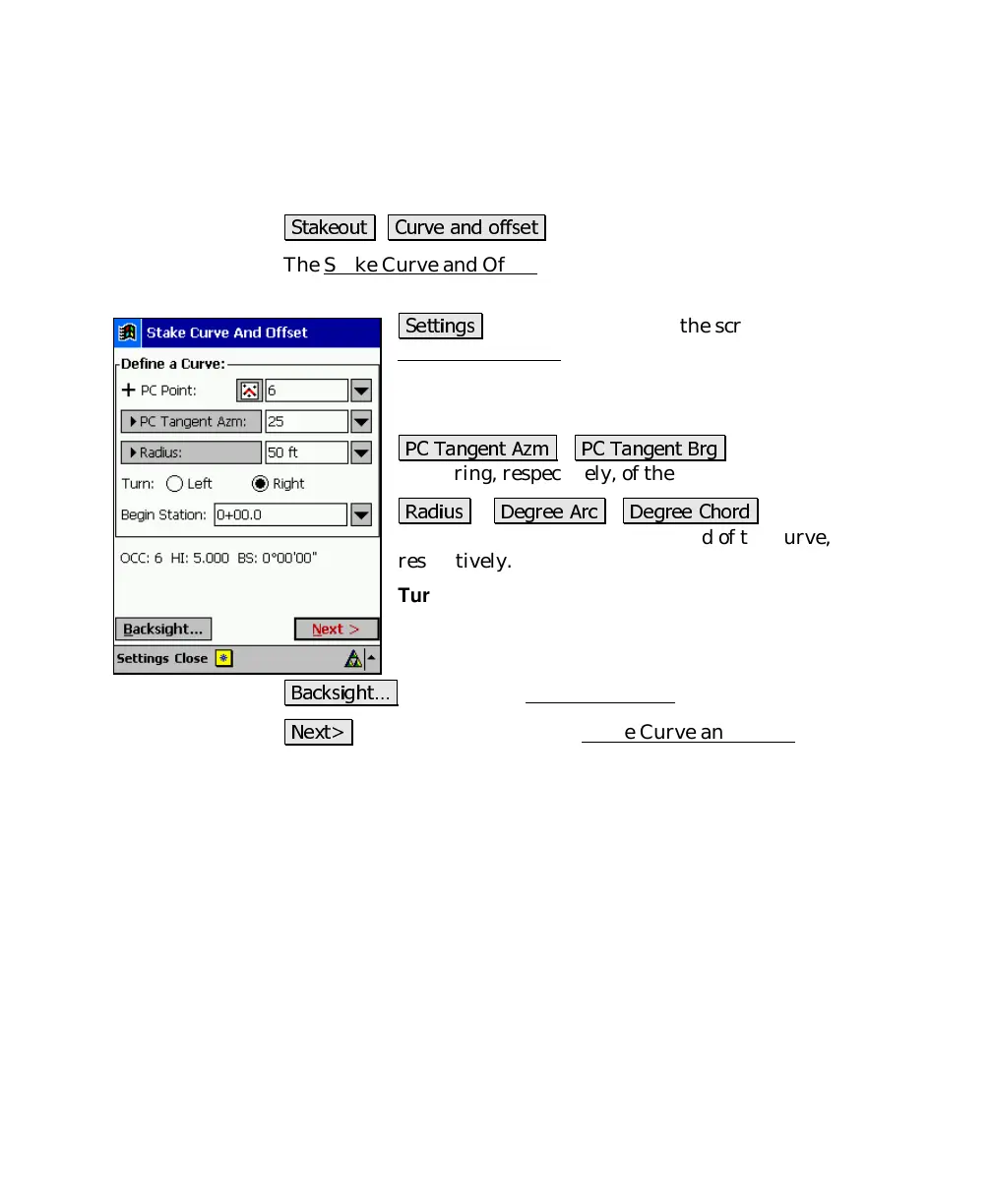
The Stake Curve and Offset screen is used to stake stations on a
curve or at an offset to it at fixed station intervals.
6HWWLQJV
: located at the top of the screen, accesses the
Stakeout Settings screen (Page R-35).
PC Point
: is the starting point of the curve (point of
curvature).
3& 7DQJHQW $]P
/
3& 7DQJHQW %UJ
: defines the azimuth
or bearing, respectively, of the tangent at the
PC Point
.
5DGLXV
/
'HJUHH $UF
/
'HJUHH &KRUG
: defines the
radius, degree arc, or degree chord of the curve,
respectively.
Turn
: defines if the curve turns to the
Left
or
Right
from
the point of view of the PC.
Begin Station
: is the station assigned to the
PC Point
.
%DFNVLJKW«
: accesses the Backsight Setup
screen (Page R-78).
1H[W!
: takes you to the second Stake Curve and Offset
screen,
described below.



 To Next Page