10
ARGO USER MANUAL
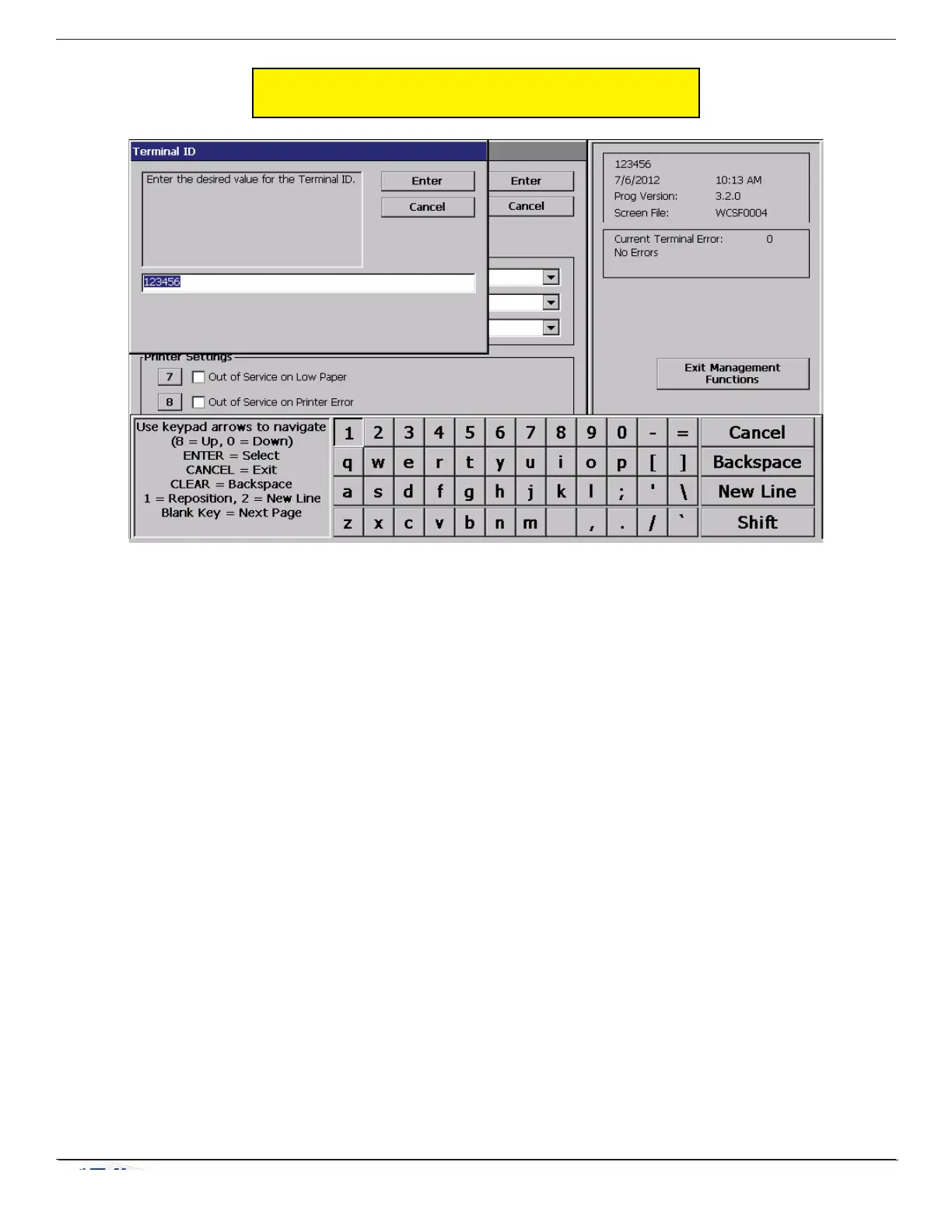
In models that do not have touch screen entry option, use the keys described below to navigate and enter
required data.
• The Arrow keys (< and >), the <8> key - (U
P), and the <0> key - (DOWN) navigate the keyboard.
• Press the <E
NTER> key to select the highlighted key entry.
• Press the <B
LANK> key to switch between upper and lower case characters.
• Press the <C
ANCEL> key to Exit the keyboard.
• Press the <C
LEAR> key for the Backspace operation.
• Press the <1> key to reposition the keyboard to another location on the display.
• Press the <2> key to position the cursor on a new line.
The virtual keypad will be displayed at any time a text entry is required. (Also available by
pressing the F-8 function key.) This is used for certain management functions, as well as entering
e-mail addresses where receipts can be sent paperless. (Some models will be equipped with
paper thermal printers for the option to print receipts.)
ON-SCREEN KEYPAD OPERATION


 To Next Page