39
ARGO USER MANUAL
4. A) MiniMech, SDD, SCDU or HCDU
1) Press 7 (Multiple Amount).
2) At prompt, remove selected cassette from
the dispenser, then press Enter.
3) Follow replenishing cash steps (see
Section 3), then replace cassette and press
Enter.
SET DENOMINATION
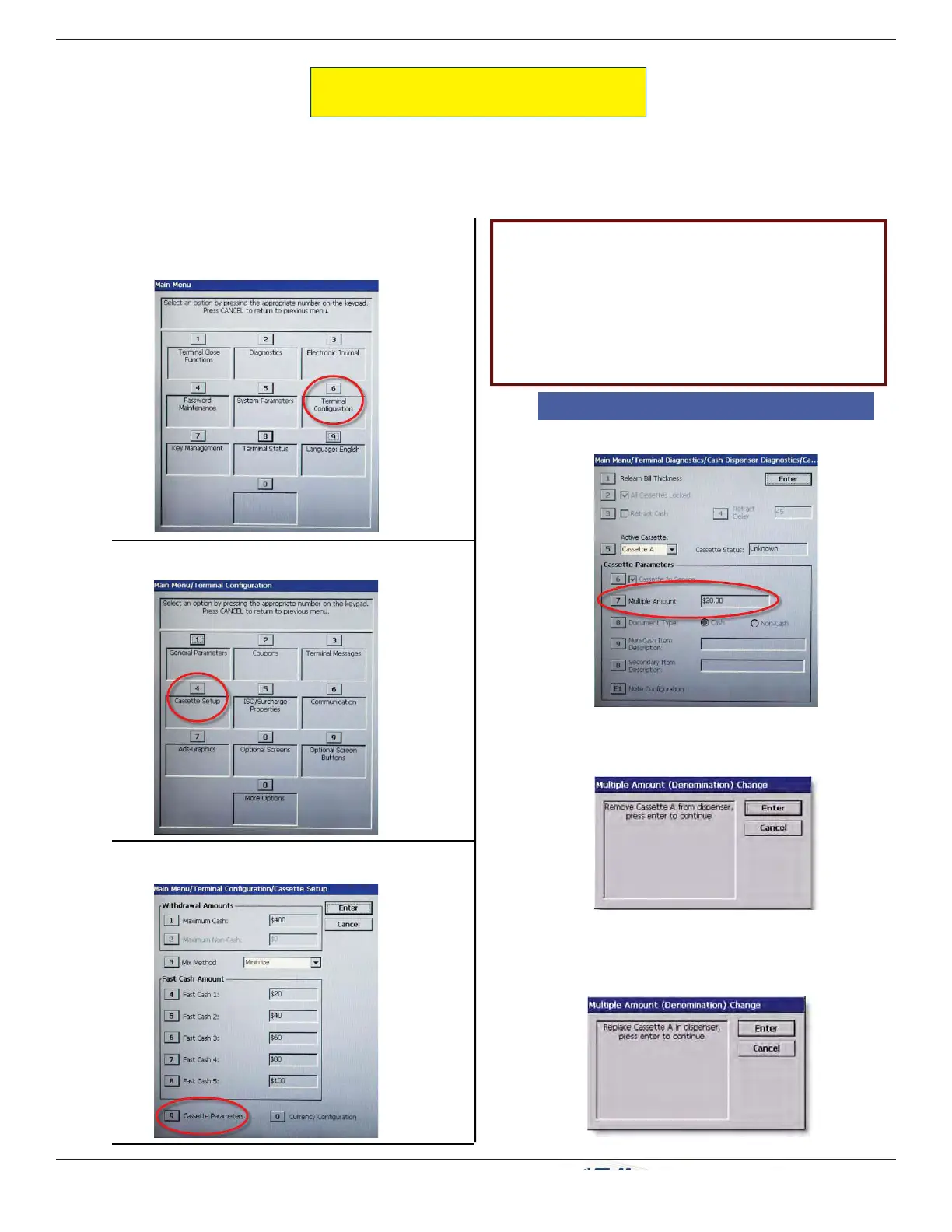
1. From the Main Menu, press 6 (Terminal
Confi guration).
2. Press 4 (Cassette Setup).
3. Press 9 (Cassette Parameters).
(Resolves error code 186.)
Denomination for each cassette must be set up. The process depends on what type dispenser is in the ATM.
Denomination setup steps from this point are
determined by dispenser:
4. A) MiniMech, SDD, SCDU, or HCDU
B) NMD50


 To Next Page