20
ARGO USER MANUAL
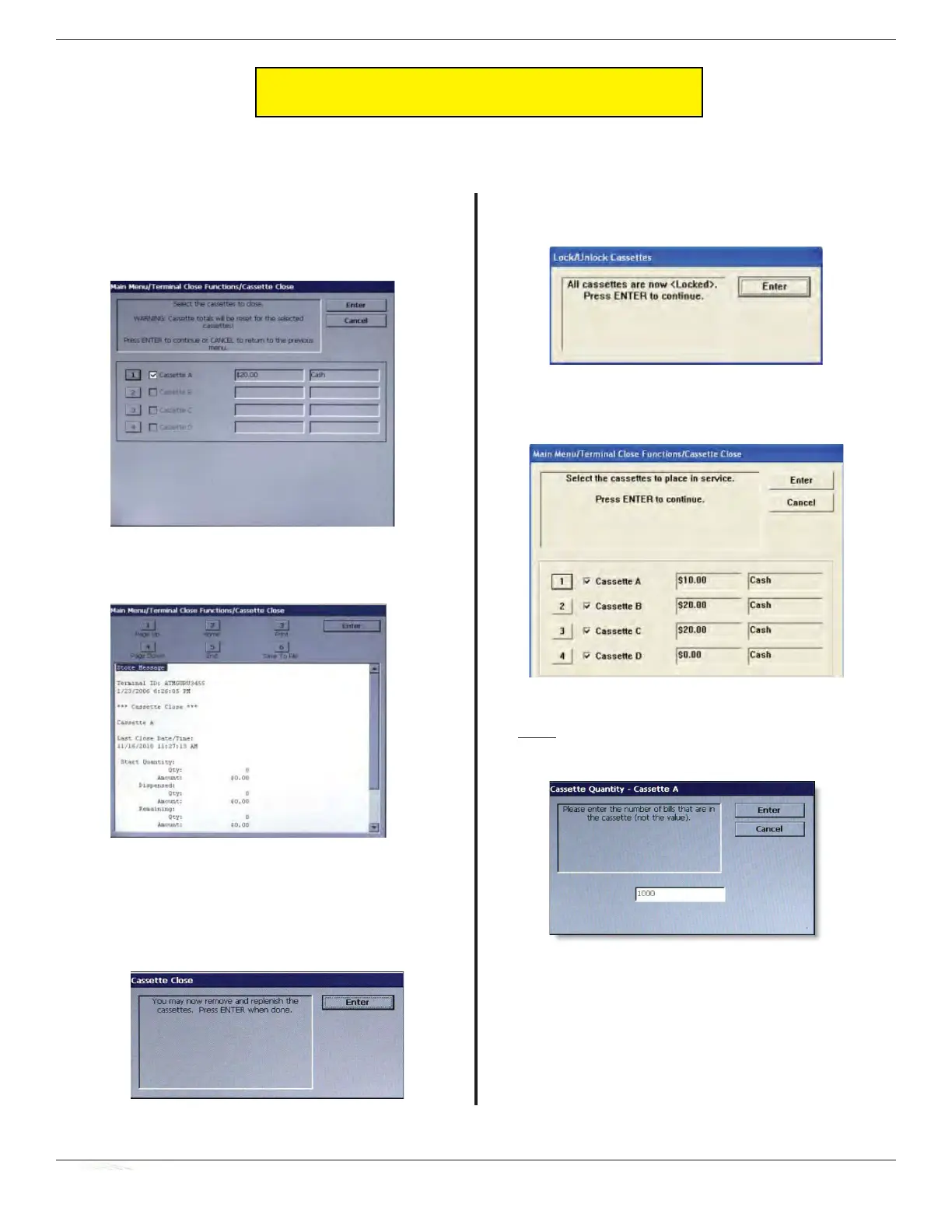
Follow access instructions to enter MANAGEMENT FUNCTIONS. Select TERMINAL CLOSE FUNCTIONS. Select
C
ASSETTE CLOSE.
n Select cassette to close. A check mark () identifi es
which cassette is selected. “A” is selected by
default. Press Enter. (Example shows only one
cassette available.)
o A Close report is displayed to be printed or saved.
This operation will reset the number of bills in the
cassette to ZERO (0). Press Enter.
p Remove and replenish the selected cassette.
q After cassette has been reinserted in the dispenser,
press Enter.
r Place selected cassette IN SERVICE. “A” will
be in service. Press Enter.
s Enter Cassette Quantity (total number of notes,
NOT value) for the selected cassette. Press Enter
to accept entry.
t A Trial Cassette Close report automatically is
displayed to be printed or saved. Print and retain
a copy for starting point reference. Press <Enter>
to return to Close functions.
Procedures for cassette replenishment are
on the following pages.
CASSETTE CLOSE PROCEDURES



 To Next Page