42
ARGO USER MANUAL
Enter Host Phone Number (continued)
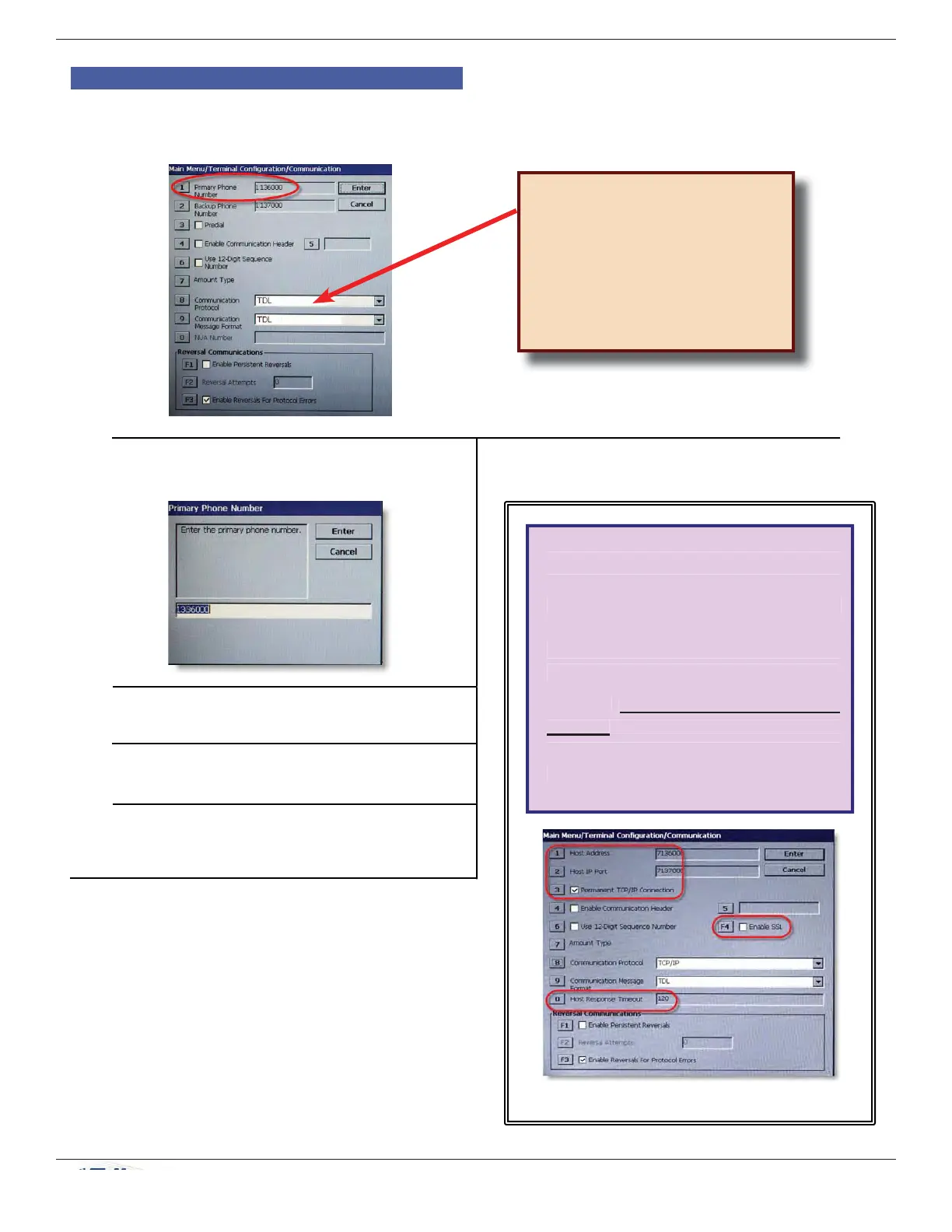
3. On the Communications menu, press 1
(Primary Phone Number).
4. Enter the host phone number to dial for
transactions.
5. Press ENTER.
6. Press ENTER again to set changes.
For a secondary, backup phone number, press 2
at step 3 and proceed.
TDL (Triton Dynamic Language)
is the default setting for
Communications Protocol and is
the dialup protocol.
Changing this setting may change
the options available on this screen.
If setting the Communication Protocol
to TCP/IP, the options on the menu
change. The differences are circled
below. Contact your Host to obtain
correct setup specifi cations to assure
effective communication with the Host.
See the XScale/X2 Configuration
Manual or contact Triton Technical
Support for more help in setting up
communication on your ARGO ATM.
TCP/IP Communication Protocol



 To Next Page