24
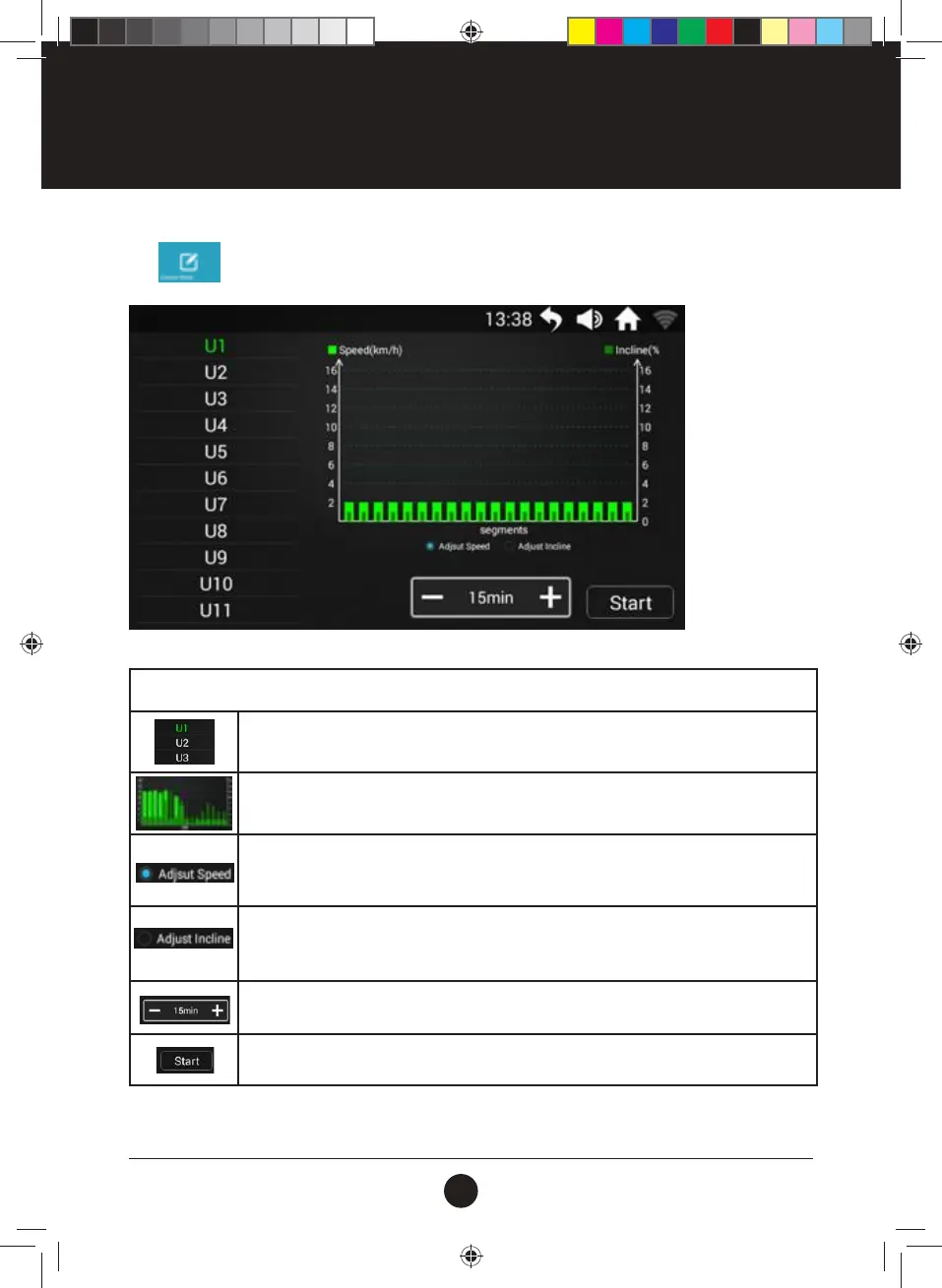
Tap to enter Custom Mode Interface:
SPECIFICATIONS
User List: U1 - U16, offered 16 User Dened options;
Program Histogram:
■ Indicates current speed value; ■ Indicates current incline value;
Set Speed: Tap to Select, slide up and down each Segment Histogram to set the Speed;
Once the User settings are successfully run, the Settings will be automatically saved into
the Program.
Set Incline: Tap to Select, slide up and down each Segment Histogram to set the Incline;
Once the User settings are successfully run, the Settings will be automatically saved into
the Program.
Set Time: Tap +/- to set the Running Time;
Start: Tap to Start the Treadmill after nishing the Setting;
OPERATION INSTRUCTIONS
#20M03T020 ELITE 2000 Treadmill UM.indd 24 2020/04/07 10:05 AM










 To Next Page