EN 8
Operating manual – local air conditioner PAC 3500 E
Operation
• Avoid open doors and windows.
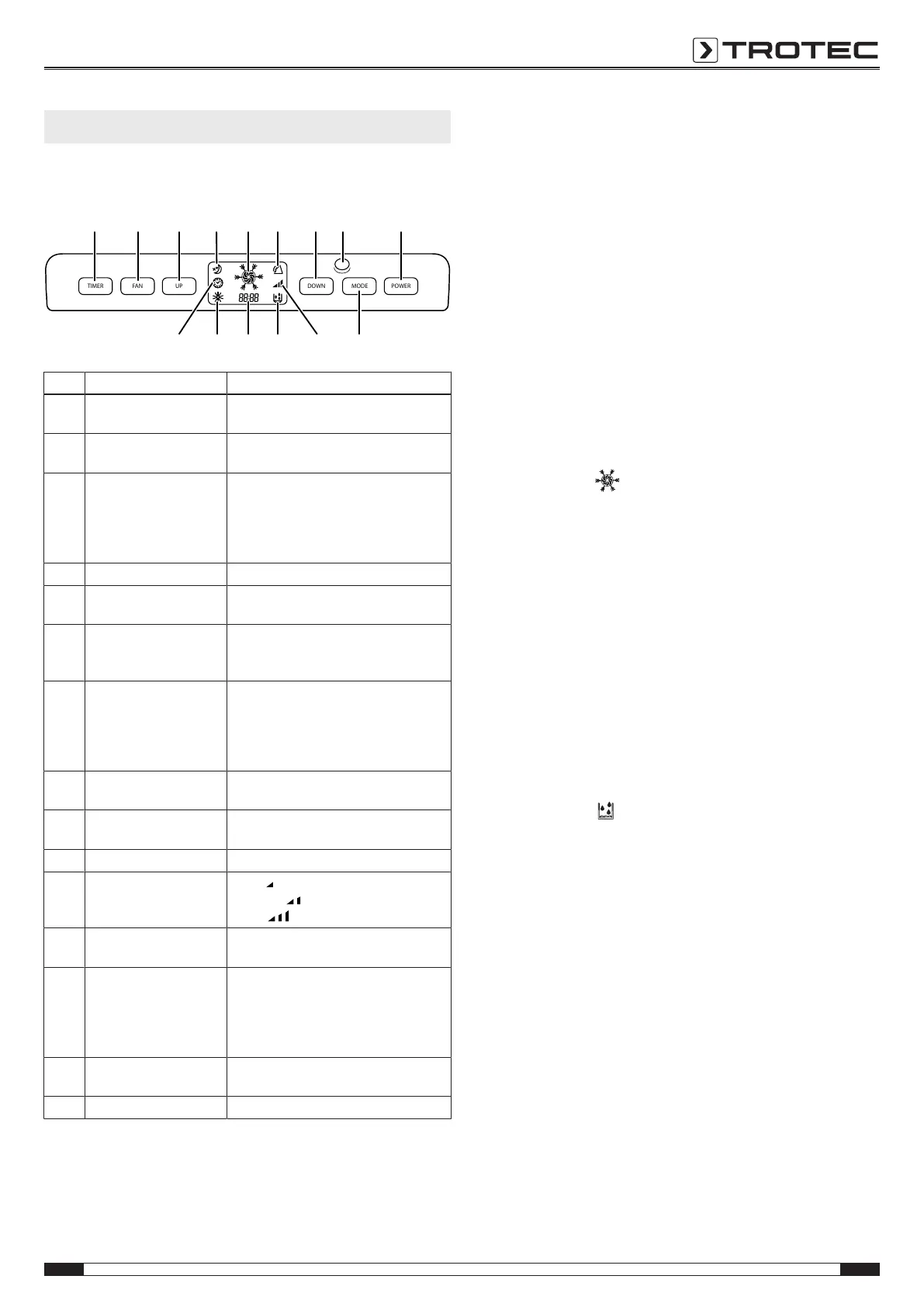
Operating elements
TIMER FAN UP DOWN MODE POWER
17 18 19 20 21 22 23
29 28 27 26
2524
3031
No. Designation Meaning
17 TIMER button Switching the timer function on or off:
1 to 24hours in increments of 1h
18 FAN button Setting the fan speed in
3 levels: high, medium and low
19 Increase value button (UP) Increasing the target temperature for
cooling: value range from 16 to 30°C
Increasing the number of hours for the
timer:
1 to 24hours in increments of 1h
20 Night mode indication Night mode active
21 Cooling and ventilation
mode indication
Operating mode cooling or ventilation
active
22 Swing function indication Swing function active
Control via remote control, SWING
button(34)
23 Reduce value button
(DOWN)
Reducing the target temperature for
cooling: value range from 16 to 30°C
Reducing the number of hours for the
timer:
1 to 24hours in increments of 1h
24 Remote control
transmitter/ receiver
Communication between device and
remote control
25 POWER button On/Off button:
to switch the device on or off
26 MODE button selection button for the mode of operation
27 Fan speed indication Low =
Medium =
High =
28 Dehumidification mode
indication
Operating mode dehumidification active
29 Segment display Display of current room temperature
Display of target temperature while
setting it
Display of timer
Display of error codes
30 Automatic defrost
indication
Automatic defrost active
31 TIMER indication Timer function active
Switching the device on
1. Allow the device to rest for a time.
2. Once you have completely installed the device as described
in the Start-up chapter, you can switch it on.
3. Press the POWER button(25).
ð The device switches on.
4. Select the desired operating mode.
The device switches off automatically when the condensation
tank is full. FL appears in the segment display(29) and an
acoustic signal is emitted.
Cooling
In cooling mode the room will be cooled down to a certain
preselected temperature.
The fan speed can be set as required, see Ventilation chapter.
1. Press the MODE button(26) until the cooling mode
indication(21,
) appears on the display.
2. Press the UP button(19) for increasing or the DOWN
button(23) for reducing the temperature to set the desired
target temperature.
ð The target temperature is indicated on the segment
display(29).
Dehumidification
In dehumidification mode the humidity level in the room is
reduced.
The temperature cannot be adjusted and the fan runs at the
lowest speed level.
Note:
The compressor only starts at a room temperature of ≥15°C.
1. Press the MODE button(26) until the dehumidification mode
indication(28,
) appears on the display.
ð The current room temperature is indicated on the
segment display(29).
Note on cooling and dehumidification
If the device is operated in a very humid environment, the
condensation tank must be emptied at regular intervals (see
Emptying the condensation tank in the Maintenance chapter).
If you use the device for an extended period of time or you do
not want to empty the tank all the time, you can connect a
condensation drain hose to the hose connector for continuous
condensate discharge.



 To Next Page