True Value Company BACK OFFICE WORKSTATION
BACK OFFICE WORKSTATION INSTALLATION
A Back-UPS is not required for the Back Office Workstation. At the very least, you should use a
surge protected multiple outlet power strip. However, for Best Practices, you should always use a
Back-UPS on any PC.
Back Office Workstation
1. Unpack the computer, keyboard, mouse, and power cable.
2. Set the Back Office Workstation PC in place.
3. Plug the Power cable from the back of the Back Office
Workstation PC to the surge protected multiple outlet
power strip or into the battery backup side of the Back-
UPS.
4. Do not turn on the Back Office Workstation PC at this
point.
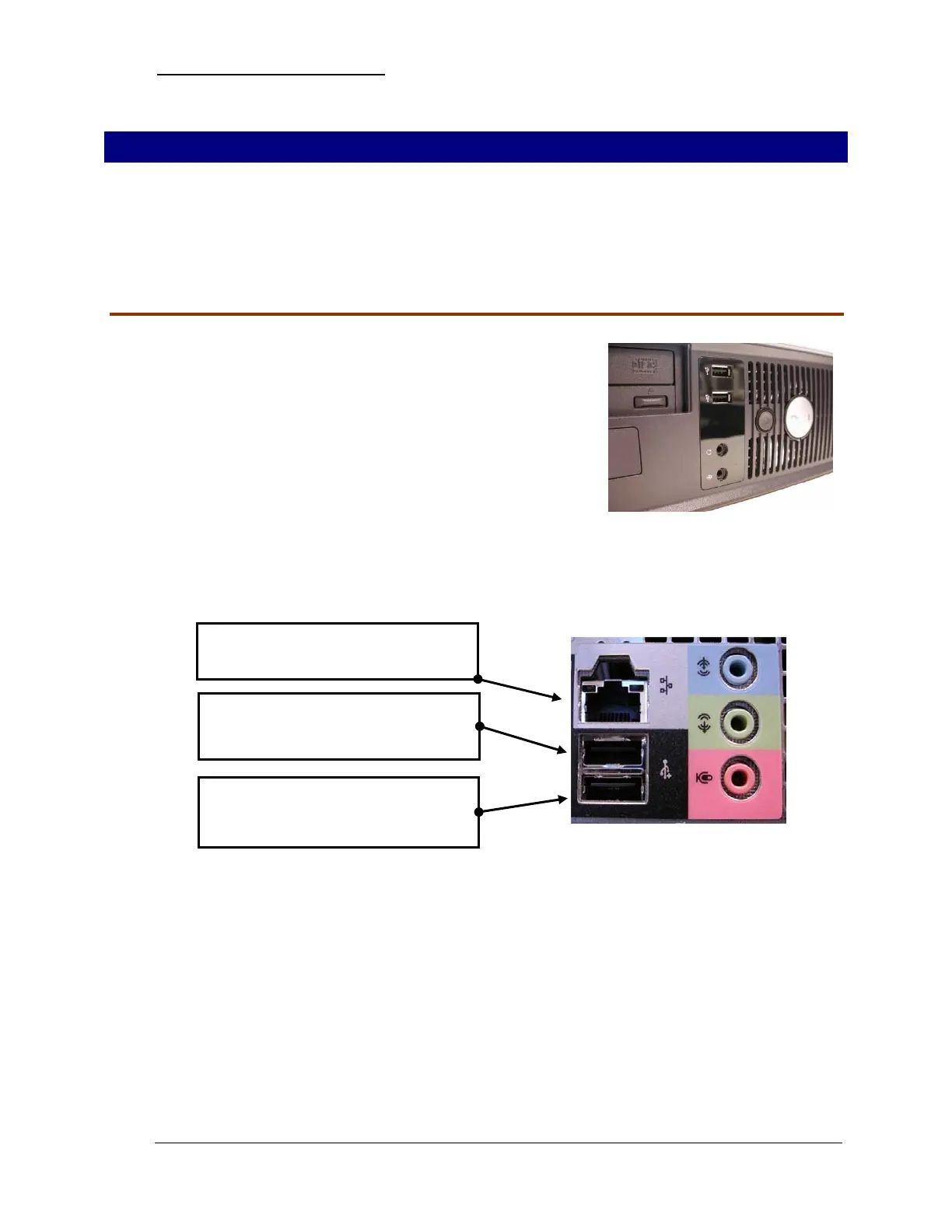
5. On the rear of the Back Office Workstation PC, connect the Network, Mouse, and Keyboard
cables:
Plug in the Network Cable to network
connection port.
Plug in the Mouse to the USB port on
the back of the PC below the network
connection port.
Plug in the Keyboard to the USB port
on the back of the PC below the
Mouse USB port.
- 16 - RockSolid Equipment Installation Instructions_beta


 To Next Page