CHAPTER 4: PROGRAMMING & OPERATION
Truefitness.com / 800.426.6570 / 636.272.7100 31
ADVANCED CONSOLE FUNCTIONS (continued):
Utilities Menu -Software Update:
TRUE may periodically release software updates to ensure users enjoy the best workout experience available. To update
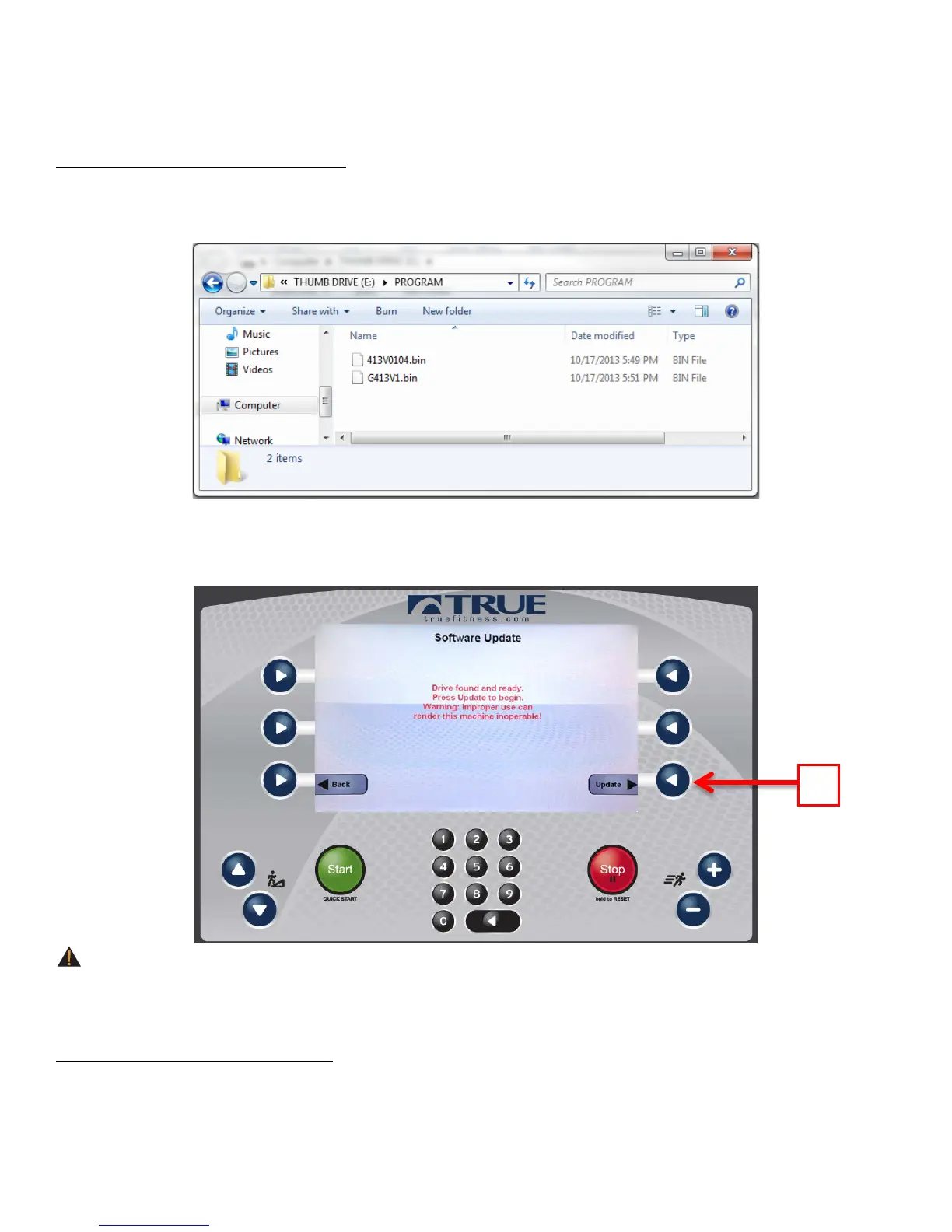
the console software , create a folder called PROGRAMS (in all caps) on a blank USB drive and copy the two update .bin
files in to the PROGRAMS folder, as shown below.
Navigate to the software update screen and insert the USB drive into the console’s USB port. When the console recognizes
the software it will show a message that reads “Drive found and ready. Press Update to begin. Warning: Improper use can
render this machine inoperable”. To complete the update, press the update selection button (A).
WARNING:
Disconnecting the power source, switching the unit off or pressing buttons on the console will disrupt the information
flow and potentially cause fatal errors.
Utilities Menu -B-Vision Setup:
This utility is not used with the PS800 Treadmill.



 To Next Page