............ www.truemfg.com ............
True Food Service Equipment, Inc.
13
13
TAC DIGITAL TEMPERATURE CONTROL
OPERATION
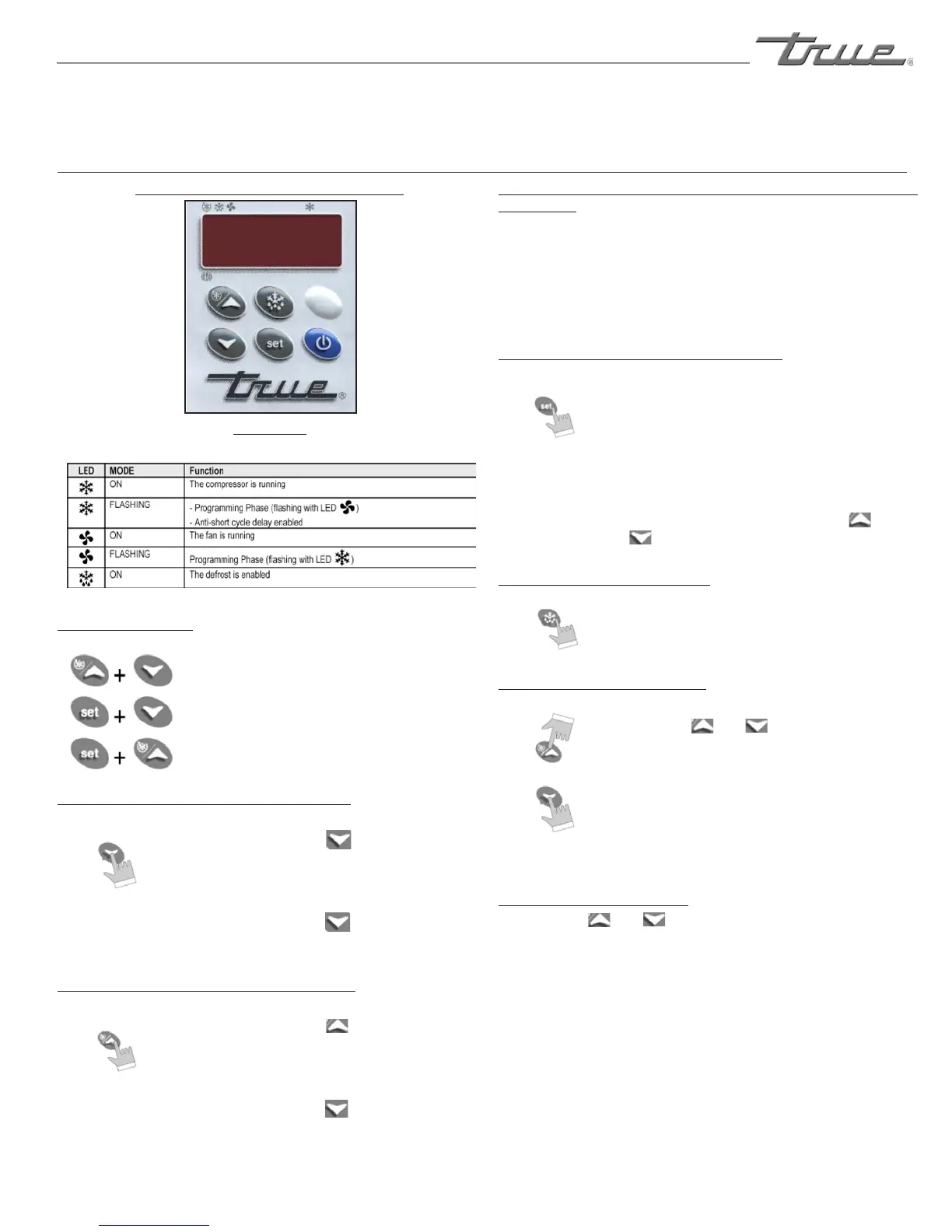
Digital Temperature Control Commands
Use of LED
Each LED function is described in the following table.
KEY COMBINATIONS
Tolock&unlockthekeyboard.
Tolock&unlockthekeyboard.
Tolock&unlockthekeyboard.
HOW TO SEE THE MINIMUM TEMPERATURE:
1.Pressandreleasethekey.
2.The"Lo"messagewillbedisplayed
followedbytheminimumtemperature
recorded.
3.Bypressingthekeyorwaitingfor5
secondsthenormaldisplaywillberestored.
HOW TO SEE THE MAXIMUM TEMPERATURE:
1.Pressandreleasethekey.
2.The"Hi"messagewillbedisplayed
followedbythemaximumtemperature
recorded.
3.Bypressingthekeyorwaitingfor
5sthenormaldisplaywillberestored.
HOW TO RESET THE MAXIMUM AND MINIMUM TEMPERATURE
RECORDED:
Toresetthestoredtemperature,whenmaximumorminimum
temperatureisdisplayed:
1.PressSETkeyuntil"rST"labelstartsblinking.
HOW TO SEE AND MODIFY THE SET POINT:
1.PushandimmediatelyreleasetheSET
key:thedisplaywillshowtheSetpoint
value;
2.TheSETLEDstartblinking;
3.TochangetheSetvaluepushtheor
arrowswithin10seconds.
TO START A MANUAL DEFROST:
1.PushtheDefrostkeyformorethan2
secondsandamanualdefrostwillstart.
HOW TO LOCK THE KEYBOARD:
1.Keeptheandkeyspressed
togetherformorethan3seconds.
2.The"POF"messagewillbedisplayed
andthekeyboardislocked.Atthis
pointitisonlypossibletoviewtheset
pointandtheMAXIMUMORMINIMUM
temperaturesstored.
TO UNLOCK THE KEYBOARD:
1. Keeptheandkeyspressedtogetherfor
morethan3seconds.
2. The"PON"messagewillbedisplayedandthe
keyboardisunlocked.
INSTALLATION / OPERATION INSTRUCTIONS


 To Next Page