19
Internet Control Panel & Weblink
If you have access to the Internet you may find your
personal Internet Control Panel very useful
(www.trueCallControl.co.uk). This is a secure web page
where you can review details of the calls that have been
made and received, change trueCall’s settings, and add and
delete items from the Trusted number and Zap lists. Access
to the control panel is free for the first year after which there
is a small annual charge.
Before you use your Internet Control Panel for the first time
you need to register your trueCall unit at
www.trueCallControl.co.uk. Click on ‘Register’ - you are
asked for your name, email address and your unit’s serial
number (printed on the bottom of your unit).
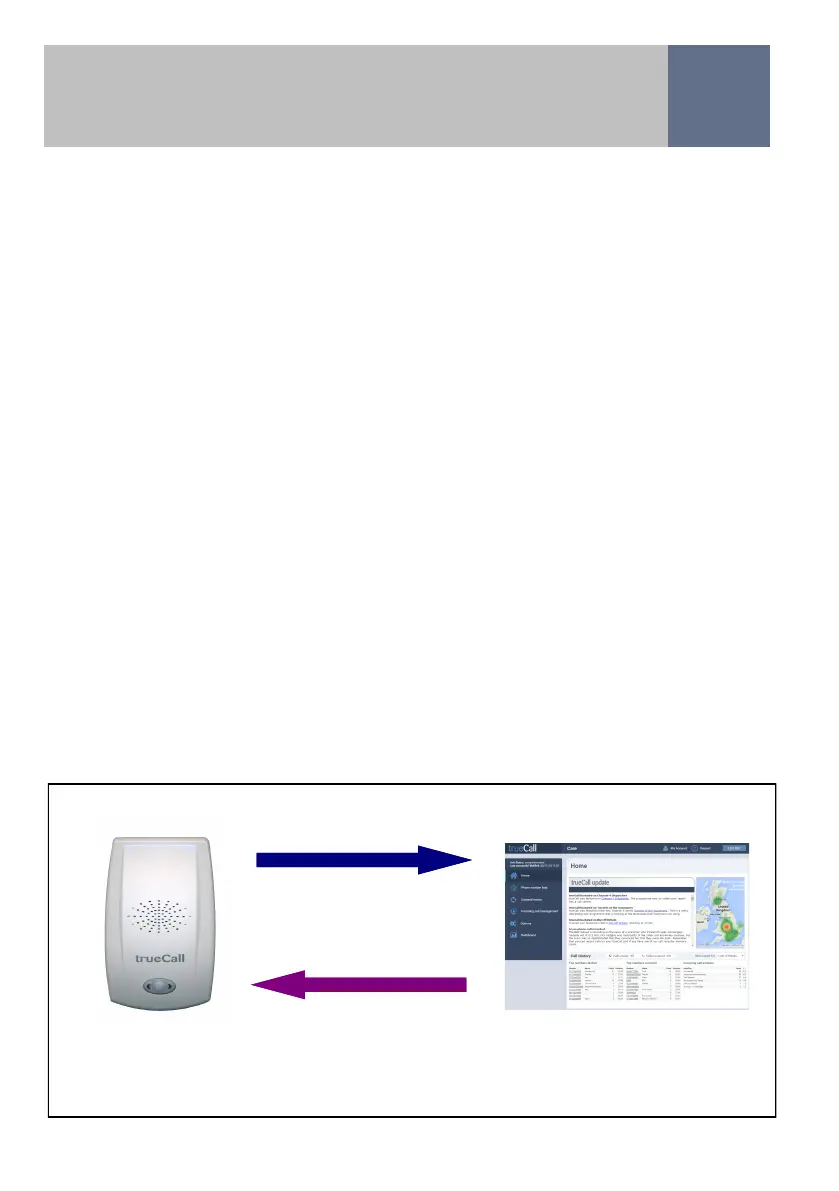
Weblink - Weblink is the process by which the trueCall
Secure unit synchronises with the Internet Control Panel by
dialling up our server in London (a standard 0208 number).
Weblink calls generally last less than a minute (though the
first Weblink after installation may take a few minutes).
You can perform a manual Weblink at any time by pressing
down trueCall’s button and holding it down for two seconds.
Wait for it to ’beep’ then release the button.
Weblink
Weblink makes sure that the trueCall Care unit and the Internet
Control Panel are up to date with each other
Call history, settings, trusted caller list
Settings, Trusted Caller, Zap, and Outgoing Call Barring lists, software updates


 To Next Page