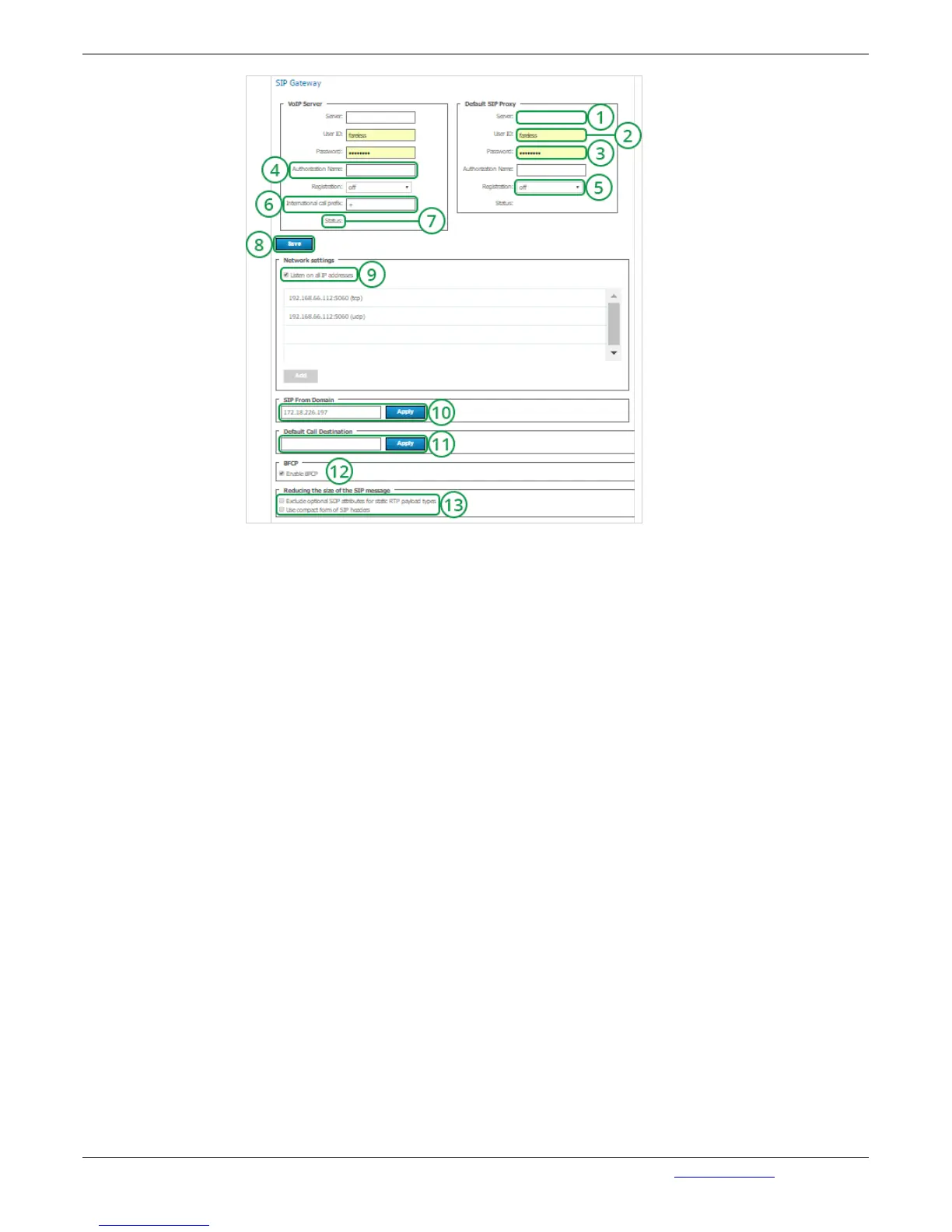
1. IP-address or host name of the server, which is used for calls in the PSTN.
2. Account of the VoIP Server/SIP Proxy for the gateway.
3. Password to the account of the VoIP server/SIP Proxy, which is used for the gateway in the
system.
4. The name used to authorize at SIP server. Enter the name if it is different from user ID.
5. Registration mode on a third-party SIP server using REGISTER request.
6. Instead of plus "+" symbol enter in the field the international prefix (e.g. prefix for calls from
Russia: 8-10). Thus, when dialing +7(926)123-45-67, it will be automatically substituted with 8-10-
7(926)123-45-67. If you place the mouse cursor over the field, a popup tip will appear.
7. Display of the status of the connection to the SIP server. Possible values: connected -
connection with the SIP/VoIP server has been established; wrong authorization - authrization error
(wrong login or password); invalid server - incorrectly specified SIP/VoiP server.
8. Save changes.
9. By default, all IP addresses are used. You can un-check the field and add the addresses
manually. To do this, fill the Host and Port fields. Then click on "Add". The table on the left will
display the submitted information. They can also be deleted. To do this, select the one you want to
delete by checking the tick on the left and click on "Remove Selected".
10. Domain name or IP address of the server. Click on "Apply" so that the incoming calls are
displayed as user@domain, where domain is the Outgoing SIP domain. This allows SIP users to
call back the users of the server.
11. Input field for TrueConf recipient ID. CID of the conference can be used as a call addressee.
Press "Apply" to enable SIP subscriber to define the recipient of the call.
12. Check this box to enable the support for BFCP protocol. This protocol is used in sending and
rexeiving additional content (additional video stream). E.g. to show slides or share desktop of a
computer connected to SIP endpoint.
13. Advanced feature. Use these options to reduce SIP protocol messages size to avoid MTU
related errors.


 To Next Page