Federation feature for all servers that participate in Federation, possibility for all servers and
subscribers to connect to your server during Federation.
The server should be available to other servers by its name, indicated at registration. The server can be
registered on the existing DNS name, as well as be specified by the actual server address with the help
of the SRV records DNS. To read more please see section "Connection using auto discovering".
Note: In case your server does not support Federation, following the Federation tab notification will be
displayed: Federation mode is not available for yourserver license. To Activate this feature, contact
our managers.
How TrueConf Server Users Can Make Calls to TrueConf Online Users ->
3.3. "Web" Group of Settings
This tab contains settings of external web pages that are available to unregistered users.
3.3.1. "Settings" Section
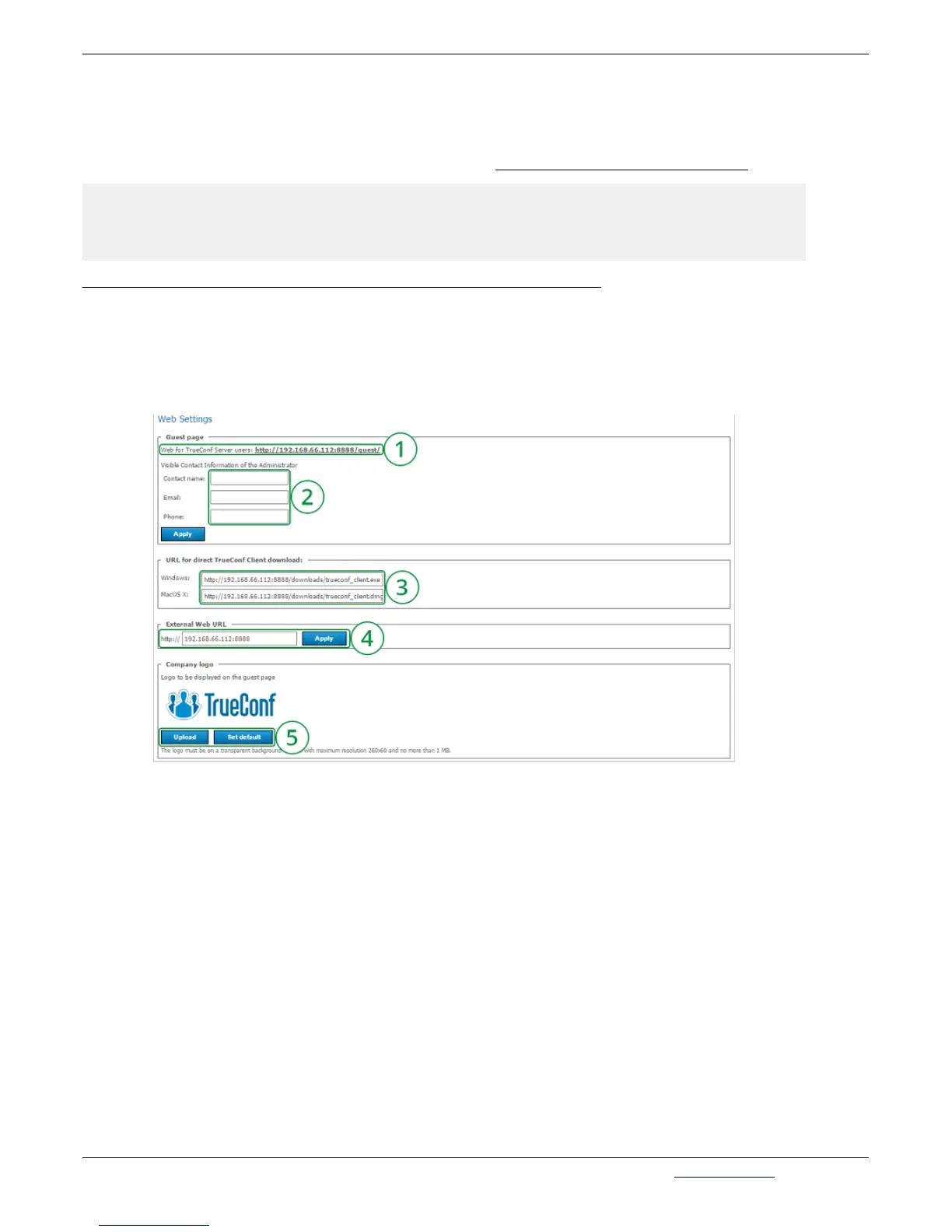
1. Contains the URL of the page with the download links and configuration information for the
client applications for various operating systems. TrueConf Server administrator can distribute the
URL among the users of the server.
2. Information about the server administrator for easy contacting with the server users. The
entered data will be displayed in the guest page. After making necessary changes, click on
"Apply".
3. URL for direct TrueConf Client for Windowsm and macOS download.
4. This section allows the administrator to configure the URL of the TrueConf Server external
page. The option can be used to correct the URL formation for all external pages of TrueConf
Server.
5. Uploading your company logo to display on the guest. By default, TrueConf Server Logo is
shown.
3.3.2. "Web Security" Section


 To Next Page