Streaming through CDNvideo cloud service
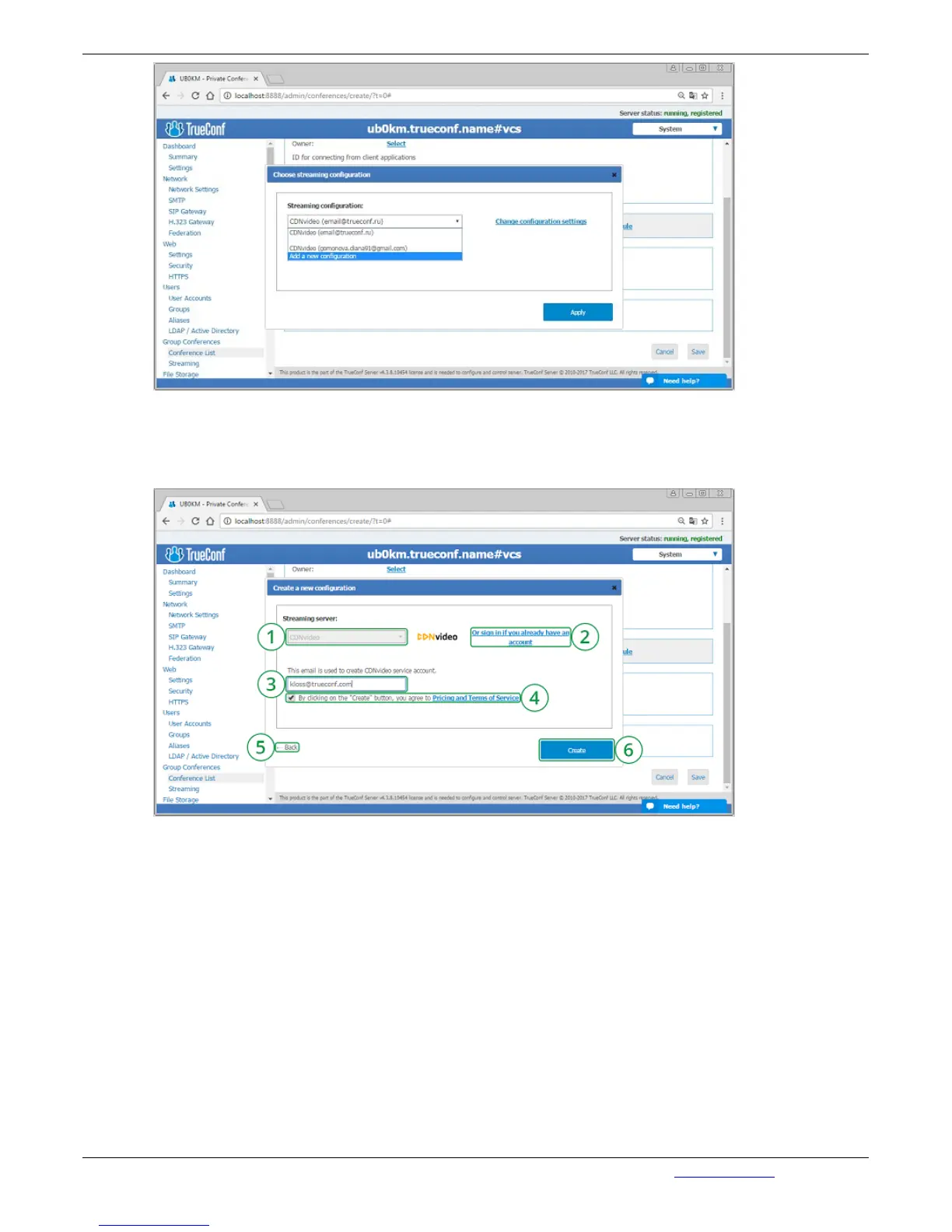
Click on "Аutomatic Setup" to create a new account at CDN video service. To continue please make
sure that a PC with installed TrueConf Server on it is connected to the Internet:
1. Selected template for current streaming configuration.
2. If you already have a CDNvideo account, click on this link to enter your username and
password.
3. Email address that will be used to create a new CDNvideo account. TrueConf Server
administrator email is used by default.
4. By creating a CDNvideo account you agree with CDNvideo terms of use.
5. Return to streaming configurations list.
6. Save current streaming configuration.
How to connect to CDNvideo streaming
Conference streaming is available on any Intranet or Internet HTML page with CDNvideo video player
widget embedded on it. The streaming will start automatically when participants join the conference or,
in case it is a role-based conference, when the first participant takes the podium. Widget code is unique
and is setup to stream only current conference.


 To Next Page