EasyManua.ls Logo

TSI Instruments dusttrak II 8532 - User Manual

TSI Instruments dusttrak II 8532
79 pages
Print Icon
To Next Page IconTo Next Page
Loading...
DUSTTRAK
II
AEROSOL MONITOR
MODEL 8530/8530EP/8532
OPERATION AND SERVICE MANUAL
P/N 6001893, REVISION S
JANUARY 2019
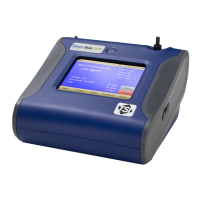
DustTrak II 8530 Desktop and 8532 Handheld
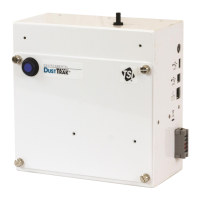
DustTrak II 8530EP Monitor

Table of Contents

Questions and Answers

  • S
    shane37Aug 18, 2025
    Why TSI Instruments dusttrak II 8532 Measuring Instruments shows no display?
    • A
      Adam ScottAug 18, 2025
      If your TSI Instruments Measuring Instruments shows no display, the unit may not be switched on, or the batteries may be low or dead. Try switching the unit on, recharging the batteries, or plugging in the AC adapter.
  • R
    Richard GonzalezAug 20, 2025
    What to do if TSI Instruments dusttrak II 8532 Measuring Instruments analog output is not in proportion to display?
    • A
      Ashley HughesAug 20, 2025
      If the analog output of your TSI Instruments Measuring Instruments is not in proportion to the display, the analog output range in the DUSTTRAK™ monitor may be set incorrectly, or the data logger scaling factor may be set incorrectly. Check the analog output setting in the Setup->Analog screen, ensuring the channel of interest is selected and the correct output (0 to 5V, 4 to 20 mA) is selected. Review the scaling factor set in the Setup-Analog screen.
  • W
    wileycynthiaAug 23, 2025
    What to do if TSI Instruments dusttrak II 8532 Measuring Instruments instrument does not store new data?
    • M
      Michelle DavisAug 23, 2025
      If your TSI Instruments Measuring Instruments does not store new data, it may be because the memory is full or the instrument is in Survey mode. Try deleting or transferring historic data. Note that the instrument does not store data in survey mode, so switch to manual or program log mode.
  • C
    Christine DonovanAug 25, 2025
    How to fix TSI Instruments dusttrak II 8532 Measuring Instruments flow error?
    • J
      Jesus JonesAug 26, 2025
      A 'Flow Error' on the front screen of your TSI Instruments Measuring Instruments indicates there may be pressure differences if sampling from a duct, a flow obstruction, a failing internal pump, or a clogged filter cassette. Attach both the input and the exhaust port into the duct. Remove any obstruction. Press any key to bypass the error. Replace the filter cassette. Factory service may be required.
  • M
    Meagan BrownAug 28, 2025
    Why TSI Instruments dusttrak II 8532 alarm output does not work?
    • E
      evan86Aug 28, 2025
      If the alarm output on your TSI Instruments Measuring Instruments does not work, it could be due to several reasons: the alarm function might not be turned on, the alarm settings might be incorrect, or the alarm output might be wired with reverse polarity. Turn the alarm function on in the Settings->Alarm screen and check the alarm settings. Also, ensure the alarm wires are correctly polarized, with the voltage input wired to the alarm input (+).
  • M
    Mason PerezAug 30, 2025
    What to do if TSI Instruments dusttrak II 8532 laser error is indicated on front screen?
    • B
      Bridget DavisAug 30, 2025
      If a 'Laser Error' is indicated on the front screen of your TSI Instruments Measuring Instruments, it suggests that the laser background is too high or the laser is failing. Remove and clean the inlet nozzle, paying close attention to the tip inserted into the instrument to ensure it's clear of contamination. Factory service may be required.
  • L
    Lisa WernerSep 1, 2025
    How to resolve TSI Instruments Measuring Instruments erratic zero reading?
    • R
      Raymond CharlesSep 2, 2025
      An erratic zero reading on your TSI Instruments Measuring Instruments can be caused by a leak, a dirty inlet port or sample tube, or internal filters not installed properly. Check connections for leaks. Replace the zero filter. Clean the inlet port and tubing. Inspect internal filter wells to ensure filters and o-rings are seated correctly. Replace internal filters if necessary.
  • J
    jackhernandezSep 4, 2025
    What to do if TSI Instruments dusttrak II 8532 Measuring Instruments no touch - screen response?
    • A
      arthurkaufmanSep 4, 2025
      If your TSI Instruments Measuring Instruments touch screen is not responding, it may be because the instrument is currently busy or the touchscreen is locked. The instrument requires time to open large data files and save configuration information. During this time, it will not respond to additional touches. If the lock in the title bar is red, unlock the instrument following the instructions in the Chapter 3, Operation: Title Bar section of this manual.
  • T
    Tina RothSep 6, 2025
    How to fix TSI Instruments dusttrak II 8532 Measuring Instruments analog output that does not work?
    • B
      Brian WilliamsSep 6, 2025
      If the analog output of your TSI Instruments Measuring Instruments is not working, the cable or connector may not be correctly installed, or the output may be wired with reverse polarity. Ensure the cable connector is fully seated and that the analog out (+) and analog ground (-) are wired correctly to the data-logger.
  • A
    Alan GilmoreSep 9, 2025
    How to resolve TSI Instruments dusttrak II 8532 run mode error 'The start time has passed'?
    • B
      Brenda JohnsonSep 9, 2025
      The 'Run Mode Error: The start time has passed' message on your TSI Instruments Measuring Instruments indicates that the selected Run Mode program has “Use Start Date” selected, but the start date is prior to the current date. Correct or change the run mode program.

Summary

SAFETY INFORMATION

Laser Safety

Precautions for safe operation of the Class I laser instrument.

CHAPTER 2 SETTING UP

Supplying Power to the DustTrak II Aerosol Monitor

Instructions on powering the instrument using batteries or AC adapter.

CHAPTER 3 OPERATION

Zero Cal

Procedure for performing a zero calibration.

Flow Cal

Procedure for calibrating the flow rate.

Taking Mass Concentration Measurements

Steps to start and control measurements.

CHAPTER 4 MAINTENANCE

CHAPTER 5 TROUBLESHOOTING

Erratic zero reading

Symptoms, causes, and corrective actions for zero reading issues.

Flow Error is indicated on front screen

Troubleshooting flow error messages.

System Error has Occurred!

Steps to resolve system errors.

TSI Instruments dusttrak II 8532 Specifications

General IconGeneral
BrandTSI Instruments
Modeldusttrak II 8532
CategoryMeasuring Instruments
LanguageEnglish

Related product manuals