EasyManua.ls Logo

TSI Instruments dusttrak II 8530 - User Manual

TSI Instruments dusttrak II 8530
79 pages
Print Icon
To Next Page IconTo Next Page
Loading...
DUSTTRAK
II
AEROSOL MONITOR
MODEL 8530/8530EP/8532
OPERATION AND SERVICE MANUAL
P/N 6001893, REVISION S
JANUARY 2019
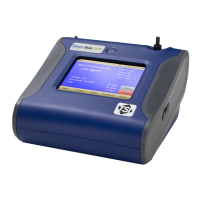
DustTrak II 8530 Desktop and 8532 Handheld
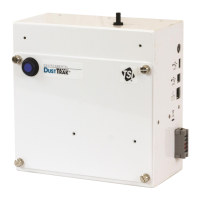
DustTrak II 8530EP Monitor

Table of Contents

Questions and Answers

  • D
    David HayesAug 18, 2025
    Why TSI Instruments dusttrak II 8530 Measuring Instruments shows no display?
    • B
      Brent SanchezAug 18, 2025
      If your TSI Instruments Measuring Instruments shows no display, the unit may not be switched on, or the batteries may be low or dead. Try switching the unit on, recharging the batteries, or plugging in the AC adapter.
  • A
    Arthur HenryAug 20, 2025
    What to do if TSI Instruments Measuring Instruments analog output is not in proportion to display?
    • J
      Joseph HardyAug 20, 2025
      If the analog output of your TSI Instruments Measuring Instruments is not in proportion to the display, the analog output range in the DUSTTRAK™ monitor may be set incorrectly, or the data logger scaling factor may be set incorrectly. Check the analog output setting in the Setup->Analog screen, ensuring the channel of interest is selected and the correct output (0 to 5V, 4 to 20 mA) is selected. Review the scaling factor set in the Setup-Analog screen.
  • D
    Dylan WilliamsAug 23, 2025
    What to do if TSI Instruments dusttrak II 8530 instrument does not store new data?
    • K
      Kevin MasonAug 23, 2025
      If your TSI Instruments Measuring Instruments does not store new data, it may be because the memory is full or the instrument is in Survey mode. Try deleting or transferring historic data. Note that the instrument does not store data in survey mode, so switch to manual or program log mode.
  • R
    rhondaelliottAug 26, 2025
    How to fix TSI Instruments Measuring Instruments flow error?
    • M
      Michael CastilloAug 26, 2025
      A 'Flow Error' on the front screen of your TSI Instruments Measuring Instruments indicates there may be pressure differences if sampling from a duct, a flow obstruction, a failing internal pump, or a clogged filter cassette. Attach both the input and the exhaust port into the duct. Remove any obstruction. Press any key to bypass the error. Replace the filter cassette. Factory service may be required.
  • S
    Spencer EdwardsAug 28, 2025
    Why TSI Instruments dusttrak II 8530 Measuring Instruments alarm output does not work?
    • C
      Carol SmithAug 28, 2025
      If the alarm output on your TSI Instruments Measuring Instruments does not work, it could be due to several reasons: the alarm function might not be turned on, the alarm settings might be incorrect, or the alarm output might be wired with reverse polarity. Turn the alarm function on in the Settings->Alarm screen and check the alarm settings. Also, ensure the alarm wires are correctly polarized, with the voltage input wired to the alarm input (+).
  • C
    Cynthia MarksAug 30, 2025
    What to do if TSI Instruments dusttrak II 8530 Measuring Instruments laser error is indicated on front screen?
    • M
      Mark ChapmanAug 30, 2025
      If a 'Laser Error' is indicated on the front screen of your TSI Instruments Measuring Instruments, it suggests that the laser background is too high or the laser is failing. Remove and clean the inlet nozzle, paying close attention to the tip inserted into the instrument to ensure it's clear of contamination. Factory service may be required.
  • M
    Marie PayneSep 2, 2025
    How to resolve TSI Instruments Measuring Instruments erratic zero reading?
    • M
      Martin CunninghamSep 2, 2025
      An erratic zero reading on your TSI Instruments Measuring Instruments can be caused by a leak, a dirty inlet port or sample tube, or internal filters not installed properly. Check connections for leaks. Replace the zero filter. Clean the inlet port and tubing. Inspect internal filter wells to ensure filters and o-rings are seated correctly. Replace internal filters if necessary.
  • J
    juliekruegerSep 4, 2025
    What to do if TSI Instruments Measuring Instruments no touch - screen response?
    • K
      Kristine RosalesSep 4, 2025
      If your TSI Instruments Measuring Instruments touch screen is not responding, it may be because the instrument is currently busy or the touchscreen is locked. The instrument requires time to open large data files and save configuration information. During this time, it will not respond to additional touches. If the lock in the title bar is red, unlock the instrument following the instructions in the Chapter 3, Operation: Title Bar section of this manual.
  • T
    Tara JohnsonSep 6, 2025
    How to fix TSI Instruments dusttrak II 8530 Measuring Instruments analog output that does not work?
    • K
      Keith GreenSep 7, 2025
      If the analog output of your TSI Instruments Measuring Instruments is not working, the cable or connector may not be correctly installed, or the output may be wired with reverse polarity. Ensure the cable connector is fully seated and that the analog out (+) and analog ground (-) are wired correctly to the data-logger.
  • K
    katiemackSep 9, 2025
    How to resolve TSI Instruments dusttrak II 8530 Measuring Instruments run mode error 'The start time has passed'?
    • S
      Scott HernandezSep 10, 2025
      The 'Run Mode Error: The start time has passed' message on your TSI Instruments Measuring Instruments indicates that the selected Run Mode program has “Use Start Date” selected, but the start date is prior to the current date. Correct or change the run mode program.

Summary

Safety Information

Laser Safety

Information on laser safety precautions for the instrument.

General Warnings

Important warnings regarding instrument usage and safety precautions.

Chapter 1 Unpacking and Parts Identification

Unpacking the DustTrak II Aerosol Monitor

Instructions for safely unpacking and verifying the contents of the aerosol monitor.

Optional Accessories

List and description of optional accessories available for the DustTrak II monitor.

Parts Identification

Identification of key components for Desktop (8530, 8530EP) and Handheld (8532) models.

Chapter 2 Setting Up

Supplying Power to the DustTrak II Aerosol Monitor

Guidance on powering the instrument using batteries or an AC adapter.

Installing Batteries

Step-by-step instructions for installing batteries in desktop and handheld models.

Connecting External Pump

Procedures for connecting the external pump module to the 8530EP DustTrak monitor.

Inlet Accessories

How to use inlet caps and size-selective impactors for particle size pre-conditioning.

Connecting to Computer and Software

Steps for connecting the instrument to a PC and installing TrakPro™™ Data Analysis Software.

Analog and Alarm Output Wiring

Details on wiring the analog output and alarm connections for external integration.

Chapter 3 Operation

Getting Started

Initial steps and screen overview for operating the DustTrak II instrument.

Setup Menu and Calibration

Guide to the setup menu, including zero calibration, flow calibration, and user calibration.

Sampling Modes

Explanation of different sampling modes like Survey, Manual, and Log modes.

Taking Measurements

Procedures for starting and controlling mass concentration measurements on the instrument.

Data Display and Graphing

How to view measurement data, statistics, and graphical representations.

Viewing Data

How to access and manage stored measurement data files.

Title Bar Information

Description of common instrument information displayed in the title bar.

Chapter 4 Maintenance

Recommended Maintenance Schedule

Factory-recommended schedule for performing routine maintenance on the DustTrak II.

Zeroing and Cleaning

Steps for zeroing the instrument and cleaning the inlet port.

Impactor Cleaning and Oiling

Procedures for cleaning and oiling the calibration impactors.

Replacing Internal Filters

Detailed instructions for replacing internal filters in handheld and desktop models.

External Pump Module Maintenance

Procedures for replacing HEPA filters in the external pump module and storage precautions.

Chapter 5 Troubleshooting

Troubleshooting Guide

Guide to common symptoms, their possible causes, and recommended solutions for the DustTrak II.

Appendix A Specifications

Technical Specifications

Detailed technical specifications including sensor type, range, accuracy, and physical dimensions.

Appendix B Zero Module

Zero Module Operation

Instructions for installing and operating the Zero Module for automatic re-zeroing.

TSI Instruments dusttrak II 8530 Specifications

General IconGeneral
Operating Temperature0 to 50 °C (32 to 122 °F)
Storage Temperature-20 to 60 °C (-4 to 140 °F)
Measurement Range0.001 to 150 mg/m³
Particle Size Range0.1 to 10 µm
Data LoggingYes
DisplayGraphic LCD
Battery Life6 hours
Resolution0.001 mg/m³
Flow Rate3.0 L/min
ConnectivityUSB
Sampling Rate1 second to 1 hour (user selectable)

Related product manuals