Key Focus 3 – Name that tune
InO-Bot has 29 built-in sounds. Full details of these are
listed in the user guide.
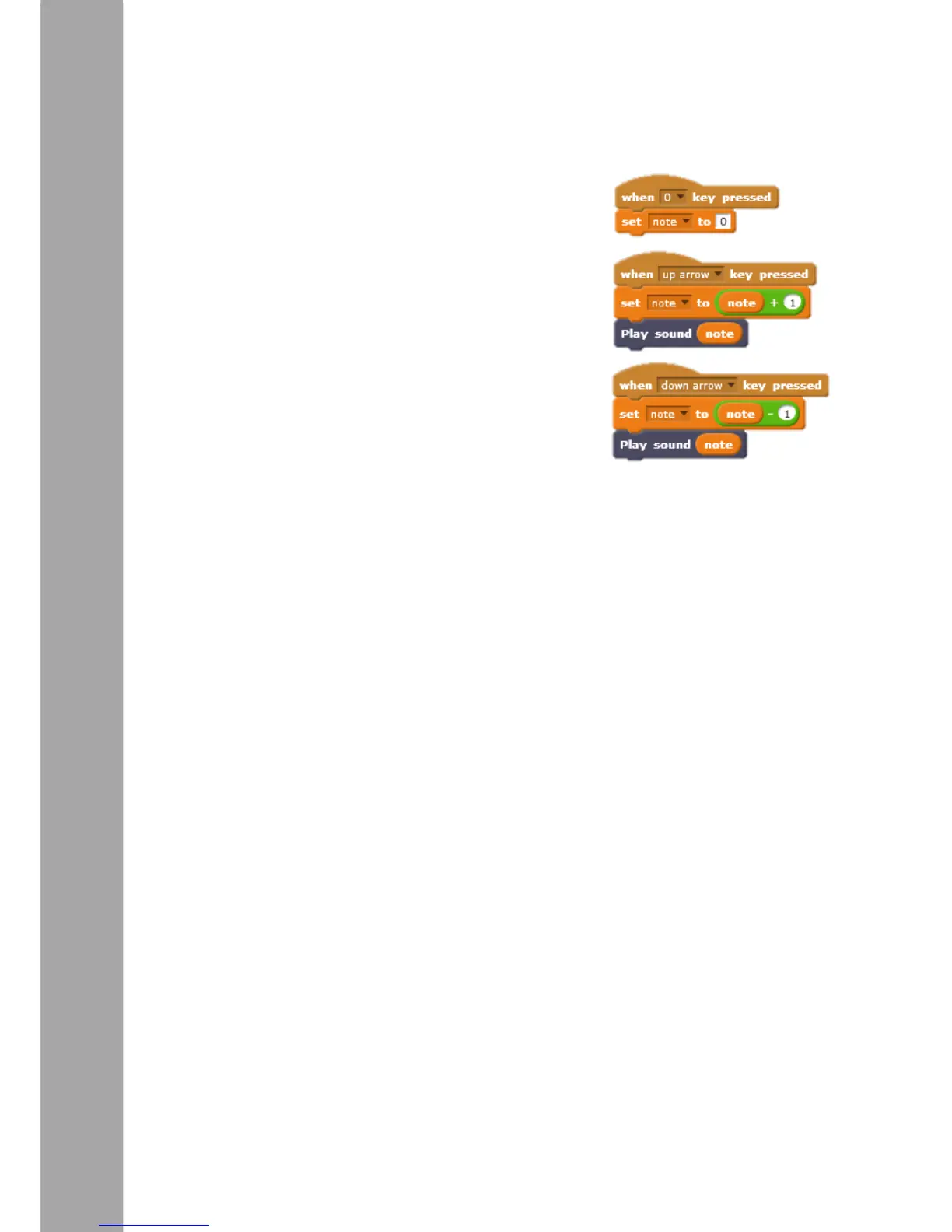
Begin by creating a simple loop to enable stepping
through the sounds on a key press. The example (right)
makes use of a variable. In the Data section of Scratch
choose ‘Make a Variable’. Call it – ‘note’. The set of
blocks shown right mean that pressing the up arrow on
the keyboard adds 1 to the variable note and then plays
that sound on InO-Bot. Pressing zero resets the variable
called ‘note’ to 0. For example press 0, ‘note’ is set to
0. Press the up arrow ‘note’ = 0 (its current value) + 1
i.e. ‘note’ now = 1, so sound 1 is played on InO-Bot.
Press the up arrow again ‘note’ = 1 + 1 i.e. ‘note’ now
equals 2 etc.



 To Next Page