us
men
ea
ures
Press Bar (#1) adjustment:
1. Grasp the Press Bar (#1)
2. Pull the Push Pull Pin 1/2 X 3 1/2 (#73) to release th
Press Bar (#1).
3. Keep the Push Pull Pin 1/2 X 3 1/2 (#73) released an
adjust the Press Bar (#1) to the desired position.
4. Release the Push Pull Pin 1/2 X 3 1/2 (#73) and mak
sure it fully engages into the selected hole of th
Press Bar’s (#1) plate.
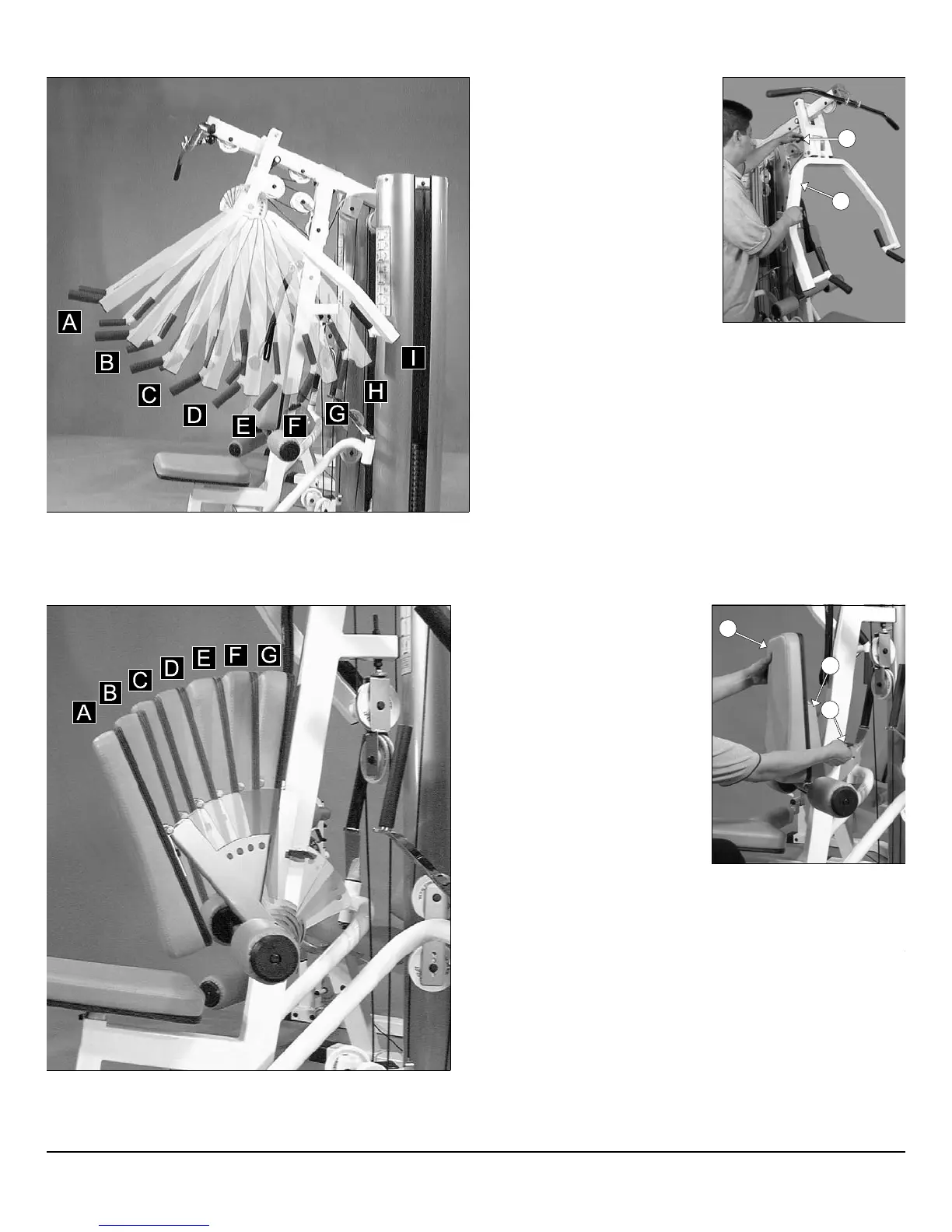
djustable range of motion Press Bar (#1) for quick starting position preference.
Press Bar (#1) settings
♦ Used for Shoulder Press
Exercise.
Settings A,B,C,D
♦ Used for Chest Press
Exercise.
Settings E,F,G
♦ Used for Seated Row
Exercise.
Settings G,H,I
Adjustable Back
Pad Bracket (#10) settings
♦ Used for Seated Row Exercise.
Settings E,F,G
♦ Used for Chest Press Exercise.
Settings E,F,G
♦ Used for Shoulder Press
Exercise.
Settings A,B,C,D
Adj. Back Pad Bracket (#10) adjustment:
1. Grasp the Back Pad (#34)
2. Pull the Push Pull Pin 1/2 X 3 1/2 (#73) to release the Bac
Pad (#34).
3. Keep the Push Pull Pin 1/2 X 3 1/2 (#73) released and adjus
the Back Pad (#34) to the desired position.
4. Release the Push Pull Pin 1/2 X 3 1/2 (#73) and make sure i
fully engages into the selected hole of the Adjustable Bac
Pad Bracket (#10).
orward Adjustable Back Pad Bracket (#10).
33
73
1
34
10
73
P-250S_AP-250D Apollo 2-Stack Gym System












 To Next Page