us
men
ea
ures
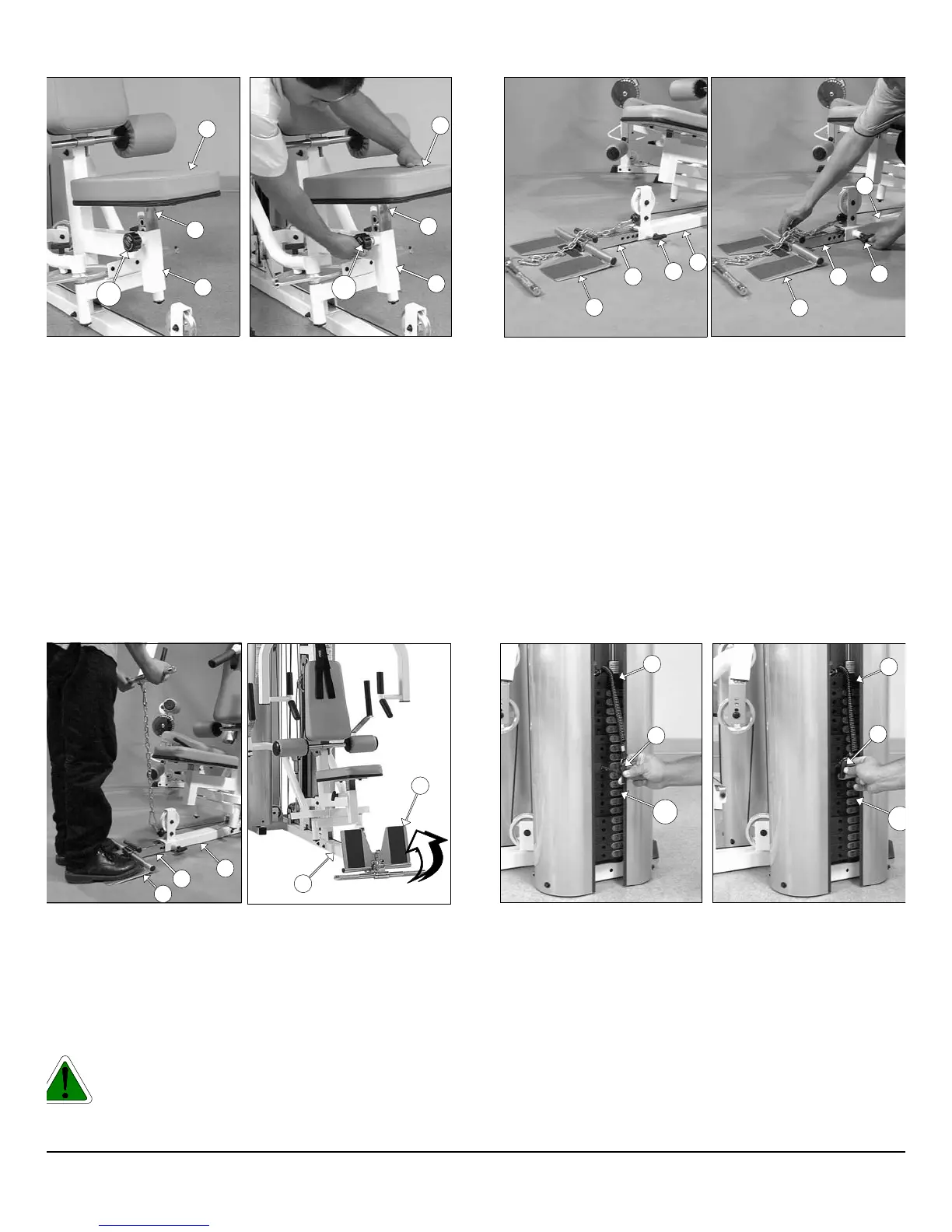
Weight Selection
1. Grasp the Weight Selector Pin (#83).
2. Insert the Weight Selector Pin (#83) into desired Weight Plate
The Decal-Numbers (#116) on the selected Weight Plate will sho
the amount of weight selected. The Top/Plate Selector Bar (#24
must be resting on top of the Weight Stack.
3. Make sure the Weight Selector Pin (#83) has been fully inserte
into the receptacle of the selected Weight Plate.
Low Row Foot Support (#15) adjustment:
1. Grasp the Low Row Foot Support (#15).
2. Pull the Push-Pull Pin 1/2 X 2 7/8 (#74) to release the Low Ro
Stabilizer (#14).
3. Keep the Push-Pull Pin (#74) released and adjust the Low Ro
Foot Support (#15) to the desired position.
4. Release the Push-Pull Pin (#74) and make sure it fully engage
into the selected hole of the Low Row Stabilizer (#14).
Positioning the Low Row Foot Support (#15)
. Picture above at the left shows the Low Row Foot Support (#15)
positioned and ready for standing. It is IMPORTANT that when in
this position, you must stand completely on the Low Row Foot
Support (#15) and not off. This is done to prevent the unit from
tipping during this workout exercise.
. Picture above at the right shows the Low Row Foot Support (#15)
positioned and ready for the seated rowing exercise.
Caution: Do not drop the Low Row Foot Support (#15) or
leave it in the position as pictured above at the right.
Always lower Low Row Foot Support (#15) when not in
use.
35
Bench Press Seat Pad (#35) adjustment:
.Grasp the Bench Press Seat Pad (#35).
. Turn counterclockwise then pull the Turn Pull Pin w/Knob (#138) to
release the Bench Press Adj. Seat Frame (#44).
. Adjust the Bench Press Seat Pad (#35) to the desired position.
. Release the Turn Pull Pin w/Knob (#138) and make sure it fully
engages into the selected hole of the Bench Press Adj. Seat
Frame (#44).
. Complete the adjustment by turning the Turn Pull Pin w/Knob
(#138) clockwise.
3
35
136
44
3
35
136
44
2
74
14
15
2
74
14
15
15
2
14
15
2
24
83
116
24
83
11
P-250S_AP-250D Apollo 2-Stack Gym System












 To Next Page