EasyManua.ls Logo

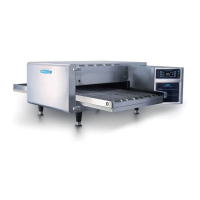
TurboChef 2020 HIGH h - User Manual

TurboChef 2020 HIGH h
34 pages
Print Icon
To Next Page IconTo Next Page
Loading...
Accelerating the World of Cooking
TM
Owners Manual
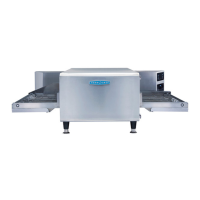
FOR THE TURBOCHEF 2020 HIGH h CONVEYOR OVEN

Questions and Answers

  • J
    John GarrettAug 14, 2025
    What does F2 error mean on my TurboChef Oven?
    • B
      Benjamin KentAug 14, 2025
      If your TurboChef Oven displays the error 'F2: Low Temp During Cook', first verify the wall circuit breaker is on and reset it if necessary, then power the oven back on. Also, consider if you are using an excessive load and reduce it, if needed. Make sure that the oven is clean. If the oven is not fully warmed up, press the back/off key until oven returns to the oven off mode, re-select the cooking profile and allow oven to reheat.
  • J
    janetbutlerAug 17, 2025
    How do I resolve the F5 CC Over Temp error on my TurboChef 2020 HIGH h Oven?
    • S
      Sharon MorganAug 17, 2025
      If your TurboChef Oven shows an 'F5: CC Over Temp' error, it could be due to a blockage of airflow into the oven. Check for anything obstructing the airflow and remove it.
  • G
    garymontesAug 20, 2025
    What does F6 EC Over Temp mean on a TurboChef 2020 HIGH h Oven?
    • M
      Michael AllenAug 20, 2025
      If your TurboChef Oven displays an 'F6: EC Over Temp' error, check for any obstructions blocking airflow into the electrical compartment, such as paper towels.
  • I
    iangutierrezAug 25, 2025
    What to do if TurboChef Oven displays F8 High Limit Tripped error?
    • Y
      ysalasAug 25, 2025
      If the 'F8: High Limit Tripped' error appears on your TurboChef Oven, start by cleaning the oven following the weekly cleaning instructions.
  • A
    Alyssa ColeAug 27, 2025
    How to troubleshoot no power to my TurboChef Oven?
    • H
      hlutzAug 27, 2025
      If your TurboChef Oven has no power, first ensure it is properly plugged into the outlet. If it is, check the main circuit breaker. If the breaker has tripped, reset it and then power the oven back on.
  • B
    brian05Aug 30, 2025
    Why is my TurboChef 2020 HIGH h Oven not warming up properly?
    • N
      Natasha PetersAug 30, 2025
      If your TurboChef Oven isn't warming up as expected, start by ensuring that a cooking profile is selected. If it still doesn't work, your oven may have been switched off at the main circuit breaker. In that case, press the back/off key until the oven is in the off state and leave it for two minutes. Then, unplug the oven for two minutes, re-plug it, switch on the main power supply and select a cooking profile.
  • P
    pparrishSep 3, 2025
    What to do if my TurboChef 2020 HIGH h is not cooking properly?
    • M
      Michelle RiosSep 3, 2025
      If your TurboChef Oven isn't cooking food properly, ensure the oven is clean by following the weekly cleaning instructions. Also, verify that you've selected the correct cooking profile and belt speed for the product you're cooking. Finally, confirm that the product was cooked from the correct starting state (e.g., chilled or frozen).
  • C
    Courtney ThomasSep 6, 2025
    How to fix F1 Blower Failure on TurboChef 2020 HIGH h?
    • M
      mike19Sep 6, 2025
      If your TurboChef Oven displays an 'F1: Blower Failure' error, it might be due to a power interruption. Check that the wall circuit breaker is on. Reset the breaker if needed, and then power the oven back on. Press the back/off key until the oven is in the off mode – leave for two minutes. Unplug the oven – leave for two minutes. Re-plug in the oven, switch on the isolator/main power supply and select a cooking profile.
  • P
    Paul WashingtonSep 9, 2025
    What causes F9 Belt Run Failure on TurboChef Oven?
    • J
      Juan BarnettSep 9, 2025
      If your TurboChef Oven displays an 'F9: Belt Run Failure' error, there might be too much weight on the belt or an obstruction blocking its rotation. First, ensure the oven is off, completely cooled, and the belt is completely stopped. If the belt is overloaded, remove some of the product. Then, check the oven cavity for any obstructions and remove them. Also, make sure that the filters are clean and fans are running and ensure the ambient temperature is not excessive (greater than 100°F [38°C]).

Summary

Safety Information

Important Safety Information - Please Read First

Key safety warnings and essential instructions for safe operation and maintenance.

General Safety Information

Guidelines for intended use, servicing, and general precautions to reduce risks.

Reducing Fire Risk

Procedures to follow if the oven ignites or smoke is observed.

Preventing Oven Damage

Instructions on how to avoid damaging the oven during servicing or cleaning.

Grounding Instructions

Details on proper grounding to reduce the risk of electric shock.

Power Cord Replacement

Guidance on who should replace a damaged power cord to avoid hazards.

Specifications and Installation

Dimensions

Provides external and conveyor dimensions of the oven with diagrams.

Electrical Specifications

Details voltage, phase, frequency, and circuit breaker requirements.

Cleaning

Daily Cleaning Instructions

Step-by-step guide for daily cleaning procedures.

Weekly Cleaning Instructions

Detailed instructions for performing weekly cleaning and maintenance.

Standard Oven Operation

Oven Controls

Overview and explanation of the oven's control panel and buttons.

Cooking a Product

Describes the standard operating modes for cooking food products.

Editing a Cooking Profile

Instructions on how to modify existing cooking profiles.

Changing a Cooking Profile Name

Steps to rename a saved cooking profile.

Adjusting the Belt Speed

How to set and adjust the speed of the conveyor belt.

Adjusting the Temperature

Instructions for setting and modifying the oven's cooking temperature.

Adjusting the Top and Bottom Air

How to control the air speed for top and bottom heating elements.

Oven Modes

Config Mode

Accessing various settings like smart card, faults, setup, and test modes.

Troubleshooting

TurboChef 2020 HIGH h Specifications

General IconGeneral
BrandTurboChef
Model2020 HIGH h
CategoryOven
LanguageEnglish

Related product manuals