EasyManua.ls Logo

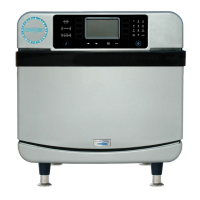
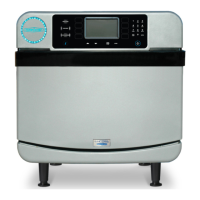
TurboChef Eco - User Manual

TurboChef Eco
56 pages
Print Icon
To Next Page IconTo Next Page
Loading...
TM
©2022-2023 TurboChef Technologies, LLC
OWNER’S MANUAL
      
ECO-1001 / Revision G / August 2023

Table of Contents

Other manuals for TurboChef Eco

Questions and Answers

  • A
    Alyssa AlexanderAug 18, 2025
    What causes the F5 Magnetron Over Temperature error on my TurboChef Eco?
    • M
      Matthew HansonAug 18, 2025
      If your TurboChef Oven shows an 'F5: Magnetron Over Temperature' error, it could be due to: * A blockage of cool air into the oven. Remove anything obstructing the flow of cool air into the side or rear oven panels. * Clogged rear cooling fan exhaust guards. Ensure the rear fans are free of debris.
  • M
    Michael JacksonAug 20, 2025
    How to troubleshoot no power to my TurboChef Oven?
    • M
      Monica SmithAug 20, 2025
      If your TurboChef Oven has no power, first, ensure the oven is properly plugged into the outlet. If it is, check the main circuit breaker to see if it has tripped. If the breaker is off, reset it and then power the oven back on.
  • C
    Chad SampsonAug 23, 2025
    Why is my TurboChef Eco Oven not warming up properly?
    • C
      Caitlin EstesAug 23, 2025
      If your TurboChef Oven isn't warming up correctly, there are several things you can check: * First, make sure the oven is turned on by touching the 'Power' button and selecting a group. * Ensure the cook cavity door is completely closed. * If the oven has been switched off at the main circuit breaker, turn it off, unplug it, and wait two minutes before plugging it back in. * Also, check if the high-limit thermostat has tripped; if so, press the reset button located on the oven's rear wall near the power cord.
  • F
    fandersonAug 26, 2025
    What to do if my TurboChef Eco Oven is not cooking properly?
    • S
      Stephanie AlvarezAug 26, 2025
      If your TurboChef Oven isn't cooking food properly, consider these potential causes: 1. Verify that the correct oven model is specified as 'Eco' in the Info Mode Manufacturing screen. 2. Ensure the oven is clean, following the cleaning instructions. 3. Confirm that you've selected the correct food group and item name for the product you're cooking. 4. Make sure the product was cooked from the correct starting state, such as chilled or frozen, as required. 5. Verify the product's weight and size match the typical product specifications.
  • M
    Marie ReyesAug 28, 2025
    Why does my TurboChef Oven display 'Oven Door Open' and sound an alarm?
    • L
      Lance JamesAug 28, 2025
      If your TurboChef Oven display shows 'Oven Door Open' and the alarm is sounding, the issue might be due to: * An obstruction preventing the door from closing. Open the door and remove any obstructions. * The door not being fully closed. Try opening and closing the door several times. * Door switches being out of alignment. In this case, you should call Customer Support.
  • W
    William ReevesAug 30, 2025
    Why is there steam or smoke coming from my TurboChef Oven?
    • D
      Danny MooreAug 30, 2025
      If you notice steam or smoke coming from your TurboChef Oven, it could be due to a dirty oven. Clean the oven following the cleaning instructions. Another possible cause is a clogged rear vent. Clean the air filter.
  • M
    Michael DodsonSep 2, 2025
    What does F2 error mean on my TurboChef Eco and how can I fix it?
    • S
      Shannon CunninghamSep 2, 2025
      If your TurboChef Oven displays the error 'F2: Cook Temperature Low', here are some possible reasons and solutions: * First, ensure that the wall circuit breaker is on, as a power interruption could be the cause. * Check for clogged air nozzles on the top and bottom of the cook cavity and clean them during daily cleaning. * Make sure the oven door is correctly aligned and fully closed by opening and closing it several times. * Try resetting the high-limit thermostat located on the oven's rear wall below the filter, as it could be a defective heater. * Repeat warmup and allow the oven to idle for five minutes.
  • A
    acortezSep 4, 2025
    Why is my TurboChef Eco cooling down or shutting down unexpectedly?
    • D
      David HicksSep 5, 2025
      If your TurboChef Oven is cooling down, shutting down, or making selections on its own, it may be caused by debris on the display. Clean the display. Alternatively, check the fault log to see if any F12 faults have been logged. If so, record the Phoenix Firmware version and contact the factory.
  • M
    Martha HarrisSep 7, 2025
    What does F6 EC Temp mean on my TurboChef Eco Oven?
    • H
      hamiltonbiancaSep 7, 2025
      If your TurboChef Oven displays the error 'F6: EC Temp', the possible causes are: * A blockage of cool air into the oven. Remove any obstructions from the side or rear oven panels. * Clogged rear cooling fan exhaust guards. Make sure the rear fans are free of debris.
  • M
    Michael MorganSep 9, 2025
    Why is the touch screen on my TurboChef Oven not responding?
    • S
      Stephen ReynoldsSep 9, 2025
      If the touch response on your TurboChef Oven is slow or not working, try unplugging the oven for 30 seconds and then plugging it back in. This can resolve issues caused by a bad boot up when power was cycled.

Summary

IMPORTANT SAFETY INSTRUCTIONS

GENERAL SAFETY INFORMATION

General safety guidelines for operating the oven, including grounding and precautions.

REDUCING FIRE RISK

Precautions to take to prevent fire hazards when operating the oven.

IMPORTANT SAFETY INSTRUCTIONS

GROUNDING INSTRUCTIONS

Instructions on proper grounding procedures for electrical safety.

POWER CORD REPLACEMENT OR REMOVAL

Guidelines for replacing or removing the power cord safely.

PRECAUTIONS TO AVOID EXCESSIVE MICROWAVE ENERGY

Safety measures to prevent excessive microwave energy exposure.

IMPORTANT SAFETY INSTRUCTIONS

RF INTERFERENCE CONSIDERATIONS

Information regarding radio frequency interference generated by the oven.

SYMBOLS: PROTECTIVE EARTH AND EQUIPOTENTIAL BONDING

Explanations of the protective earth and equipotential bonding symbols.

SPECIFICATIONS AND INSTALLATION

Theory of Operation, Features, and Dimensions

Overview of the oven's technology, key features, and physical dimensions.

SPECIFICATIONS AND INSTALLATION

Certifications, Construction, and Electrical Specs

Oven certifications, construction details, and electrical requirements.

Installation and Unpacking Procedures

General instructions for installing and unpacking the oven.

Critical Lifting and Handling Warnings

Warnings for safely lifting and handling the oven.

SPECIFICATIONS AND INSTALLATION

Oven Installation and Placement Guidelines

Steps for installing the oven and placing it near heat sources.

SPECIFICATIONS AND INSTALLATION

Oven Accessories and Connectivity Systems

Information on restraint kit, ChefComm, and Open Kitchen systems.

Initial Setup: Registration and Voltage Selection

Details on initial oven registration and voltage configuration.

SPECIFICATIONS AND INSTALLATION

Ventilation Requirements for Ventless Operation

Information on the oven's ventless operation and ventilation requirements.

CLEANING

Daily Maintenance Procedures and Supplies

Step-by-step guide for routine daily cleaning and required supplies.

CLEANING

Oven Interior, Door, and Component Cleaning

Detailed steps for cleaning oven interior, door, and components.

Reinstallation and Exterior Cleaning Steps

Instructions for reassembling components and cleaning the oven exterior.

ONETOUCH CONTROLLER OPERATION

OneTouch Controller Interface Overview

Overview of the various controls and icons on the OneTouch controller.

OneTouch Recipe Mode Operation

Guide to using the oven in Recipe Mode with OneTouch controller.

OneTouch Manual Cook Mode Operation

Instructions for operating the oven in Manual Cook Mode with OneTouch.

ONETOUCH CONTROLLER OPERATION

OneTouch Recipe Mode Step-by-Step Guide

Detailed steps for operating the oven in Recipe Mode.

Preheat, Food Placement, and Recipe Selection

Steps for preheating, placing food, and selecting recipes.

ONETOUCH CONTROLLER OPERATION

Managing the OneTouch Cooking Process and Alerts

Managing the cooking process, alerts, and completion steps.

ONETOUCH CONTROLLER OPERATION

OneTouch Manual Cook Mode Details and Settings

Specific settings and functions within Manual Cook Mode.

Saving Manual Settings and Starting Cook

Procedures for saving manual settings and starting cooking.

ONETOUCH CONTROLLER OPERATION

Navigating the OneTouch Settings Menu

Accessing and navigating the oven's settings menu.

Configuring Oven and Feature Settings

Adjusting various oven settings like volume, language, and network.

ONETOUCH CONTROLLER OPERATION

Date, Time, Network, and Reboot Settings

Configuring date, time, network, and reboot options.

USB Menu Management Procedures

Loading and saving menu settings using a USB drive.

ONETOUCH CONTROLLER OPERATION

Enabling and Using OneTouch Edit Mode

Activating and using Edit Mode for customization.

Creating and Managing Recipe Groups

Steps for creating, naming, and organizing recipe groups.

ONETOUCH CONTROLLER OPERATION

Editing and Sorting Recipe Groups

Procedures for editing group details and sorting recipes.

Creating New Recipes and Adding to Groups

Steps for creating new recipes and adding them to groups.

ONETOUCH CONTROLLER OPERATION

Recipe Creation Workflow Steps

Detailed steps for inputting recipe name, keywords, image, and temperature.

Configuring Cook Settings for New Recipes

Adding stages and defining cook parameters for new recipes.

ONETOUCH CONTROLLER OPERATION

Placing Recipes into Groups and Sorting

Selecting groups to add recipes and sorting them.

ONETOUCH CONTROLLER OPERATION

Editing Existing Recipes and Options

Modifying recipe name, keywords, image, temperature, and cook settings.

Recipe Management Actions

Options for copying, moving, or deleting recipes.

LEGACY CONTROLLER OPERATION

Legacy Controller Interface and Modes

Familiarization with the buttons, display, and modes of the legacy controller.

Navigating Legacy Groups and Items

Understanding the structure and navigation of groups and items.

LEGACY CONTROLLER OPERATION

Legacy Menu Cook Mode Operation

How to operate the oven in Menu Cook Mode using the legacy controller.

Initiating Legacy Menu Cook Mode

Steps for powering on and selecting temperature in Menu Cook Mode.

LEGACY CONTROLLER OPERATION

Legacy Menu Cook Mode Step-by-Step Guide

Detailed steps for placing food, selecting groups/items, and cooking.

Completing Legacy Menu Cook Mode

Managing the cooking process and checking results.

LEGACY CONTROLLER OPERATION

Extending Cook Time with Legacy Controller

Using "Cook More" features for extended cooking or browning.

Cooling Down the Legacy Oven

Procedures for turning off and cooling down the oven.

LEGACY CONTROLLER OPERATION

Legacy Manual Cook Mode Operation

How to operate the oven in Manual Cook Mode using the legacy controller.

Adjusting Legacy Manual Cook Settings

Adjusting temperature, events, air, microwave, and time.

Saving Manual Settings in Legacy Mode

Saving manual cook settings as a menu recipe.

LEGACY CONTROLLER OPERATION

Legacy Info Mode Navigation and Screens

Accessing and navigating different Info Mode screens.

Configuring Legacy Controller Options

Enabling/disabling features like Editing, Demo Mode, and Manual Cooking.

TROUBLESHOOTING

Common Oven Issues and Resolution Steps

Troubleshooting common problems like no power, warming issues, and display errors.

TROUBLESHOOTING

Troubleshooting Specific Faults and Blockages

Addressing issues like steam, shutdown, touch response, and air flow blockages.

North America Limited Warranty

Warranty Terms, Exclusions, and Claims

Details of the warranty period, coverage, exclusions, and claim procedures.

Warranty Service, Liability, and Legal Provisions

Warranty service, limitations on damages, and governing law.

North America Limited Warranty

Warranty Service and Claims Process Details

Detailed steps for warranty claims and service.

Warranty Disclaimers and Non-Warranty Charges

Disclaimers on damages, parts, and costs for non-warranty service.

International Limited Warranty

International Warranty Coverage and Terms

Warranty coverage and conditions for international purchases.

International Warranty Service and System

Procedures for international warranty service and system registration.

International Limited Warranty

International Claims, Exclusions, and Liabilities

Process for international claims, excluded items, and liability limitations.

Warranty Legalities and Governing Law

Exclusive remedies, third party rights, and governing law.

TROUBLESHOOTING

Oven Operation and Error Troubleshooting

Resolving issues related to oven operation, power, and cooking accuracy.

TROUBLESHOOTING

Troubleshooting Specific Faults and Blockages

Addressing issues like steam, shutdown, touch response, and air flow blockages.

North America Limited Warranty

North America Warranty Terms and Exclusions

Details of the warranty period, coverage, and what is excluded.

Warranty Service, Claims, and Limitations

Warranty service, claim procedures, and repair limitations.

North America Limited Warranty

North America Warranty Service and Claims Process

Procedures for obtaining service and filing warranty claims.

Legal and Indemnity Clauses for North America

Customer indemnity, governing law, and non-warranty service charges.

International Limited Warranty

International Warranty Coverage and Terms

Scope and duration of the international limited warranty.

International Warranty Service and Registration

Procedures for international warranty service and system registration.

International Limited Warranty

International Claims, Exclusions, and Liabilities

Process for international claims and excluded items.

Warranty Legalities and Governing Law

Exclusive remedies, third party rights, and governing law.

TurboChef Eco Specifications

General IconGeneral
BrandTurboChef
ModelEco
Exterior FinishStainless Steel
Voltage208-240V
Frequency60 Hz
Power SourceElectric
CategoryOven
Phase1-Phase
PlugNEMA 6-
Cooking ModesConvection
Warranty1 year
TurboChef TechnologyAir impingement, microwave

Related product manuals