EasyManua.ls Logo

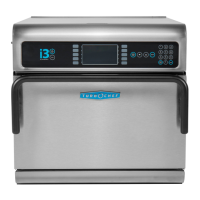
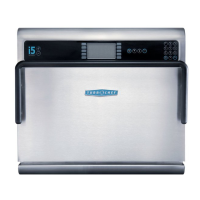
TurboChef i5 - Service Manual

TurboChef i5
85 pages
Print Icon
To Next Page IconTo Next Page
Loading...
Accelerating the World of Cooking
TM
Service Manual
FOR THE TURBOCHEF i5 RAPID COOK OVEN

Table of Contents

Other manuals for TurboChef i5

Questions and Answers

  • T
    Thomas ThomasSep 10, 2025
    What to do if the touch response is slow on my TurboChef i5 Oven?
    • M
      Margaret CarterSep 10, 2025
      If the touch response on your TurboChef oven is slow or not detecting touch at all, it could be due to a bad boot up when power was cycled. Unplug the oven for 30 seconds and plug it back in to see if the issue is resolved.
  • J
    Julie Hale MDAug 22, 2025
    Why is my TurboChef i5 Oven not warming up properly?
    • K
      Kimberly HallAug 22, 2025
      If your TurboChef Oven isn't heating correctly, try these steps: * Ensure the oven is turned on by pressing the “On/Off” soft key. * Make sure the cook cavity door is fully closed. * Try power cycling the oven: Place the oven in the OFF state and unplug the oven – leave for two minutes. Re-plug in the oven, switch on the isolator/main power supply, and press the “On/Off” soft key. * Reset the high-limit, located in the bottom-left corner of the oven's rear wall.
  • A
    Andre MartinezAug 25, 2025
    What to do if TurboChef i5 is not cooking properly?
    • L
      Lucas JordanAug 25, 2025
      If your TurboChef Oven isn't cooking food properly, consider the following: 1. Clean the oven, as large deposits of grease, carbon, or food debris can interfere with cooking. 2. Verify that you've selected the correct food group and item name for what you're cooking. 3. Ensure the food product was in the correct starting state (e.g., chilled or frozen) before cooking. 4. Check that the rack is positioned correctly. 5. Confirm the lower air diverter is present and correctly installed.
  • H
    Hayley MannAug 26, 2025
    Why is my TurboChef Oven not cooking properly?
    • D
      Diane GambleAug 26, 2025
      Several factors can cause your TurboChef oven to not cook properly. Check the following: * Ensure the oven model is correctly set to “i3” or “i5” from the Info Mode Manufacturing screen. * Clean the oven to remove grease, carbon, or food debris, which can dilute the microwave. * Verify that the correct food group and/or item was selected. * Make sure the product was in the correct state (chilled or frozen) before cooking. * Ensure the product's weight/size matches the typical product specifications.
  • F
    fmillerAug 27, 2025
    What to do if my TurboChef i5 has no power?
    • M
      mhamiltonAug 27, 2025
      If your TurboChef oven has no power, there are a couple of things you can check: * First, ensure that the oven is properly plugged into the power outlet. * Second, check the main circuit breaker to see if it has tripped. If it has, reset the breaker and then power the oven back on.
  • R
    Richard PorterAug 29, 2025
    Why is my TurboChef i5 display showing “Oven Door Open” and sounding an alarm?
    • G
      greedAug 29, 2025
      If your TurboChef oven's display reads “Oven Door Open” and an alarm sounds, it could be due to a few reasons: * Check for any food obstruction preventing the door from closing properly. Remove any obstructions. * Ensure the oven door is fully closed. Try opening and closing the door several times to ensure proper closure. * If the issue persists, there may be a problem with the door switches being out of alignment.
  • B
    Becky MurraySep 18, 2025
    How do I fix the F1 error on my TurboChef i5?
    • B
      Billy PearsonSep 18, 2025
      If your TurboChef Oven displays the error “F1: Blower Running Status Bad”, it could be due to: * Power interruption: Verify the wall circuit breaker is on. Reset the breaker if needed, and then power the oven back on. * Try power cycling the oven: Place the oven in the OFF state and unplug the oven – leave for two minutes. Re-plug in the oven, switch on the isolator/main power supply, and press the “On/Off” soft key.
  • D
    dmartinezSep 12, 2025
    Why does my TurboChef Oven display “Oven Door Open” and alarm sounds?
    • A
      Amanda ColeSep 12, 2025
      If your TurboChef Oven displays “Oven Door Open” and the alarm is sounding, the issue might be: * Food obstructing the door: Open the door and remove any obstructions. * Door alignment: Open and close the door several times to ensure proper closure. * Door switches: If the problem persists, the door switches may be out of alignment.
  • A
    andrew14Sep 8, 2025
    What does it mean if my TurboChef i5 Oven displays F6: EC Temp?
    • M
      Misty AllenSep 8, 2025
      If your TurboChef oven displays the error code 'F6: EC Temp', it could be caused by: * A blockage of cool air into the oven. Remove anything that may be obstructing the flow of cool air into the side/rear oven panels. * Clogged rear cooling fan exhaust guard(s). Make sure the rear fans are free of debris.
  • F
    frank27Sep 5, 2025
    What does it mean if my TurboChef Oven displays F1: Blower Running Status Bad?
    • J
      Joshua WellsSep 5, 2025
      If your TurboChef oven displays the error code 'F1: Blower Running Status Bad', it could be due to: * An interruption in the oven power. Verify the wall circuit breaker is on, reset it if necessary, and then power the oven on. * If the issue persists, turn the oven off, unplug it for two minutes, then re-plug it in, switch on the power supply, and select “Menu” and then a set temperature.

Summary

Safety Instructions

General Safety Information

General safety precautions for using the oven.

Reducing Fire Risk

Precautions to take to prevent and handle fires within the oven.

Grounding Instructions

Proper grounding procedures to prevent electric shock.

Power Cord Replacement

Procedure for replacing a damaged power cord.

Precautions for Servicing

Safety measures during servicing to avoid microwave exposure.

RF Interference Considerations

Information on radio frequency interference from the oven.

Specifications and Installation

Theory of Operation

How the oven's technology creates higher heat transfer rates.

Certifications

List of safety and regulatory certifications for the oven.

Dimensions

Physical dimensions of the oven and its cook cavity.

Oven Construction

Details on the exterior and interior materials and design.

Electrical Specifications

Voltage, frequency, current, and plug types for different models.

Unpacking Instructions

Steps for safely removing the oven from its packaging.

Lifting and Placing the Oven

Guidelines for safely moving and positioning the oven.

Installation Near Open Heat Source

Requirements for installing the oven near grills or fryers.

Optional Installation Items

Information on optional accessories like the oven cart.

Voltage Selection

Procedure for selecting the correct incoming voltage for North America models.

Daily Maintenance

Oven Controls and Cooking

Oven Controls

Explanation of the oven's interface keys and display elements.

Cooking

Description of the standard operation modes for cooking food.

Info Mode

Overview of the Info Mode

Purpose and access methods for the Info Mode.

Viewing Cook Counter;Time Logs

How to access logs for cooking counts and times.

Viewing the Fault Log

Accessing and understanding the oven's fault log.

Viewing the Service Numbers

Retrieving contact information for technical support.

Resetting the Oven

Procedure to clear error messages by resetting the oven.

Turning Oven Options On;Off

Managing oven features like Adjust Time and Cook More.

Setting the Language

Changing the display language (availability varies).

Setting the Date;Time

Adjusting the oven's internal clock for accurate logging.

Test Mode - Testing Oven Parts

Running diagnostic tests on individual oven components.

Test Mode - Status Indicators

Understanding status indicators during testing.

Test Mode - Fault Log

Accessing fault logs within Test Mode.

Test Mode - Turning On;Off Diagnostic Mode

Activating/deactivating diagnostic mode for detailed parameters.

Test Mode - Self Test

Performing comprehensive self-tests on oven components.

Test Mode - Manufacturing Mode

Accessing manufacturing-specific tests and settings.

Serial Number Edit

Procedure to edit the oven's serial number.

Changing Temperature Measurement Setting

Switching between Fahrenheit and Celsius units.

Erase;Default Oven Settings

Resetting counters, logs, and oven settings to defaults.

Loading a Menu

Loading new recipes or software via smart card or USB.

Edit Mode

Overview of the Edit Mode

Main purposes of the Edit Mode: temperatures, names, settings.

Single vs. Multiple Temperature Mode

Differences between operating in single or multiple temperature settings.

Changing Set Temperatures

How to modify default cooking temperatures.

Changing Food Group;Recipe Name

Editing names for food groups and individual recipes.

Changing Recipe Settings

Adjusting event stages, time, blower, and microwave settings.

Oven Systems

Convection System

Overview of components like blower motors, heater, jetplates.

Troubleshooting Convection System

Diagnosing faults and performance issues in the convection system.

Oven Door

Information on the oven door, interlocks, and hinges.

Interlock Switches

Function and adjustment of door interlock switches.

Hinges and Counter-Balance Assembly

Components ensuring smooth door operation and balance.

Adjusting the Counter-Balance Assembly

Procedure for adjusting the counter-balance mechanism.

Measuring RF Leakage for Microwave Safety

Testing for microwave leakage to ensure safety compliance.

Microwave System

Capacitors

Information on capacitor ratings and testing procedures.

Filament Transformers

Role and specifications of filament transformers.

Wiring the Filament Transformers

Guidelines for correctly wiring filament transformers.

High-Voltage Transformers

Function and design of high-voltage transformers.

Wiring the High-Voltage Transformers

Critical wiring instructions for high-voltage transformers.

Testing a Filament or HV Transformer

Procedures for testing transformer impedance.

High-Voltage Diodes

Details on high-voltage diodes and their function.

Testing a High-Voltage Diode

Method for testing the functionality of high-voltage diodes.

Magnetrons

Specifications and output of magnetrons.

Testing a Magnetron for an Open;Shorted Filament

Safe procedure for testing magnetron filament continuity.

Stirrer Motor and Assembly

Function of the stirrer motor in heat distribution.

Wave Guides

Role of wave guides in directing microwaves.

Troubleshooting Microwave System

Diagnosing faults related to microwave system components.

Control System

Control Board

Function and power supply of the main control board.

Fuses

Types and functions of the oven's fuses.

High Limit Thermostat

Function and reset procedure for the high limit thermostat.

Troubleshooting Control System

Diagnosing issues within the oven's control system.

Filtering System

Catalytic Converter

Function and cleaning of the VOC-type catalytic converter.

Troubleshooting Filtering System

Diagnosing issues related to filters and converters.

Troubleshooting

Overview of Troubleshooting

Introduction to troubleshooting sections and accessing test modes.

Fault Code Descriptions

Detailed explanations of specific fault codes (F1-F8).

Fault Code Troubleshooting

Step-by-step guides for resolving identified fault codes.

Non-Fault Code Troubleshooting

Troubleshooting tips for issues not indicated by fault codes.

Oven Schematic

Appendix - Replacing Oven Components

Comprehensive Table of Oven Components

Reference table for oven parts and removal procedures.

Replacing Items - Opening Top Cover Required

Procedure for opening the oven's top cover.

Replacing Items - Removing Left Side Cover Required

Procedure for removing the left side panel.

Replacing Items - Removing Right Side Cover Required

Procedure for removing the right side panel.

Replacing Items - Removing;Opening Multiple Covers Required

Steps for removing multiple covers or accessing complex assemblies.

TurboChef i5 Specifications

General IconGeneral
BrandTurboChef
Modeli5
CategoryOven
LanguageEnglish

Related product manuals