16
Go to Table of Contents
PC/Mac Setup
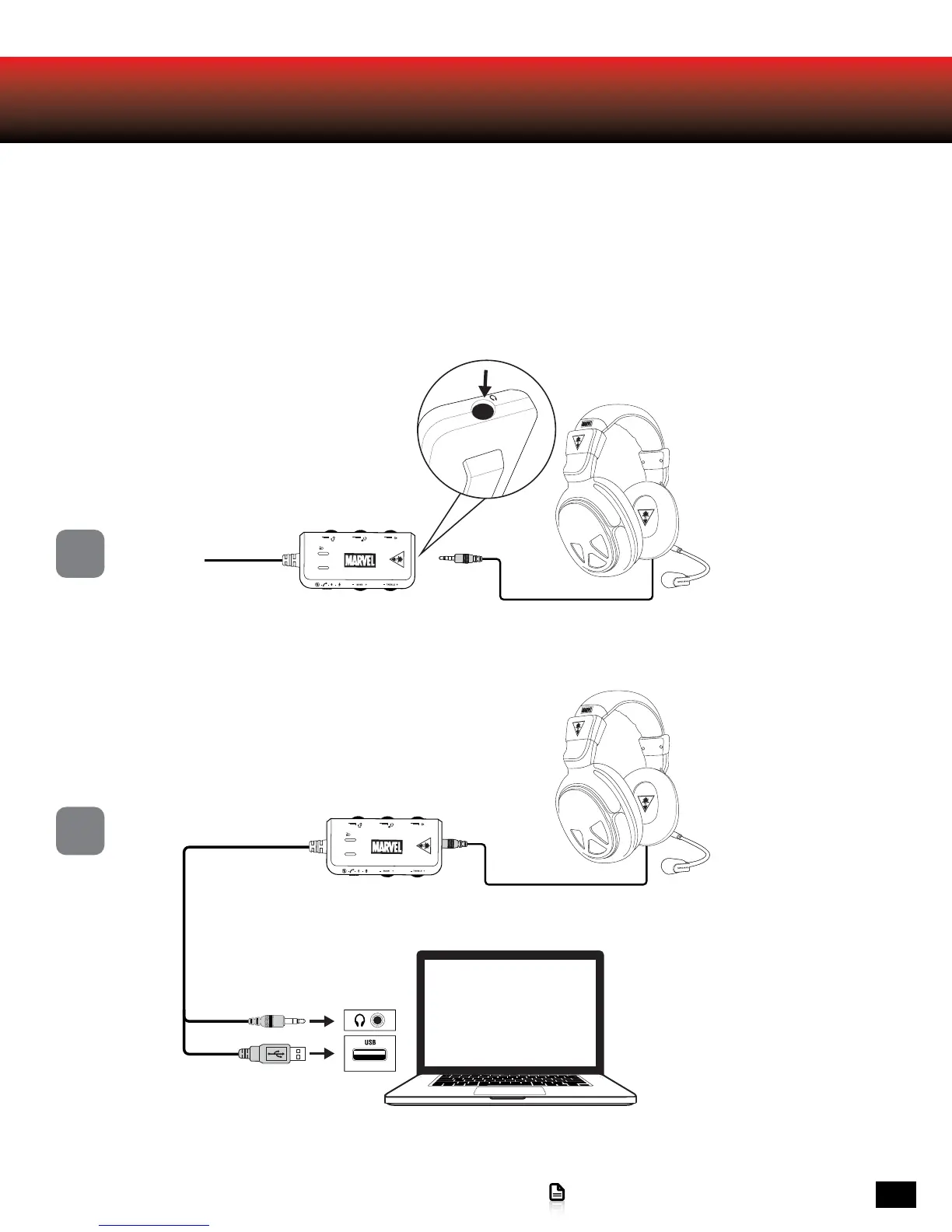
When used as a PC/Mac gaming headset, the MARVEL SEVEN functions as both a USB Stereo Headset and an Amplified
Stereo Headset.
The In-Line Amplifier’s black 3.5mm plug is used for sending the stereo game signal from the computer sound card to the MARVEL
SEVEN amplifier, allowing game audio, music and other sounds to be heard from the computer.
Use the USB Turtle Beach MARVEL SEVEN Chat path for chat platforms like Skype, Ventrilo, TeamSpeak, Yahoo! Messenger, etc.
Note: Both the USB and 3.5mm should always be connected. Set system volume to maximum and then adjust volume using the
InLine Amp.
*The first time the MARVEL SEVEN is connected some drivers will be automatically installed. Wait for these drivers
to install before moving onto the system settings configuration.
1
2
Inline Amplifier
Headset
Headset
Inline Amplifier














 To Next Page