6
Go to Table of Contents
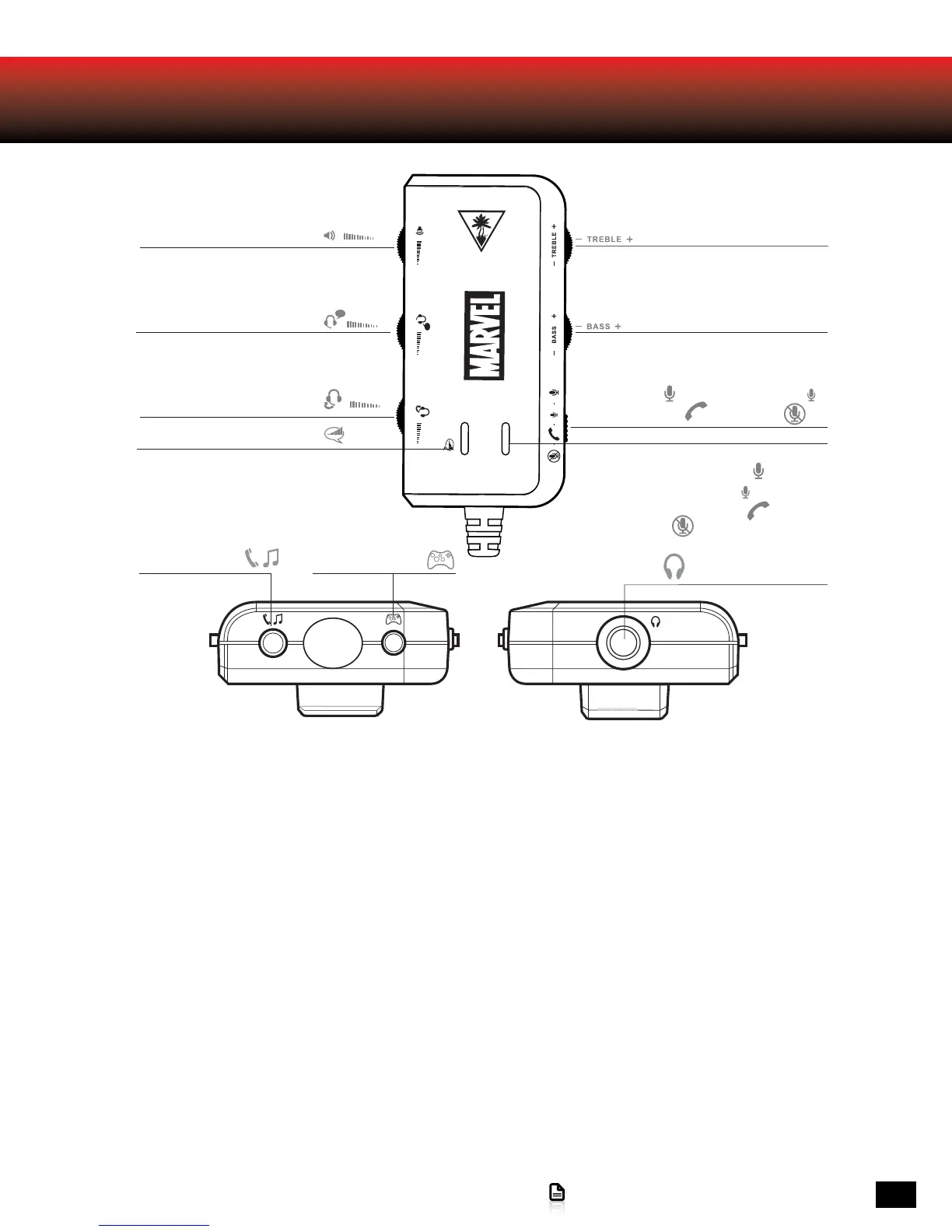
Amplifier Features
Mic Switch:
Mic On (High) Mic On (Low)
Phone Call Mode Mic Mute
Mic Mute Indicator LED:
bright blue = Mic On (High),
dark blue = Mic On (Low),
purple = Phone Call Mode,
red = Mic Mute
Headset Output
Aux Input for
Phone & Music
Xbox 360 Talkback
Cable Input
Bottom View Top View
Chat Volume Control
Variable Mic Monitor
Bass Control
Treble Control
Chat Boost Indicator LED
Game Volume Control
· Game Volume Control: Adjusts the incoming sound level from the 3.5mm connection.
· Treble/Bass Controls: Adjusts treble and bass levels of incoming sound from the 3.5mm connection.
· Chat Control: Adjusts volume of incoming chat through USB or Xbox 360 chat input
· Variable Mic Monitor: Adjusts the sound level of your voice in the headset
· Mic Switch & Mic Mute Indicator LED:
· Mic on (High) (Bright Blue): Your voice is louder to other people.
· Mic on (Low) (Dim Blue): Your voice is lower to other people.
· Phone Mode (Purple): Routes mic to phone.*
· Mute (Red): Mutes your voice to all parties
· Chat Boost Indicator: When game volume increases; chat volume increases automatically. The Blue LED indicates the Chat
Boost activating. (Brighter when louder, dimmer when softer)
· Aux Input for Phone & Music: Connect your mobile device while gaming using the Auxiliary Cable.
· Xbox Chat Input: Connect your Xbox 360 Controller for chat using the Xbox 360 Talkback Cable
· Headset Jack: Connect your MARVEL SEVEN headset using the Headset Breakaway Cable or the Mobile Adapter Cable.
*Note: Phone mode must be switched on in order to talk on the phone while gaming.














 To Next Page