6
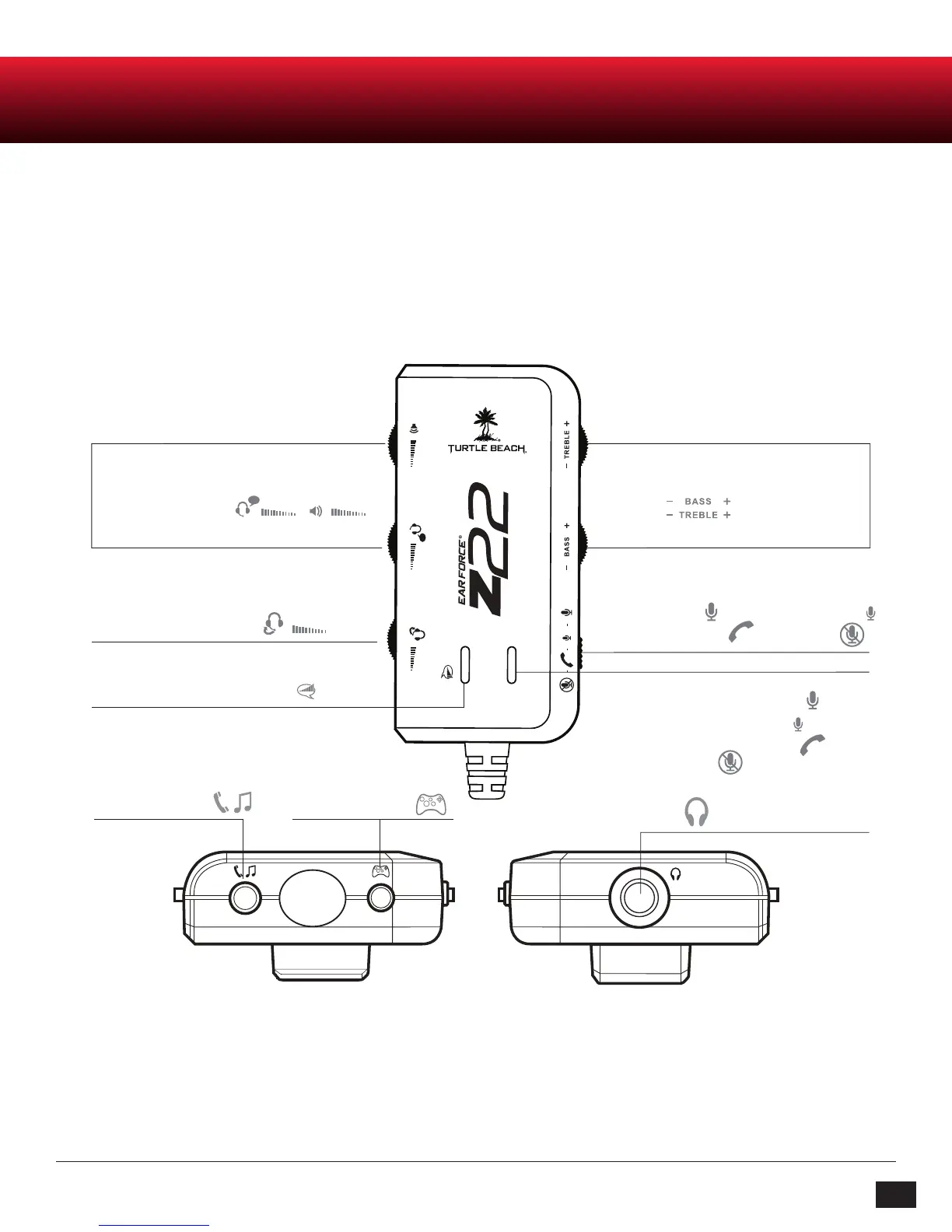
Amplifier Function Map / Use
Inline Amplifier
MODE SWITCH
Headset Output Jack
Aux Input for
Phone & Music *Xbox Chat Input
Bottom View Top View
Chat & Game
Volume Controls
Variable Mic Monitor
Bass &
Treble Controls
Chat Boost Indicator LED
Mic Switch:
Mic On (High) Mic On (Low)
Phone Call Mode Mic Mute
Mic Mute Indicator LED:
Bright blue = Mic On (High),
Dark blue = Mic On (Low),
Purple = Phone Call Mode,
Red = Mic Mute
* For Xbox LIVE chat, an Xbox 360 Talkback Cable (not included) is required. For Xbox 360 game audio, a 3.5 mm Female to RCA Splitter Cable
and an Xbox 360 Audio Adapter are also required. These cables are available at: http://www.TurtleBeach.com/parts














 To Next Page