Editing Macros
You can also edit macros that you previously recorded from the macro editor window.
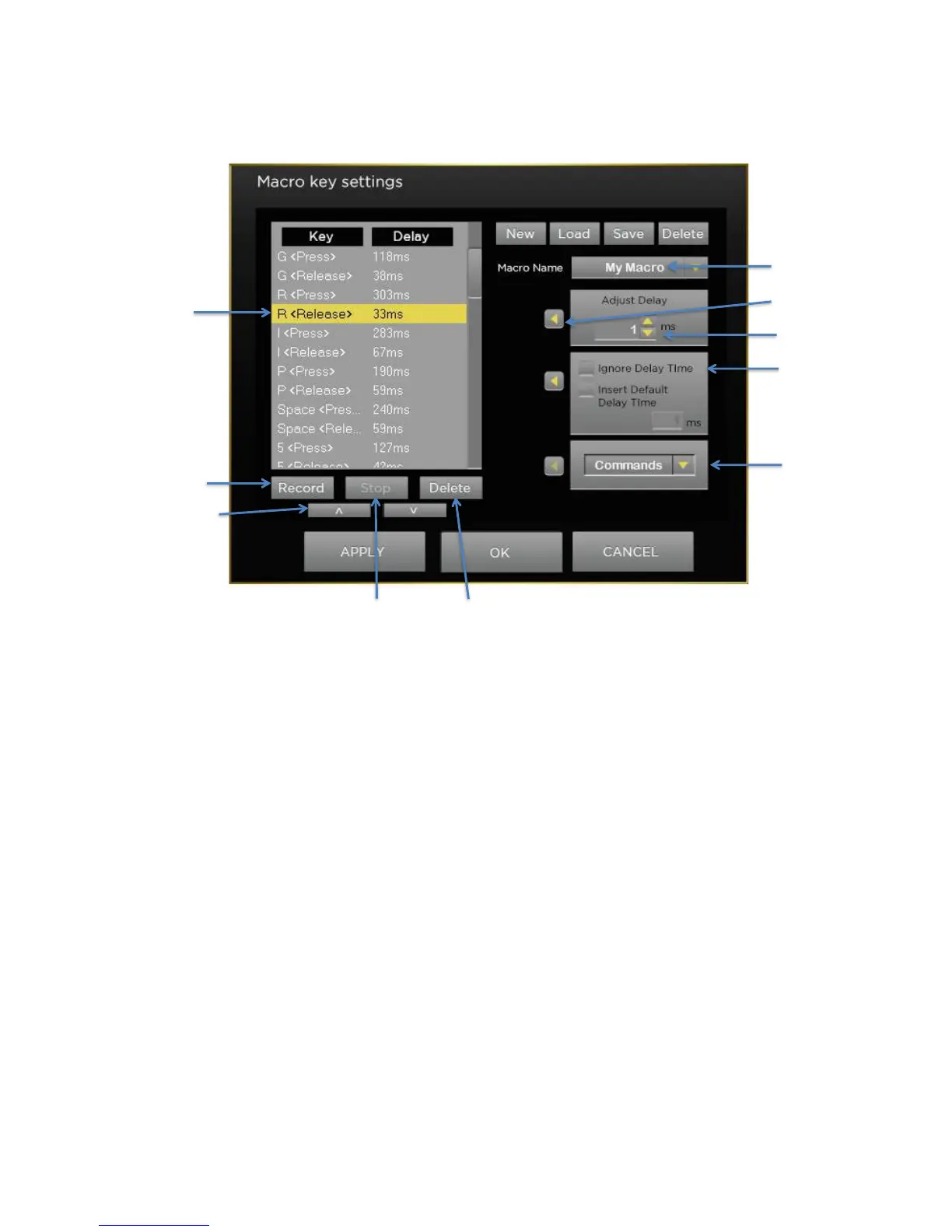
To change the timing of commands in your macro, select the line of the keystroke in the editor window and them
change the delay in the Adjust Delay box. When you have the delay you want to apply to that line click on the left
arrow to apply it to that line. You can apply the same delay (or a different one) on any step in your macro via the
same method.
If you’d like to insert Commands (such as Page Up, Copy, Paste, Close Window, Undo, Print Screen, Zoom In) select
the line just after where you would like to insert the command. Then select the desired Command from the
Commands pull-down menu and press the Apply Arrow. Your command will be inserted just above the selected line.
Saving, Loading, Deleting Macros
You can save macros to a file for use later on another computer or to send to a friend.
To save a macro select the macro that you want to save and then press Save. Then select the location on your
computer where you would like to save your macro. A file with a .mac file extension with the file name of your
macro will be saved in that location. You can then copy or email that file to another computer and your macros
will be there.
To load a macro that you saved, press the Load button and navigate to the location on your computer where the
file is stored. The macro will now be available for use on that new computer. (Note: The other computer needs to
have the Grip 500 Configuration software installed.
Help
To access this manual at any time, press the ? (Help) button on the top right of the window.



 To Previous Page