English
WHAT’S IN THE BOX
• Victrix Pro KO Leverless Fight Sck
• 3m Braided USB-C Cable
• USB Breakaway Cable
• Switch Puller Tool
• Protecve Sleeve
CONNECTING THE PRO KO
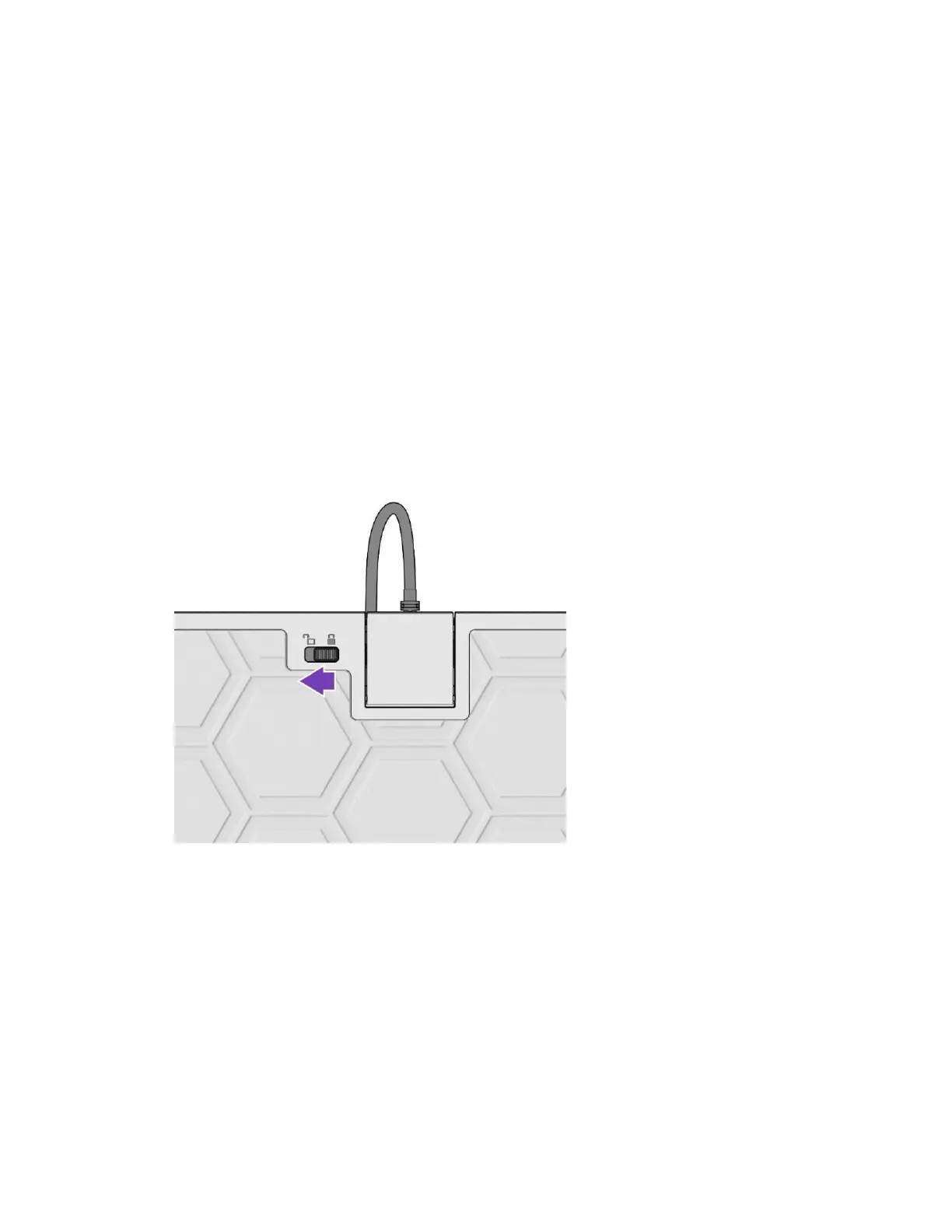
A. Release the cable lock by sliding the switch on the back of the Pro KO to the unlocked
posion unl the door opens
B. Insert the included USB-C Cable into the USB-C port on the Pro KO
C. Close the door to lock your cable in place (you do not need to slide the switch, just close
the door)
D. Plug the USB-A end of the cable into your Xbox Console or PC
WARNING: The USB-C Cable is securely locked into place and will not unplug if the cable is
pulled or tripped on. You may choose to use the included breakaway cable to allow the
USBC Cable to detach from the Pro KO and prevent damage to your Xbox console if the cable
gets pulled. To do so, insert the breakaway cable into the USB-C port on the Pro KO, close
the door, then insert the 3m USB-C Cable into the end of the breakaway cable.



 To Next Page