25
6.3 TPMS Receiver Display Button Functions
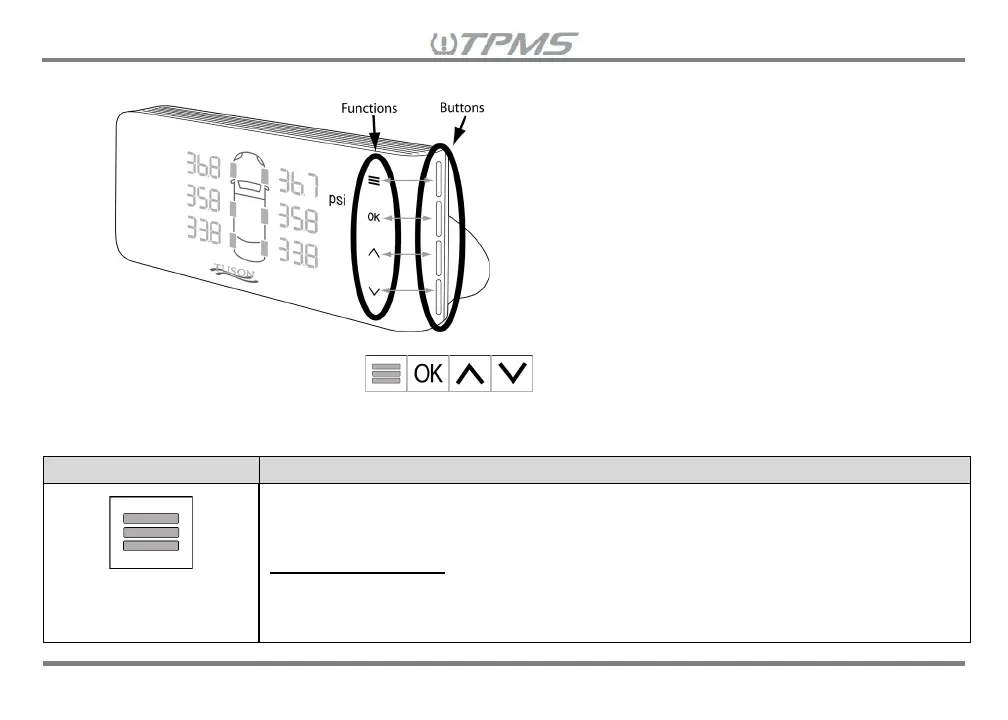
There are four buttons, from top to bottom, on the right side of the receiver. Once the receiver is powered
on, the display button functions will appear on the right side of the display and
corresponds with each of the four buttons on the right side of the receiver. The next page is a list of the
button functions.
MENU
• Review paired sensor ID#s to each vehicle selection & wheel location –
Hold down and add power to the receiver
• Switch between Mode Menus – Hold for 3 seconds
Driving Mode Menu
• View one parameter only (pressure/temperature/trailer battery) – Press
• Return to view all parameter values of a vehicle selection on rotational
display mode – Press again


 To Next Page