-11-
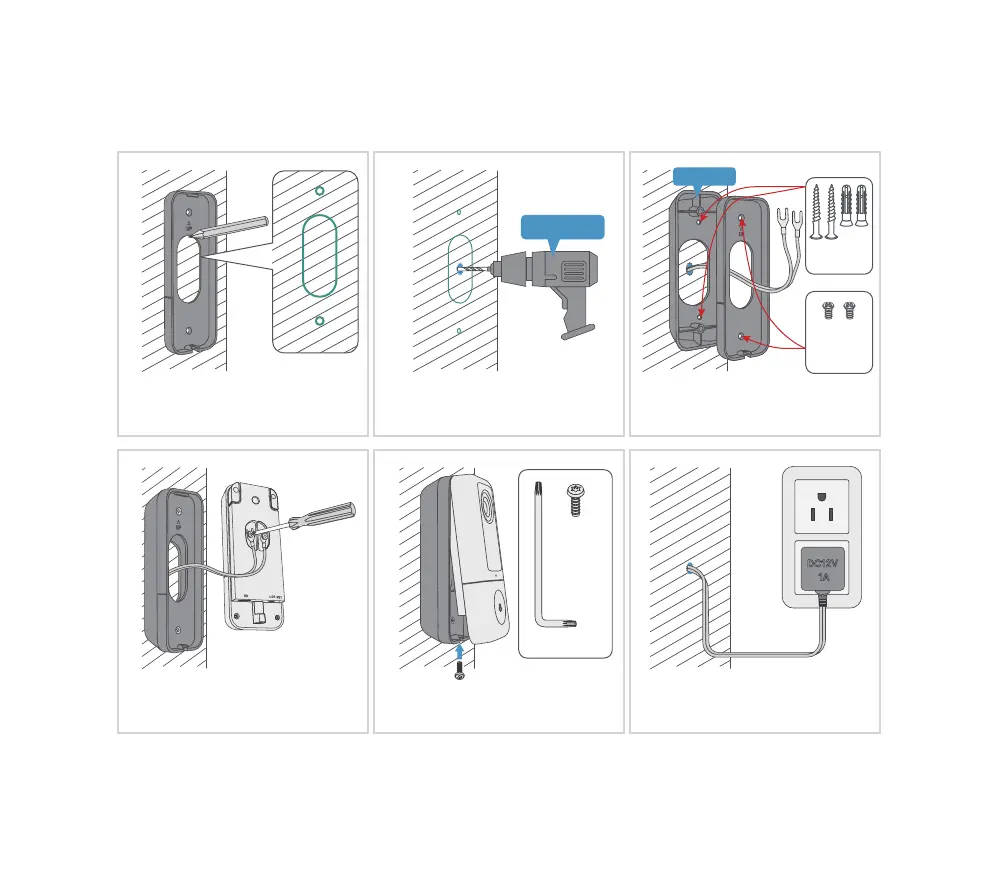
Hardwire your doorbell with the provided DC12V power adapter.
10.2
Hardwire installation
Mark the screw holes location for
doorbell installation.
Drill a hole on the wall and lead the
adapter wires out from inside.
Lead the adapter wires through the
brackets and install the brackets.
Wall mount
screw kit
Bracket
mount
screws
Attach the wires to the screws on
the rear of the doorbell.
Attach your doorbell to the brackets
and secure it with the security screw.
Plug the indoor adapter to your AC
outlet to supply power
. All set!
Security
screw
Screwdriver
Not included
Optional


 To Next Page