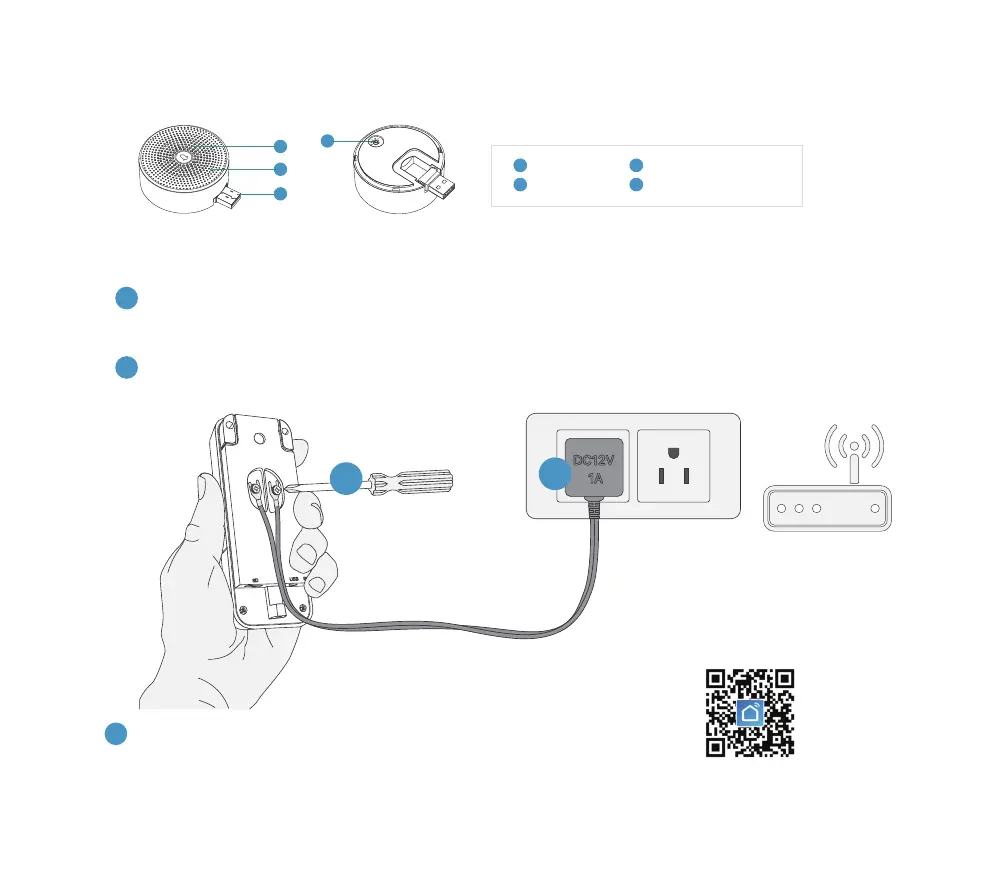
3. Meet the chime
Speakers
Reset Button
2
1
LED Indicator
USB Port (Foldable)
3
4
1
3
2
4
- 2 -
Download and install the 'SmartLife' App to your smartphone.
Launch the App and register an account with your mobile phone
number or email ID.
4. SET up your doorbell
Attach the wires from the provided power adapter to the terminals on the rear of your doorbell, and
tighten the terminal screws with screwdriver. Each wire can be connected to each power terminal.
The cable order doesn’t matter.
Plug the adapter to your AC outlet. Install the doorbell within 30 feet of your 2.4GHz WiFi router.
It is suggested to test your doorbell prior to physical installation.
2
3
1
1
2
Scan to download
SmartLife APP


 To Next Page