Network Configuration English
Add
Next
Done
Add gateway
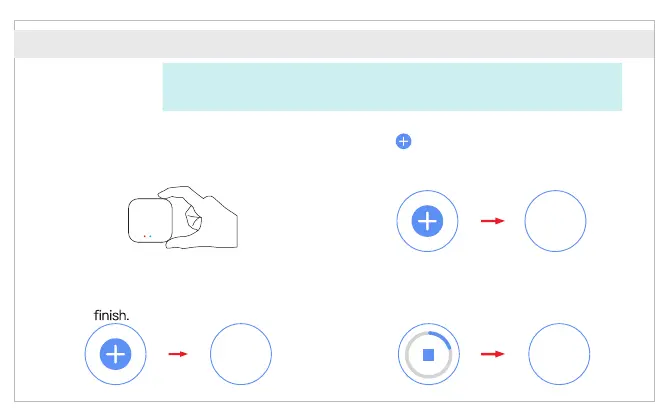
① After the gateway is powered on, the
“ " of the device about 10 red light
seconds later, and the gateway
enters the network configuration stat
② Enter the “Home” interface of the APP,
click “ ” in the upper right corner, select
“ ”. The system will automaticallyAdd Device
detect the device and click “ ”.Add
③ Select 2.4G Wi-Fi and enter the
password, click “ ”, and then Next
wait for the network configuration
to
④ Wait a moment until the device is found and
initialized, then click “ ” to finish.Done
*Attention: Please turn on the Bluetooth of your mobile phone before adding a
gateway. And ensure that the smartphone OS allows the Smartlife APP to access
the Bluetooth function.



 To Next Page